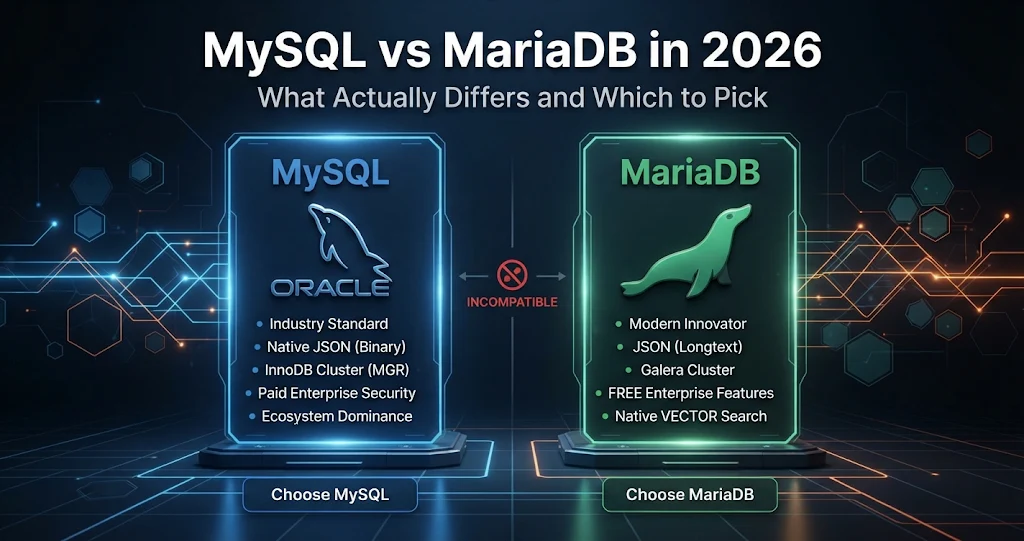
In 2009, when Oracle bought Sun Microsystems and with it MySQL, MySQL’s original author forked the code and called the result MariaDB. For years the pitch was simple: a drop-in replacement — same protocol, same files, same commands. That was true then. It is only partly true now. After more than fifteen years of separate development the two databases share a common ancestor, a wire protocol and most everyday SQL, but they disagree on JSON, authentication, replication, release cadence and a long list of features. This guide walks through what actually differs in 2026, what stays the same, and how to choose.
What is still the same
For most day-to-day work, you will not notice which one you are talking to. Both speak the same client/server protocol, so the same drivers and connectors work against either. Both use InnoDB as the default storage engine. Ordinary CREATE TABLE, SELECT, JOIN, indexes, transactions, views, stored procedures, triggers, common table expressions and window functions behave the same way. A typical web application’s SQL runs unchanged on both.
Both are GPL-licensed open source. Oracle also sells a commercial MySQL Enterprise Edition with extra tooling; MariaDB plc sells an Enterprise Server and support. The community editions are free for either.
Versions and release cadence in 2026
Both projects now ship long-term support (LTS) releases alongside short-lived feature releases — and that is the first thing to get right when you pick a version.
- MySQL: the long-running 8.0 series reached end of life in April 2026. 8.4 is the current LTS line most production servers should be on, while the 9.x “innovation” releases carry new features with short support windows.
- MariaDB: the LTS lines in use are 10.11, 11.4 and 11.8, each supported for several years. Rolling releases in between add features that later land in the next LTS. Older lines such as 10.6 have reached or are reaching end of life.
Rule of thumb: pick an LTS for anything you will not upgrade every few months. To see what you are actually connected to:
SELECT VERSION();
-- MySQL:   8.4.x
-- MariaDB: 11.4.x-MariaDB   (the suffix gives it away)

SHOW VARIABLES LIKE 'version_comment';
The differences that actually matter
Here is the side-by-side view for current LTS versions. Details shift release to release, so treat it as a map, not a contract.
| Area | MySQL 8.4 / 9.x | MariaDB 11.4 / 11.8 |
|---|---|---|
| JSON type | Native binary JSON storage, fast path lookups | JSON is an alias for LONGTEXT with a validity check; JSON functions still work |
| Default authentication | caching_sha2_password; mysql_native_password disabled by default in 8.4 and removed in 9.x |
mysql_native_password still common; unix_socket for root on Linux; ed25519 available |
| Replication / clustering | GTID replication, Group Replication, InnoDB Cluster | Its own GTID format (not compatible with MySQL’s), Galera Cluster built in |
| Sequences | No; use AUTO_INCREMENT |
CREATE SEQUENCE |
| Temporal (history) tables | No | System-versioned tables (WITH SYSTEM VERSIONING) |
RETURNING clause |
No | INSERT ... RETURNING, DELETE ... RETURNING |
| Thread pool | Enterprise Edition only | Included in the community server |
| Extra storage engines | InnoDB plus a few classics | Aria, ColumnStore, Spider, MyRocks and more |
| Hiding an index | INVISIBLE indexes |
IGNORED indexes |
| Vector search | VECTOR type in 9.x |
VECTOR type and vector indexes from 11.7 (in 11.8 LTS) |
| Command-line tools | mysql, mysqldump |
mariadb, mariadb-dump (the old mysql* names remain as deprecated aliases in many packages) |
JSON: the difference you will hit first
MySQL stores JSON in an optimised binary format and validates it on write. MariaDB accepts the same JSON keyword and the same functions (JSON_EXTRACT, JSON_VALUE, JSON_TABLE and so on) but stores the value as text. Queries generally port across, but MySQL-only operators such as -> and ->> are not supported by MariaDB, and a dump from MySQL containing JSON columns may need adjusting. If your application leans hard on JSON documents, test it on the exact target.
-- Works on both
SELECT JSON_VALUE(settings, '$.theme') FROM users;

-- MySQL only
SELECT settings->>'$.theme' FROM users;
Authentication: the one that breaks old clients
MySQL 8 made caching_sha2_password the default, and MySQL 8.4 switched the legacy mysql_native_password plugin off by default. If an old client library or application cannot log in after an upgrade with an error about an authentication plugin, this is almost always the cause — upgrade the client rather than weakening the server. MariaDB has its own set of plugins and, on Linux, often lets the operating system’s root user log in to the database root account through the unix_socket plugin with no password at all.
MyDBDesk — One Windows Workbench for MySQL and MariaDB
Running both engines? MyDBDesk connects to MySQL 5.7+ and MariaDB 10.x servers, local or remote, and lets you connect to several servers at the same time — switch between them by clicking in the navigation tree, and every open tab stays on the server its table came from. Compare schemas side by side, run the same SQL against each, and pick the SSL mode each connection needs.
Features only MariaDB has
MariaDB has added several conveniences MySQL never adopted. Two are worth knowing even if you never use them:
-- A standalone sequence (MariaDB)
CREATE SEQUENCE invoice_no START WITH 1000 INCREMENT BY 1;
SELECT NEXTVAL(invoice_no);

-- A table that remembers every past version of each row (MariaDB)
CREATE TABLE prices (
  sku   VARCHAR(32) PRIMARY KEY,
  price DECIMAL(10,2) NOT NULL
) WITH SYSTEM VERSIONING;

SELECT * FROM prices FOR SYSTEM_TIME AS OF '2026-01-01 00:00:00';
System versioning in particular is a quiet superpower for audit trails: the database keeps the history for you, and you query the past with plain SQL.
Features where MySQL leads
MySQL’s strengths are in its high-availability stack (Group Replication and InnoDB Cluster managed through MySQL Shell), its native JSON engine and document store, and the fact that most managed cloud database services and many third-party tools treat MySQL as the reference implementation. If you are deploying to a managed service, check which engine and versions it actually offers before you design around either one.
Can you switch from one to the other?
MySQL 5.7 → MariaDB was once nearly an in-place swap. MySQL 8 → MariaDB is not: the data dictionary, system tables and some on-disk formats differ, so the safe path is a logical migration — dump the data with SQL, load it into the new server, and test. The usual snags are:
- Collations such as MySQL’s
utf8mb4_0900_ai_ci, which older MariaDB versions do not recognise. - JSON columns and the
->/->>operators. - User accounts and authentication plugins — recreate users on the target rather than copying the
mysqlsystem schema. - Replication: GTID formats differ, so you cannot simply point a MariaDB replica at a MySQL 8 source with GTIDs.
Going the other way, MariaDB-only syntax (sequences, system versioning, RETURNING) has to be rewritten before MySQL will accept it.
So which should you pick?
Choose MySQL if you are targeting a managed cloud service built around it, need InnoDB Cluster or Group Replication, store a lot of JSON, or rely on a vendor that only certifies MySQL.
Choose MariaDB if you are self-hosting on Linux (it is the default “MySQL” package on many distributions), want Galera multi-primary clustering, a free thread pool, system-versioned tables or sequences, or prefer a project developed in the open under a foundation.
If you are already running one happily, there is rarely a reason to switch. Pick an LTS release, keep it patched, and spend the effort on indexes, backups and security instead — that is where performance and safety actually come from.
Whichever you choose, the tooling question is separate: a good client should work with both. We compared a desktop manager against the browser-based classic in MyDBDesk vs phpMyAdmin.
MyDBDesk — Try MariaDB Without Installing a Server
Want to test the MariaDB-only features above before committing? Click Local Server in MyDBDesk and it downloads and runs a portable MariaDB 11.4 on your own PC, listening only on 127.0.0.1, and adds a connection to it automatically. Create a database, try a sequence or a system-versioned table in the SQL console, and stop the server when you are done.
Key takeaways
- MySQL and MariaDB share a protocol and most everyday SQL, but they are no longer drop-in replacements for each other beyond MySQL 5.7.
- Run an LTS release: MySQL 8.4, or MariaDB 10.11 / 11.4 / 11.8. MySQL 8.0 reached end of life in April 2026.
- The big practical differences are JSON storage, default authentication, replication/GTIDs and clustering.
- MariaDB adds sequences, system-versioned tables,
RETURNINGand a free thread pool; MySQL leads on native JSON and InnoDB Cluster. - Migrate between them with a logical dump and a test restore, watching collations, JSON and user accounts.
- Check what you are connected to with
SELECT VERSION();— and use a client that handles both.
Leave a Reply