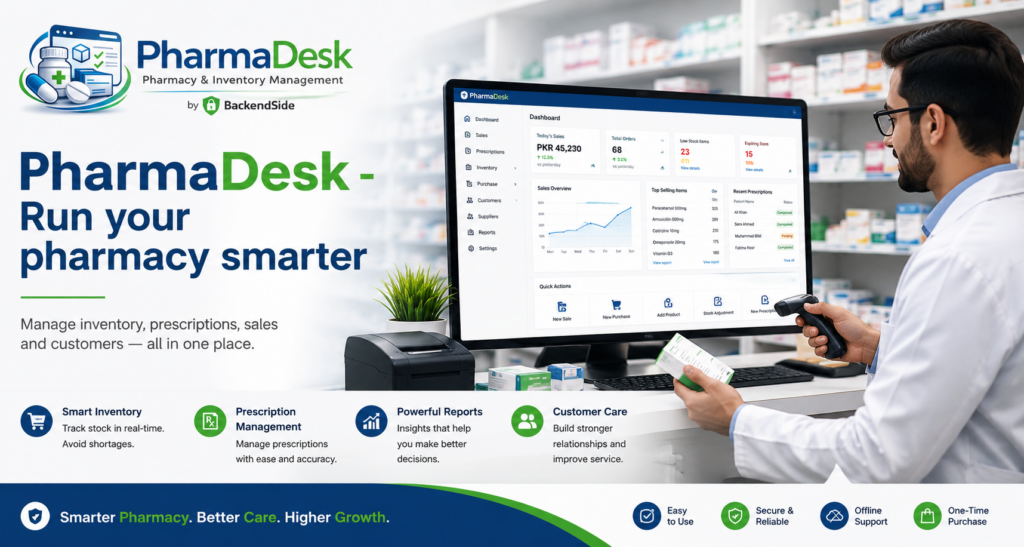
Ask a pharmacy owner where the day goes and you will rarely hear “serving customers”. You hear about the stock count that did not match, the supplier invoice nobody can find, the strip of medicine discovered expired on the shelf, and the end-of-day till that is short by an amount no one can explain. Running a pharmacy smarter is not about moving faster at the counter — it is about removing the guesswork between the counter, the stockroom and the cash drawer. This article walks through what good pharmacy management software should do at each of those points, and what PharmaDesk does specifically.
1. Split the sales counter into dispensing and cash
Most pharmacy billing software treats a sale as one action by one person. Real counters do not work that way, especially once there is a queue: one member of staff finds the medicine and builds the bill, another takes the money. Collapsing those into a single login is how discrepancies start — and how they become impossible to trace afterwards.
PharmaDesk models the counter as a two-role workflow. The salesman searches the medicine catalogue, adds items to a bill, applies discounts and marks the bill ready for payment. The cashier picks up that pending bill, collects payment by cash, card or bank transfer, applies any final discount and confirms the sale. The receipt prints automatically on confirmation. Dispensing and cash handling stay separate, which is better for accuracy, better for accountability, and considerably better for the conversation at the end of the day when the till is counted.
Multi-draft billing: the queue does not stop for one customer
A customer changes their mind, needs to check a prescription, or steps outside to take a call. In most systems that half-built bill either blocks the counter or gets abandoned. In PharmaDesk a salesman can pause one bill and start another, switching between open drafts freely without losing work. Drafts persist until confirmed or cancelled, and are visible only to the salesman who created them — so two staff working side by side never see each other’s half-finished bills.
PharmaDesk — Pharmacy Management Software for Windows
PharmaDesk runs the whole pharmacy from one Windows machine: a two-role sales counter for salesmen and cashiers, multi-draft billing, a searchable medicine catalogue, batch-level stock with expiry tracking, purchasing and supplier management, stock adjustments and returns, and reports covering sales, profit, stock valuation and expiry. Staff work from any browser on the network — nothing to install on client devices. 30-day free trial.
2. Make the stock position answer for itself
The single most expensive habit in a small pharmacy is finding out about a stock problem at the shelf. Two questions should never require a physical check: are we about to run out of this? and is anything about to expire?
PharmaDesk’s medicine catalogue holds the details that make a stock position meaningful — form (tablet, liquid, capsule), strength, generic name, category, supplier, shelf location and a reorder level per product. The reorder level is what turns inventory from a list into a system: cross it, and the product raises a low-stock alert on its own.
Those alerts land on the dashboard, alongside expiry warnings, and they are live — they reflect the current state of stock without a manual refresh or a report run. Logging in is the stock check. Nothing on that screen is news you find out about later at the counter.
Stock itself is tracked at batch level: every purchase records its batch number and expiry date, sales draw from the oldest-expiring batch first, and a batch breakdown view shows days-to-expiry per batch. We covered why that matters in depth — and why expiry-driven stock rotation beats plain first-in-first-out in a pharmacy — in our article on batch and expiry tracking.
3. Buy on a record, not on a memory
The purchasing side is where paperwork quietly accumulates: delivery notes in a drawer, credit terms remembered rather than recorded, returns agreed on the phone and never reconciled. Pharmacy management software earns its keep here by making each purchase a record that stock and supplier balances both hang off.
In PharmaDesk, purchases are recorded with full invoice details, payment status and per-batch expiry tracking, against a supplier directory that holds credit terms. Purchase returns are processed in the system rather than around it: each return is logged with a full audit trail and automatically adjusts both stock and the supplier balance. All purchase history stays searchable and reportable, which is the difference between “I think we paid that one” and knowing.
Adjustments: the honest record of what actually happened
Stock will still need manual correction — damaged goods, count discrepancies, expired units pulled from the shelf. The temptation is to fix the number and move on, and that is precisely how a stock file stops being trustworthy. PharmaDesk’s Adjustments module records every change with a reason and a full audit trail, and handles sales returns the same way. A live session audit log shows adjustments as they happen, so an administrator can always see what changed and who changed it.
| Event at the pharmacy | What PharmaDesk records |
|---|---|
| Sale at the counter | Itemised bill, discounts, payment method, cashier, automatic receipt |
| Delivery from a supplier | Invoice details, payment status, batch number and expiry per line |
| Damaged or expired units removed | Adjustment with reason, user and timestamp in the audit trail |
| Customer returns an item | Sales return logged permanently, stock adjusted |
| Goods sent back to a supplier | Purchase return with audit trail, stock and supplier balance updated |
4. Know your margins, not just your takings
Plenty of pharmacy POS software can tell you what came through the till. Running a pharmacy smarter means knowing what you actually made, and what is currently sitting on the shelves as capital.
PharmaDesk’s built-in reporting covers sales summaries with revenue totals, profit and margin breakdowns, stock valuation by batch and cost, purchase summaries, and expiry reports — each with summary totals, and filterable by date range, staff member and product. Reports are served as browser pages from the built-in web server, so any device on the network can open them.
Those four reports answer the questions that actually change decisions: which products earn their shelf space, how much cash is tied up in stock, which supplier is worth negotiating with, and what is going to be written off next month if nobody acts.
5. Give every role exactly the screen it needs
PharmaDesk has four built-in roles. Admin has full access including settings and user management; Pharmacist oversees clinical and inventory functions; Salesman builds bills and dispenses; Cashier takes payment and confirms sales. Every protected request enforces the role check on the server, not merely in the menu — a salesman cannot reach cashier functions by knowing the address, and vice versa.
Around that, administrators manage accounts with full name, username, role and active status, can set a forced password-change flag that is enforced on next login, and can see last-login timestamps for every user. Pharmacy details — name, contact information, currency symbol and its position (₹, $, £, €, PKR and more) — are configured from the settings screen, appear on printed receipts, and take effect immediately without restarting the server.
Runs on one Windows PC, works from every device in the shop
PharmaDesk uses a client/server design: the server runs on a single Windows machine in the pharmacy, holds the data, and serves the entire interface — sales counter, catalogue, purchase forms, inventory views and reports — as browser pages. Staff open a browser on a PC, tablet or phone, point it at the server’s address and log in. Nothing is installed on client devices, and an embedded database with write-ahead logging gives reliable concurrent multi-user access, so the counter, the stockroom and the back office all work against the same live stock position.
For a single shop, that keeps all your data on hardware you own, on your own network — a trade-off we compared directly in cloud vs offline pharmacy software. If you run several branches and want them on one system, the same server can be installed on a VPS with a public IP and reached over the internet instead, as described in our guide to taking a LAN business app onto a VPS.
Frequently asked questions
What does pharmacy management software need to do as a minimum?
Bill at the counter, track stock at batch level with expiry dates, record purchases and supplier balances, log adjustments and returns with an audit trail, and report on sales, profit, stock valuation and expiry. Anything narrower leaves staff reconciling by hand.
Why separate the salesman and cashier roles?
Because dispensing and cash handling are different jobs with different risks. Keeping them separate speeds up a queue — one person builds the bill while another takes payment — and makes every sale traceable to the staff who handled each half of it.
Can PharmaDesk warn me before medicines expire?
Yes. Stock is tracked per batch with expiry dates, expiry warnings appear live on the dashboard, and a dedicated expiry report plus a days-to-expiry batch breakdown let you act before stock is written off.
Does it show profit, or only sales?
Both. Sales summaries include revenue totals with profit and margin breakdowns, and a separate stock valuation report values inventory by batch and cost.
What do staff need installed on their devices?
Just a modern web browser. The whole interface is served from the Windows server component, so any PC, tablet or phone on the pharmacy network is a working terminal.
Can I use my own currency and pharmacy details on receipts?
Yes. Pharmacy name, contact information, and currency symbol and position are configurable from the settings screen and appear on printed receipts, taking effect immediately without a restart.
Key takeaways
- Running a pharmacy smarter means removing guesswork between the counter, the stockroom and the cash drawer — not just billing faster.
- A two-role sales counter with multi-draft billing keeps queues moving and keeps dispensing separate from cash handling.
- Reorder levels and live dashboard alerts turn stock from a list you check into a system that tells you.
- Purchases, returns and adjustments belong in the system, each with a reason and an audit trail — that is what keeps the stock file trustworthy.
- Reports should cover profit, margin, stock valuation and expiry, not only takings.
- PharmaDesk does all of this from one Windows machine, with every screen served to any browser on the network and nothing installed on client devices.
PharmaDesk — Pharmacy Management Software for Windows
PharmaDesk runs the whole pharmacy from one Windows machine: a two-role sales counter for salesmen and cashiers, multi-draft billing, a searchable medicine catalogue, batch-level stock with expiry tracking, purchasing and supplier management, stock adjustments and returns, and reports covering sales, profit, stock valuation and expiry. Staff work from any browser on the network — nothing to install on client devices. 30-day free trial.
Leave a Reply