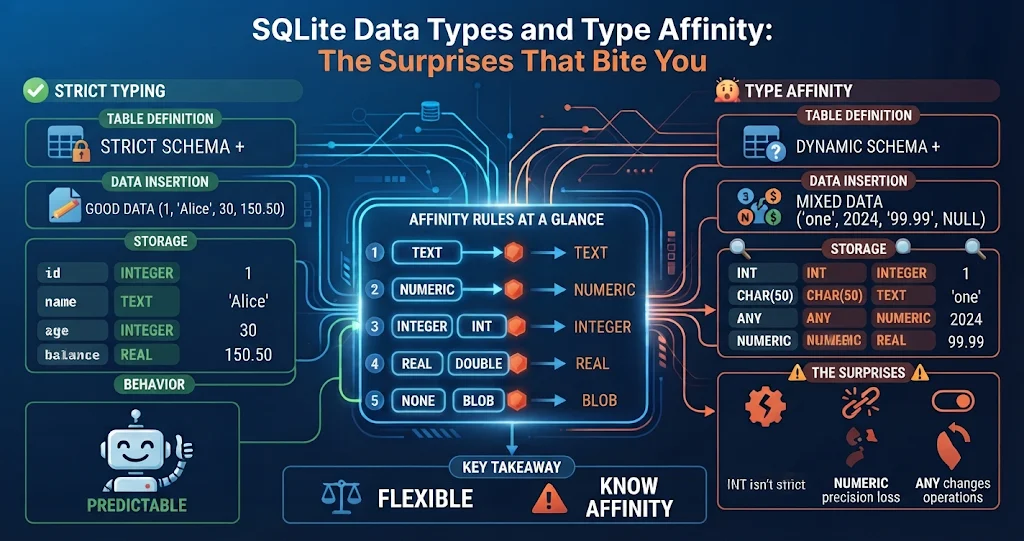
Coming to SQLite from PostgreSQL, MySQL or SQL Server, most developers assume a column declared INTEGER holds integers and a VARCHAR(10) holds at most ten characters. In SQLite, neither is true by default. SQLite uses dynamic typing: the type belongs to each value, and a column’s declared type only expresses a preference called type affinity. That flexibility is deliberate and occasionally handy — but it produces some genuinely surprising bugs. Here is how the system works, the surprises it causes, and how to get strict typing back when you want it.
Five storage classes
Every value stored in SQLite has one of exactly five storage classes:
| Storage class | Holds |
|---|---|
NULL |
The missing value |
INTEGER |
Signed integer, stored in 1–8 bytes depending on size (up to 64-bit) |
REAL |
8-byte IEEE floating-point number |
TEXT |
A string in the database encoding (usually UTF-8) |
BLOB |
Raw bytes, stored exactly as given |
There is no separate date, boolean, decimal or fixed-length string type. You can always ask what a value really is with typeof():
SELECT typeof(42), typeof(4.2), typeof('42'), typeof(x'2A'), typeof(NULL);
-- integer | real | text | blob | null
How affinity is decided
Each column gets one of five affinities — INTEGER, TEXT, BLOB, REAL or NUMERIC — worked out from the declared type name by these rules, applied in order:
- If the type contains
INT→ INTEGER affinity. - Otherwise, if it contains
CHAR,CLOBorTEXT→ TEXT affinity. - Otherwise, if it contains
BLOB, or no type is given → BLOB affinity. - Otherwise, if it contains
REAL,FLOAorDOUB→ REAL affinity. - Otherwise → NUMERIC affinity.
Simple substring matching on the type name leads to some memorable results:
| Declared type | Affinity | Why |
|---|---|---|
VARCHAR(255) |
TEXT | Contains CHAR; the 255 is ignored |
BIGINT, TINYINT |
INTEGER | Contains INT |
FLOATING POINT |
INTEGER | “POINT” contains INT, and rule 1 wins |
STRING |
NUMERIC | Matches none of the keywords |
DECIMAL(10,2) |
NUMERIC | No precision or scale is enforced |
BOOLEAN, DATE, DATETIME |
NUMERIC | No such types exist |
| (no type) | BLOB | Values stored exactly as given |
Affinity then drives conversion on the way in. A column with TEXT affinity converts numbers to text. A column with INTEGER or NUMERIC affinity converts text that looks like a number into a number — and quietly keeps anything else as text. BLOB affinity converts nothing.
Surprise 1: text in an integer column
CREATE TABLE orders (id INTEGER PRIMARY KEY, qty INTEGER, note VARCHAR(5));
INSERT INTO orders (qty, note) VALUES ('12', 'this is far longer than five');
INSERT INTO orders (qty, note) VALUES ('twelve', 'ok');

SELECT qty, typeof(qty), length(note) FROM orders;
-- 12      | integer | 28
-- twelve  | text    | 2
The string '12' was converted to an integer, but 'twelve' was stored as text without complaint, and the “five-character” column accepted 28 characters. Your application, not the database, was expected to enforce both.
Surprise 2: leading zeros disappear
The flip side of helpful conversion: anything that looks numeric becomes a number in an INTEGER or NUMERIC column, and numbers have no leading zeros.
CREATE TABLE customers (zip STRING, phone NUMERIC);
INSERT INTO customers VALUES ('02134', '0044123456789');
SELECT zip, phone FROM customers;
-- 2134 | 44123456789
STRING looks like a text type but has NUMERIC affinity, so the ZIP code lost its zero. Identifiers that happen to be made of digits — postal codes, phone numbers, account numbers, product codes — belong in TEXT columns. A related trap: '3.0e+5' stored in a NUMERIC column becomes the integer 300000.
SQLiteDesk — Imports That Keep Your Leading Zeros
Leading zeros usually vanish during a CSV import. SQLiteDesk imports CSV and JSON with type inference and creates the table for you, but values that would lose digits as numbers stay text — ZIP codes, phone and account numbers come through intact. Large CSV files are streamed, so import size is not limited by memory.
Surprise 3: comparisons and sorting across types
When values of different storage classes are compared, SQLite orders them as NULL < INTEGER and REAL < TEXT < BLOB. A number is always “less than” any text, and text that contains digits sorts as text:
CREATE TABLE t (v);                 -- no declared type: BLOB affinity
INSERT INTO t VALUES (9), ('10'), (100), ('9');

SELECT v FROM t ORDER BY v;         -- 9, 100, '10', '9'
SELECT count(*) FROM t WHERE v = 9; -- 1 (the text '9' does not match)
Columns with INTEGER, REAL or NUMERIC affinity convert a text literal before comparing, so WHERE qty = '12' works. A column with no declared type does not, which is how “the row is right there but the query finds nothing” bugs happen. If a column ended up with mixed types, CAST(v AS INTEGER) in the query is the quick fix and cleaning the data is the real one.
Surprise 4: NULL is not an empty string
SQLite treats NULL and '' as completely different values. WHERE name = '' will not find NULLs, WHERE name = NULL finds nothing at all (use IS NULL), and count(name) skips NULLs but counts empty strings. Tools that show both as a blank cell make this very easy to get wrong when editing data by hand.
SQLiteDesk — NULL Is Never Mistaken for an Empty String
In the SQLiteDesk grid, NULL shows as a faded italic NULL, never confused with an empty string, and Ctrl+0 sets a cell to NULL explicitly. Sort the whole table by clicking a header or type a WHERE condition to filter it — both run in the database, not just on the visible page — and only the cells you actually changed are written back.
Surprise 5: the types that do not exist
- Booleans are integers.
TRUEandFALSEare accepted keywords, but they are simply 1 and 0. - Dates and times have no type. Pick one representation and stick to it: ISO-8601 text (
'2026-11-04 09:15:00', which sorts correctly), Unix time as an INTEGER, or a Julian day number as a REAL. The built-indate(),datetime(),strftime()andjulianday()functions understand all three. - Decimals are floating point.
DECIMAL(10,2)gives NUMERIC affinity, and fractional values are stored as REAL, so0.1 + 0.2is not exactly0.3. Store money as an INTEGER number of cents. - Very large integers beyond the 64-bit range (about 9.22 × 10¹⁸) become REAL and lose precision — store long identifiers as text.
Surprise 6: INTEGER PRIMARY KEY vs INT PRIMARY KEY
A column declared exactly INTEGER PRIMARY KEY becomes an alias for the table’s internal rowid: lookups by it are as fast as possible, and it auto-assigns values. Declare it INT PRIMARY KEY or BIGINT PRIMARY KEY instead and you get an ordinary column with a separate unique index — still INTEGER affinity, but no rowid alias and no automatic numbering. One word makes the difference.
Getting real type safety: STRICT tables
Since SQLite 3.37.0 you can add the STRICT keyword to a table. Every column must then use one of INT, INTEGER, REAL, TEXT, BLOB or ANY, and values that cannot be converted losslessly are rejected:
CREATE TABLE payments (
    id          INTEGER PRIMARY KEY,
    amount_cents INTEGER NOT NULL,
    reference   TEXT NOT NULL,
    meta        ANY
) STRICT;

INSERT INTO payments (amount_cents, reference) VALUES ('1250', 'A-001'); -- ok: '1250' becomes 1250
INSERT INTO payments (amount_cents, reference) VALUES ('abc', 'A-002');
-- Error: cannot store TEXT value in INTEGER column payments.amount_cents
An ANY column in a STRICT table keeps whatever you give it without conversion. One caveat: SQLite versions older than 3.37.0 cannot read the schema of a database that contains STRICT tables, so check what versions your users or tools run.
If you cannot use STRICT, CHECK constraints do the same job column by column, and work on any version:
CREATE TABLE products (
    sku    TEXT    NOT NULL CHECK (typeof(sku) = 'text' AND length(sku) <= 12),
    price  INTEGER NOT NULL CHECK (typeof(price) = 'integer' AND price >= 0)
);
Auditing an existing database
Inherited a database and suspect mixed types? Group each column by typeof():
SELECT typeof(qty) AS stored_as, count(*) AS n
FROM orders
GROUP BY typeof(qty);
-- integer | 9812
-- text | 14 <- these are your bugsSQLiteDesk — Design Tables with a Live DDL Preview
The SQLiteDesk Schema Designer lets you create tables visually — column types, primary key and auto-increment, NOT NULL, unique, defaults and foreign keys — while a live DDL preview shows exactly the CREATE TABLE statement you are about to run. For STRICT tables and CHECK constraints, the SQL workspace has syntax highlighting and schema-aware autocomplete. Available on the Microsoft Store with a free trial.
Key takeaways
- SQLite types belong to values; a column’s declared type only sets its affinity.
- Affinity comes from substring rules applied in order, which is why
STRINGis numeric andFLOATING POINTis integer. - Store digit-based identifiers as TEXT to keep leading zeros; store money as integer cents.
- There are no native boolean, date or decimal types — choose a representation and be consistent.
- Only
INTEGER PRIMARY KEY, spelled exactly that way, aliases the rowid. - Use STRICT tables (3.37.0+) or
CHECK (typeof(...))constraints when you want the database to enforce types, and audit old data withtypeof().
Leave a Reply