
SQLiteDesk – SQLite Database Manager for Windows
A clean, fast desktop manager for SQLite databases — including SQLCipher-encrypted ones. Open or create databases, browse the schema, edit rows in a grid, run SQL with syntax highlighting and autocomplete, design tables visually, draw ER diagrams, back up live databases safely, and run maintenance like VACUUM and integrity checks — all from one window.
Download Desktop Version 1.2.1
Available on the Microsoft Store — free trial included, no subscription, no ads.

SQLCipher-aware out of the box
Open an encrypted .db with a password prompt, or encrypt / decrypt / change the password on any existing database from the Maintenance menu — the rewritten file is verified before it replaces the original, so an interrupted operation never costs you your data. Backup and restore work on encrypted databases too. Passwords are never persisted — not in settings, not in logs.
Changelog — what's new in each release
Full release notes for SQLiteDesk, from the first public 1.0.0 to the latest 1.2.1.
View the full changelogUser Guide — every screen, every workflow
Step-by-step walkthrough of SQLiteDesk — connections, browsing, editing, the SQL workspace, the schema and ER designers, import / export, backup / restore, and SQLCipher maintenance.
Read the User GuideFeatures
📁 Connections & Multi-Database Explorer
Open or create databases, with a password prompt for SQLCipher files and a recent-files list. The explorer is searchable, shows file paths, includes a count badge, and a footer with the total database count and combined size. Open a .db straight from the command line or a file association.
🏠 Welcome Screen
Logo hero, “Get started” cards, and a recent-databases list with size and last-modified date — double-click to open. No empty start screen wondering what to do next.
📋 Browse & Edit (Excel-Style)
Paged data grid with inline cell edit, insert and delete (rowid/PK-safe, with a confirmation before a delete), and per-table export. Only the cells you actually changed are written back. Enter moves to the next column Excel-style; Ctrl+0 sets a cell to NULL explicitly. Schema tree on the side shows tables, views, indexes and triggers.
💻 SQL Workspace
Full editor with SQLite syntax highlighting and schema-aware autocomplete (Ctrl+Space). Run script or just the selection with F5, and cancel a running query with Stop. Results are capped (10,000 rows by default) so a runaway SELECT cannot exhaust memory. Multiple result grids, persistent query history, and a “Run against” picker so each editor's target database is always explicit.
🛠️ Schema Designer
Visually create tables with columns, types, PK / auto-increment, NOT NULL, unique, defaults — and foreign keys with ON DELETE / ON UPDATE behaviour — all with a live DDL preview. Rename and drop tables, views, indexes and triggers from the tree.
🧩 Interactive ER Designer
Drag tables onto a canvas, edit columns inline, and draw field-to-field foreign keys visually. The SQL preview updates live; one click creates the whole schema in the selected database.
🗺️ ER Diagram of an Existing Database
Visualise the tables and foreign-key relationships of any database you open — a clean map of how everything fits together, generated from the live schema.
⤓ Import & Export
Import CSV and JSON with type inference and table creation — large CSV files are streamed, so import size is not limited by memory — or run a .sql script. Export tables and query results to CSV, JSON, or SQL INSERT, and dump an entire database to .sql.
💾 Backup & Restore
Online backup — safe on a live database while writes are happening — and restore from a backup file. Optionally re-encrypt the result.
🧹 Maintenance
Database stats, VACUUM, ANALYZE, REINDEX, integrity check — plus encrypt / decrypt / change-password for SQLCipher databases. Everything from a menu, no shell required.
🌓 Light & Dark Themes
A professional light theme by default, plus a neutral mid-grey dark theme in the sense Adobe and Blender use the word — switching in Settings repaints the whole app instantly, no restart. A vertical utility rail keeps History, Refresh, Maintenance, Settings and About one click away.
🔐 Offline & Private
Runs 100% offline — no telemetry, no cloud sync, no accounts. Passwords are never persisted. Logs and settings live under %LOCALAPPDATA%\SQLiteDesk.
Screenshots
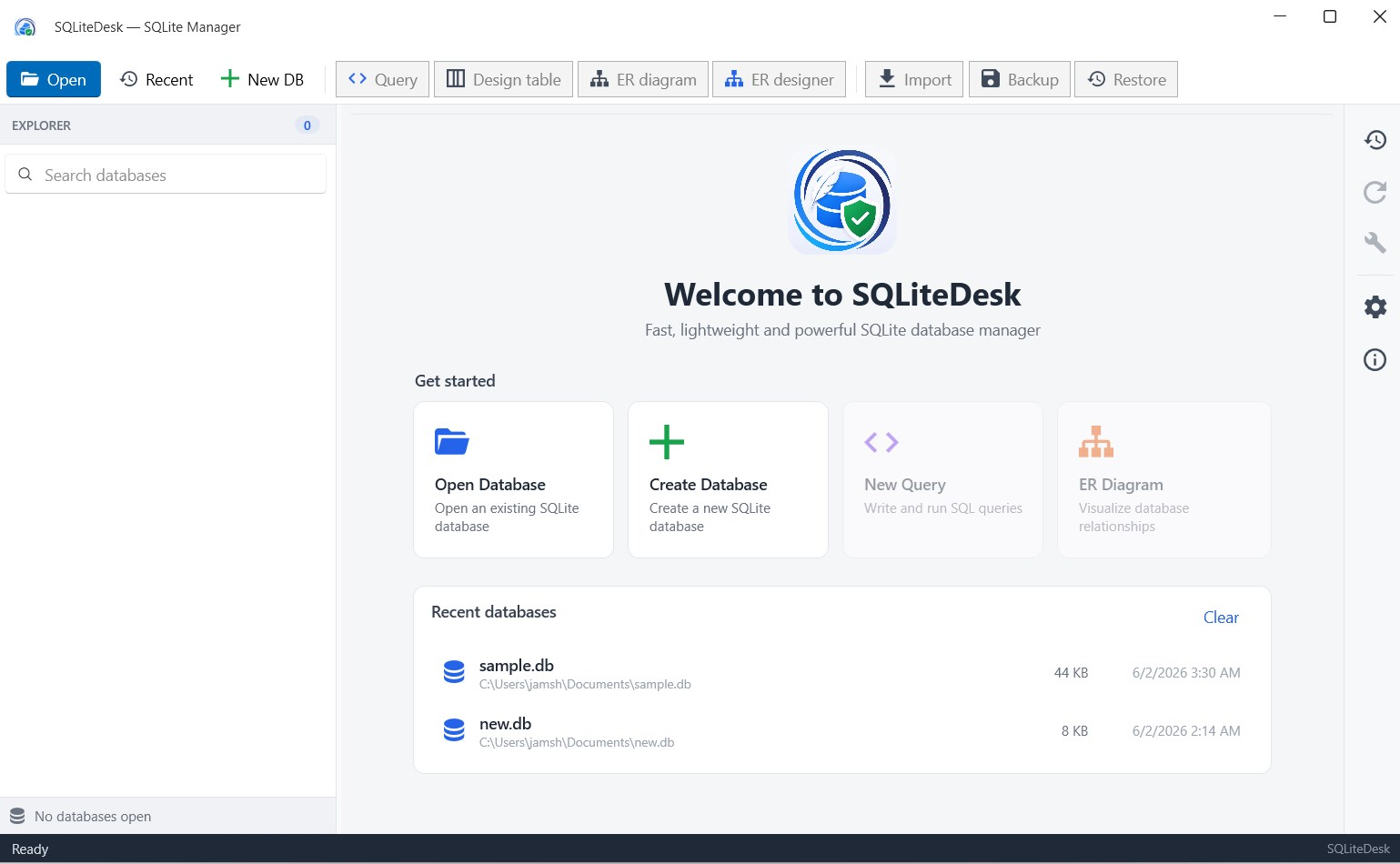
Welcome screen & recent databases
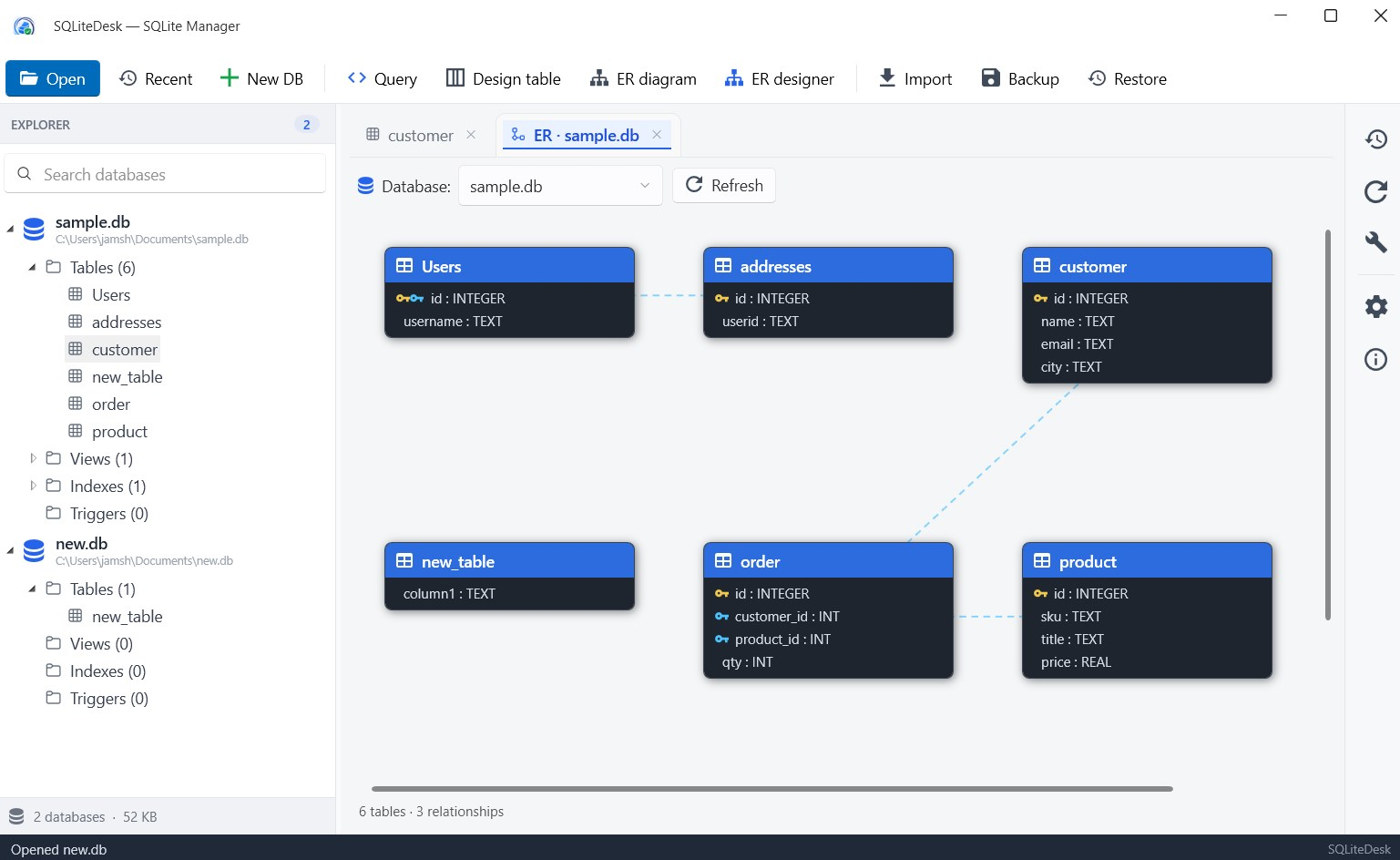
ER diagram — visualize relationships
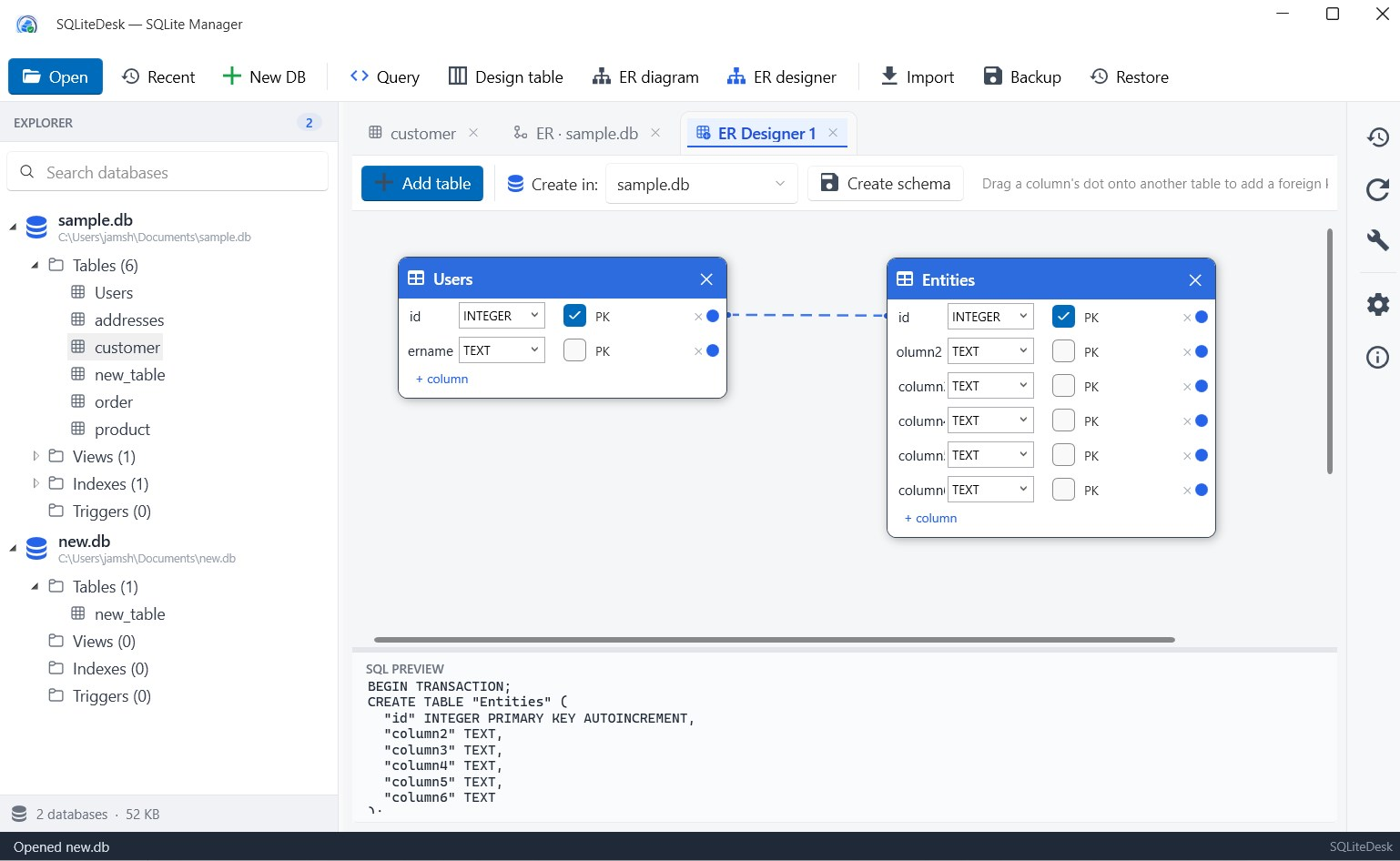
Interactive ER Designer
Browse & edit grid
Latest Release
Version 1.2.1 — August 28, 2026
Query cancellation and a result row cap, foreign keys in the table designer, streamed CSV import, safer encryption operations that never touch the original until the new file is verified, a proper neutral-grey dark theme that switches live, and file associations for .db / .sqlite files — everything from the 1.0.0 audit in one update.