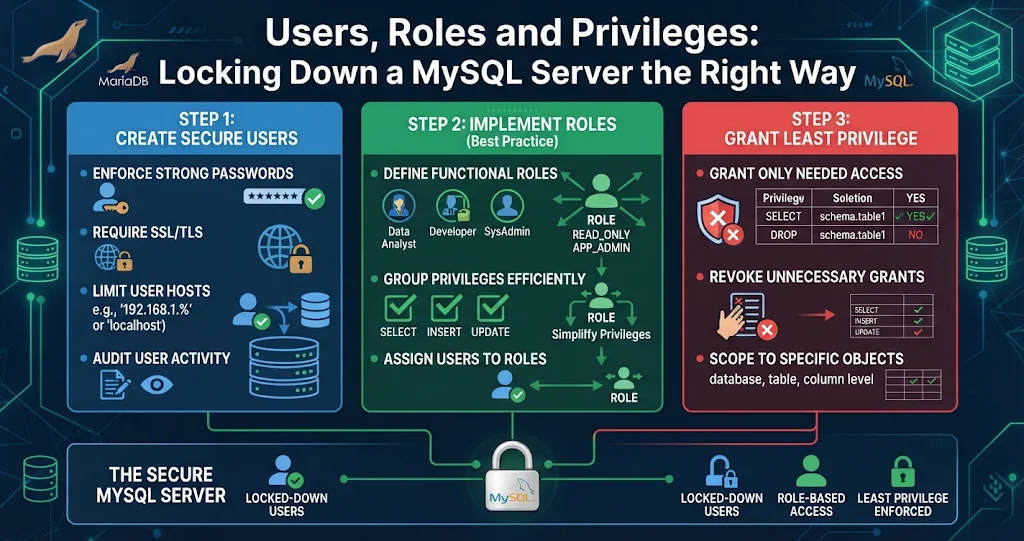
Database security problems are rarely exotic. Far more often they are an application connecting as root, an account that can log in from any host on the internet, or a single shared login used by five people and three scripts. MySQL and MariaDB have a precise, layered permission system that makes all of this avoidable — if you know how accounts, privileges and roles fit together. This guide covers exactly that, with the syntax for MySQL 8.x and MariaDB 10.11/11.x and the differences between them.
Accounts are user and host
The first surprise for newcomers: a MySQL account is not just a name. It is 'user'@'host', and 'app'@'localhost' and 'app'@'%' are two completely separate accounts with separate passwords and privileges. The host part controls where the account may connect from:
| Host part | Meaning | Typical use |
|---|---|---|
'localhost' |
Same machine only (socket or loopback) | Apps running on the database server, admin work |
'10.0.0.25' |
One specific IP | A single application server |
'10.0.0.%' |
Any host in that subnet | A pool of app servers on a private network |
'%' |
Anywhere | Avoid for privileged accounts; pair with a firewall and TLS if you must |
CREATE USER 'shop_app'@'10.0.0.%' IDENTIFIED BY 'a-long-random-passphrase';

-- See who exists and where they can connect from
SELECT user, host FROM mysql.user ORDER BY user, host;
Least privilege: grant only what is needed
Privileges can be granted at several levels — global (*.*), database (shop.*), table (shop.orders) and even column. The principle is simple: give each account the smallest set that lets it do its job, at the narrowest level.
-- The web app reads and writes data, nothing more
GRANT SELECT, INSERT, UPDATE, DELETE ON shop.* TO 'shop_app'@'10.0.0.%';

-- A reporting user that can only read two tables
CREATE USER 'reports'@'10.0.0.40' IDENTIFIED BY 'another-long-passphrase';
GRANT SELECT ON shop.orders    TO 'reports'@'10.0.0.40';
GRANT SELECT ON shop.customers TO 'reports'@'10.0.0.40';

-- Check the result
SHOW GRANTS FOR 'shop_app'@'10.0.0.%';
Note what the application does not get: CREATE, DROP, ALTER, FILE, PROCESS or anything global. Run schema migrations with a separate, more privileged account that the running application never sees. If the app is ever compromised through SQL injection, the damage is limited to the data it could already touch — it cannot drop tables or read files from the server’s disk.
Privileges that deserve extra suspicion
| Privilege | Why it is dangerous |
|---|---|
ALL PRIVILEGES ON *.* |
Effectively root on every database |
GRANT OPTION |
Lets the account hand its privileges to others |
FILE |
Read and write files on the server host via LOAD DATA / SELECT ... INTO OUTFILE |
SUPER |
Broad admin powers; deprecated in MySQL 8 in favour of narrower dynamic privileges such as SYSTEM_VARIABLES_ADMIN |
PROCESS |
See every running statement, including other users’ queries |
Privileges on the mysql schema |
Direct access to the account tables themselves |
To take something back, use REVOKE with the same level you granted at:
REVOKE DELETE ON shop.* FROM 'shop_app'@'10.0.0.%';MyDBDesk — Privileges You Can See, Tick and Un-tick
GRANT syntax is easy to get subtly wrong. MyDBDesk’s Privileges tab lists users and MariaDB roles with their grants, lets you create or drop users, and changes access in one Edit privileges editor that opens with what the user already has ticked — you just tick and un-tick. Applying makes only the changes you made, and privileges the editor cannot show are left alone. No manual GRANT statements.
Roles: grant to the job, not the person
Granting the same five privileges to twelve analysts one by one is error-prone, and so is remembering to remove them all when someone changes team. Roles are named bundles of privileges: grant privileges to the role once, then grant the role to people. Both MySQL 8 and MariaDB support them, with small but important syntax differences.
-- Works on both
CREATE ROLE analyst;
GRANT SELECT ON shop.* TO analyst;
GRANT analyst TO 'sara'@'10.0.0.%';

-- MySQL 8: roles are not active at login until you say so
SET DEFAULT ROLE analyst TO 'sara'@'10.0.0.%';
--   (or set activate_all_roles_on_login = ON server-wide)

-- MariaDB: note FOR instead of TO
SET DEFAULT ROLE analyst FOR 'sara'@'10.0.0.%';

-- Inside a session, either engine:
SET ROLE analyst;
SELECT CURRENT_ROLE();
The most common confusion: after granting a role on MySQL, the user logs in and gets “access denied”. The role was granted but never activated — set a default role and the problem disappears. Under the hood, MySQL roles are accounts with a host part (analyst means 'analyst'@'%'), while MariaDB roles are a separate kind of object with no host.
When someone leaves the team, REVOKE analyst FROM 'sara'@'10.0.0.%'; removes everything in one statement, and changing what analysts may see is a single GRANT to the role.
Encrypt connections, and require it
Passwords and query results cross the network in clear text unless the connection uses TLS. Modern MySQL generates certificates automatically on first start, and MariaDB 11.4 and later enables TLS by default too; older MariaDB setups usually need certificates configured by hand. Either way, you can require encryption per account so a misconfigured client fails loudly instead of silently falling back:
ALTER USER 'reports'@'10.0.0.40' REQUIRE SSL;

-- From a connected session, confirm the link is encrypted
SHOW STATUS LIKE 'Ssl_cipher';MyDBDesk — Secure Connections From Your Desk
A locked-down server deserves a careful client. In MyDBDesk each saved connection picks its own SSL mode — Off, Preferred, Required, or certificate-verified — with an optional CA certificate, so an account created with REQUIRE SSL just works. Saved connection passwords are encrypted and kept on your own device, never written in plain text, and the app runs offline with no telemetry or cloud sync.
Passwords, lockouts and dormant accounts
A few account options are worth knowing:
-- Disable an account without deleting it (both engines)
ALTER USER 'contractor'@'%' ACCOUNT LOCK;

-- MySQL 8.0.19+: lock for a day after 5 failed logins
ALTER USER 'shop_app'@'10.0.0.%'
  FAILED_LOGIN_ATTEMPTS 5 PASSWORD_LOCK_TIME 1;

-- MariaDB: the equivalent is the server-wide max_password_errors variable

-- Force a password change at next login (both)
ALTER USER 'sara'@'10.0.0.%' PASSWORD EXPIRE;
Locking is better than dropping when you are unsure whether something still uses an account: a locked account fails fast and visibly, and unlocking is one statement.
Day-one hardening checklist
- Run the secure-installation script (
mysql_secure_installation, ormariadb-secure-installationon MariaDB). It removes anonymous users and the test database and lets you secure root. - Keep root local. No
'root'@'%'. On Linux MariaDB, root often authenticates throughunix_socket— only the system root user can log in as database root, which is a sensible default. - Bind to the right interface. If only local apps connect, set
bind-address = 127.0.0.1. Otherwise bind to a private address and firewall port 3306 — never expose it to the whole internet. - One account per application and per person, each with least privilege. Shared logins make auditing impossible.
- Require TLS for any account that connects over a network.
- Review regularly. List accounts with broad grants and ask whether each still needs them:
-- Accounts with global privileges worth questioning
SELECT user, host
FROM mysql.user
WHERE Super_priv = 'Y' OR File_priv = 'Y' OR Grant_priv = 'Y';

-- Accounts that can connect from anywhere
SELECT user, host FROM mysql.user WHERE host = '%';
Keep application secrets out of source control as well: the strongest GRANT design does little if the app password is sitting in a public repository.
Key takeaways
- An account is
'user'@'host'; restrict the host to where the account genuinely connects from. - Apply least privilege: applications get data privileges on their own database only; migrations use a separate account.
- Treat
ALL ON *.*,GRANT OPTION,FILE,SUPERandPROCESSas admin-only. - Use roles to grant by job; on MySQL remember
SET DEFAULT ROLE ... TO, on MariaDBSET DEFAULT ROLE ... FOR. - Require TLS for networked accounts, lock dormant ones, and keep root local.
- Review accounts and grants on a schedule — permissions only ever drift wider on their own.
Leave a Reply