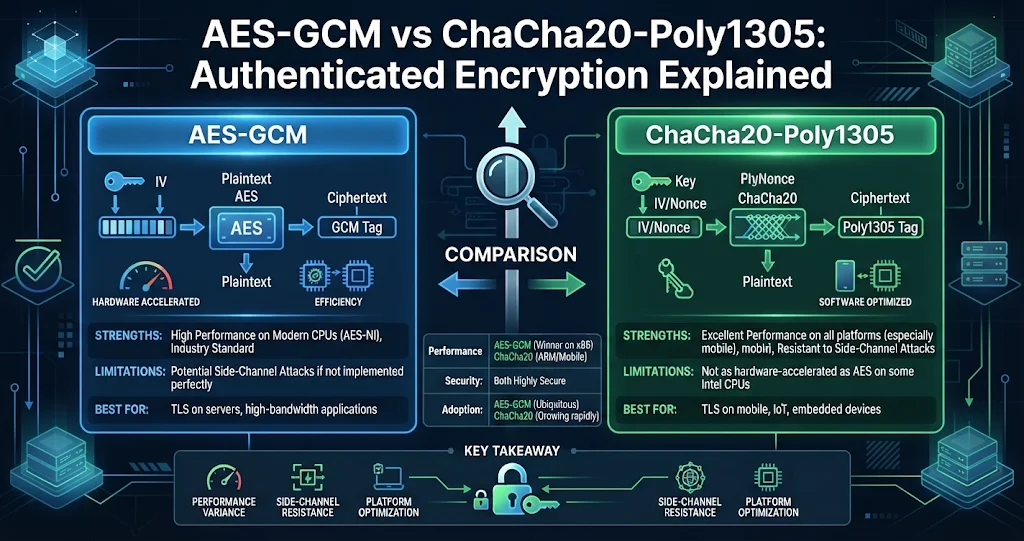
If you look at what protects a TLS 1.3 connection, a WireGuard tunnel, or a modern encrypted file format, you will almost always find one of two names: AES-GCM or ChaCha20-Poly1305. Both are authenticated encryption with associated data (AEAD) ciphers, both are considered secure when used correctly, and both fail in the same spectacular way when used incorrectly. This guide explains what AEAD actually guarantees, how each cipher is built, how they differ in speed and safety margins, and the rules you must follow — especially around nonces — to use either one safely.
Why “just encrypt it” is not enough
Older encryption modes such as AES-CBC or plain AES-CTR provide confidentiality only. They stop an attacker reading the data, but not changing it. With a stream-style mode like CTR, flipping one bit of ciphertext flips exactly the same bit of plaintext after decryption — an attacker who knows a file format can change an amount, a flag or a path without ever knowing the key. CBC has its own problems, including the padding-oracle attacks that broke many real systems.
The fix is to add a message authentication code (MAC): a short tag, computed with a secret key, that changes completely if any bit of the ciphertext changes. Doing this by hand (“encrypt-then-MAC”) works but is easy to get wrong. AEAD ciphers bundle both into one primitive with a simple contract:
Encrypt(key, nonce, plaintext, associated_data) -> ciphertext || tag
Decrypt(key, nonce, ciphertext || tag, associated_data) -> plaintext   OR   FAIL
The associated data is information that must not be altered but does not need to be secret — a file header, a version number, a chunk index. It is authenticated by the tag but not encrypted. And decryption is all-or-nothing: if a single bit of the ciphertext, tag, nonce or associated data has changed, you get an error, not garbage. A correct implementation never releases unverified plaintext.
How AES-GCM works
AES-GCM (Galois/Counter Mode) combines two pieces:
- AES in counter mode for encryption. AES encrypts a counter block (nonce + counter) to produce a keystream, which is XORed with the plaintext.
- GHASH for authentication: a polynomial hash over the finite field GF(2128), keyed by a value H derived from the AES key. The ciphertext and associated data are hashed and the result is encrypted to form the 128-bit tag.
The standard nonce is 96 bits. Keys can be 128, 192 or 256 bits; AES-128 is secure today, and AES-256 adds a comfortable margin, including against future quantum attacks that would roughly halve effective key strength. A single (key, nonce) pair can encrypt up to roughly 64 GB, and NIST guidance limits the number of messages encrypted under one key with random nonces to about 232 to keep the chance of a repeated nonce negligible.
How ChaCha20-Poly1305 works
ChaCha20-Poly1305, standardised in RFC 8439, also has two pieces:
- ChaCha20, a stream cipher designed by Daniel J. Bernstein, built only from 32-bit additions, rotations and XORs (an “ARX” design). It takes a 256-bit key, a 96-bit nonce and a block counter and produces keystream.
- Poly1305, a one-time MAC. For each message, a fresh Poly1305 key is derived from the first ChaCha20 block, then used to compute the 128-bit tag over the ciphertext and associated data.
Because ARX operations run in constant time on any CPU, ChaCha20 is naturally resistant to cache-timing side channels and fast in plain software. A variant, XChaCha20-Poly1305, extends the nonce to 192 bits — long enough that picking nonces at random is safe for practically unlimited messages.
Side-by-side comparison
| AES-256-GCM | ChaCha20-Poly1305 | |
|---|---|---|
| Key size | 128 / 192 / 256 bits | 256 bits |
| Nonce | 96 bits (standard) | 96 bits (192 in XChaCha20) |
| Tag | 128 bits | 128 bits |
| Fastest on | CPUs with AES-NI + carry-less multiply (most x86 since ~2010, ARMv8 with crypto extensions) | CPUs without AES hardware: older phones, small ARM boards, embedded |
| Software-only timing safety | Needs careful constant-time code; naive table-based AES leaks via cache timing | Constant-time by design |
| Nonce reuse | Catastrophic: keystream reuse + authentication key exposure | Catastrophic: keystream reuse + one-time MAC key reuse |
| Standards | NIST SP 800-38D, TLS 1.2/1.3, IPsec, many file formats | RFC 8439, TLS 1.2/1.3, WireGuard, SSH |
You can measure the difference on your own machine with OpenSSL, if you have it installed (it ships with Git for Windows):
openssl speed -evp aes-256-gcm
openssl speed -evp chacha20-poly1305
On a modern desktop CPU, AES-GCM usually wins thanks to hardware instructions; on a low-power device without them, ChaCha20-Poly1305 usually does. That is why TLS clients advertise both and let the server pick what is fastest for the pair.
SafeViewer — Authenticated AES-256 for Your Private Files
SafeViewer is an encrypted-file explorer for Windows. Every file is protected with authenticated AES-256, using a key derived from your session password and unique encryption data per file — and tampering with an encrypted file is detected the moment you open it. Images, PDFs, text, Office documents and video open in built-in viewers, decrypted only in memory and never written back to disk.
The one rule: never reuse a nonce with the same key
Both ciphers are stream-based: the ciphertext is plaintext XOR keystream, and the keystream depends only on the key and the nonce. Encrypt two different messages with the same key and nonce and an attacker can XOR the two ciphertexts together, cancelling the keystream and leaving plaintext1 XOR plaintext2. With any known or guessable content, both messages unravel.
The authentication side breaks too. In GCM, two messages under the same nonce let an attacker solve for the GHASH key H and then forge valid tags for arbitrary ciphertexts — the so-called “forbidden attack”. In ChaCha20-Poly1305, the one-time Poly1305 key is reused, which likewise enables forgeries. One mistake undoes both confidentiality and integrity.
Safe nonce strategies:
- A counter per key that is never reset or rolled back (watch out for restored VM snapshots and multiple processes sharing a key).
- Random 96-bit nonces, kept well under the ~232-messages-per-key limit — fine for a modest number of files.
- A fresh key per file or message, so nonce collisions across files cannot happen. Many file formats derive a unique key per file from a random salt.
- XChaCha20-Poly1305 or a misuse-resistant mode like AES-GCM-SIV where random nonces or accidental repeats are a real risk.
Where the key comes from
An AEAD key must be uniformly random — a password is not a key. When encryption is password-based, the password goes through a deliberately slow key derivation function (PBKDF2, scrypt or Argon2) with a random salt, so identical passwords yield different keys and brute-force guessing becomes expensive. A typical Python example with the widely used cryptography library looks like this:
import os
from cryptography.hazmat.primitives.ciphers.aead import AESGCM, ChaCha20Poly1305
from cryptography.hazmat.primitives.kdf.scrypt import Scrypt

salt = os.urandom(16)
key = Scrypt(salt=salt, length=32, n=2**17, r=8, p=1).derive(b"correct horse battery staple")

nonce = os.urandom(12)                 # 96 bits, NEVER reused with this key
header = b"myformat-v1"                # authenticated, not encrypted
ct = AESGCM(key).encrypt(nonce, b"secret data", header)
# or: ChaCha20Poly1305(key).encrypt(nonce, b"secret data", header)

pt = AESGCM(key).decrypt(nonce, ct, header)   # raises InvalidTag if anything changed
Store the salt, nonce and header next to the ciphertext; none of them are secret. Only the password (and the derived key) must stay private.
Encrypting big files: chunking done right
A single AEAD call has to verify the tag before releasing any plaintext, which means reading the entire message first. For a multi-gigabyte video that is impractical — you want to stream and seek. The standard answer is to split the file into chunks and encrypt each chunk as its own AEAD message. But naive chunking opens new attacks: an attacker could reorder chunks, duplicate one, or truncate the file by dropping the last few, and every remaining chunk would still verify.
The fix, formalised in constructions such as STREAM, is to bind each chunk’s position into its authentication — through the nonce or the associated data — along with a marker for the final chunk or the total count:
chunk[i] = AEAD_Encrypt(file_key, nonce_base || i, data[i], AD = header || i || total)

Reorder chunk 3 and 4   -> index mismatch    -> tag fails
Drop the last chunk     -> total mismatch    -> tag fails
Swap in a chunk from another file -> key/header mismatch -> tag failsSafeViewer — Seekable Encrypted Video, Chunk by Chunk
SafeViewer plays encrypted MP4, MKV, WebM, MOV and more using exactly the chunked approach described above: each chunk of a video is independently encrypted and authenticated, and each chunk binds its own position — its index and the total count — into the authentication. A tampered, reordered or truncated video fails to decrypt instead of playing corrupted content, and you can still click or drag the seek bar to jump anywhere. The decrypted video is streamed to the player from memory and never written to disk.
So which should you choose?
- On desktops and servers with AES hardware, AES-256-GCM is fast, ubiquitous and well-studied — a solid default.
- On devices without AES hardware, or when you need constant-time behaviour in pure software, ChaCha20-Poly1305 is the better fit.
- When random nonces at scale are unavoidable, prefer XChaCha20-Poly1305 or AES-GCM-SIV.
- In practice, the cipher choice matters far less than nonce discipline, proper key derivation, and never releasing unverified plaintext. Most real-world breaks come from those, not from AES or ChaCha20 themselves.
Encryption on disk is only half of the job, though. A file can be perfectly encrypted and still leak the moment you open it, if the viewer writes a decrypted temporary copy. That is the problem SafeViewer was designed around: its viewers decrypt in memory and never write the readable content back to disk, and since version 3.1 even its own settings file — your favorites, recent files and vault folder — is AES-256-GCM encrypted under a key derived from your session password, with tampering detected.
SafeViewer — Authenticated AES-256 for Your Private Files
SafeViewer is an encrypted-file explorer for Windows. Every file is protected with authenticated AES-256, using a key derived from your session password and unique encryption data per file — and tampering with an encrypted file is detected the moment you open it. Images, PDFs, text, Office documents and video open in built-in viewers, decrypted only in memory and never written back to disk.
Key takeaways
- AEAD ciphers give you confidentiality and integrity in one step; decryption either returns the exact plaintext or fails.
- AES-GCM = AES counter mode + GHASH; fastest where AES-NI and carry-less multiply are available.
- ChaCha20-Poly1305 = ARX stream cipher + one-time Poly1305 MAC; constant-time and fast in pure software.
- Both use 96-bit nonces and 128-bit tags, and nonce reuse under one key breaks both secrecy and authenticity. Use counters, per-file keys, or XChaCha20 / AES-GCM-SIV.
- Derive keys from passwords with a salted, slow KDF; never use a password as a key directly.
- For large files, chunk and bind each chunk’s position into the authentication to stop reordering and truncation — the approach SafeViewer uses for encrypted video.
Leave a Reply