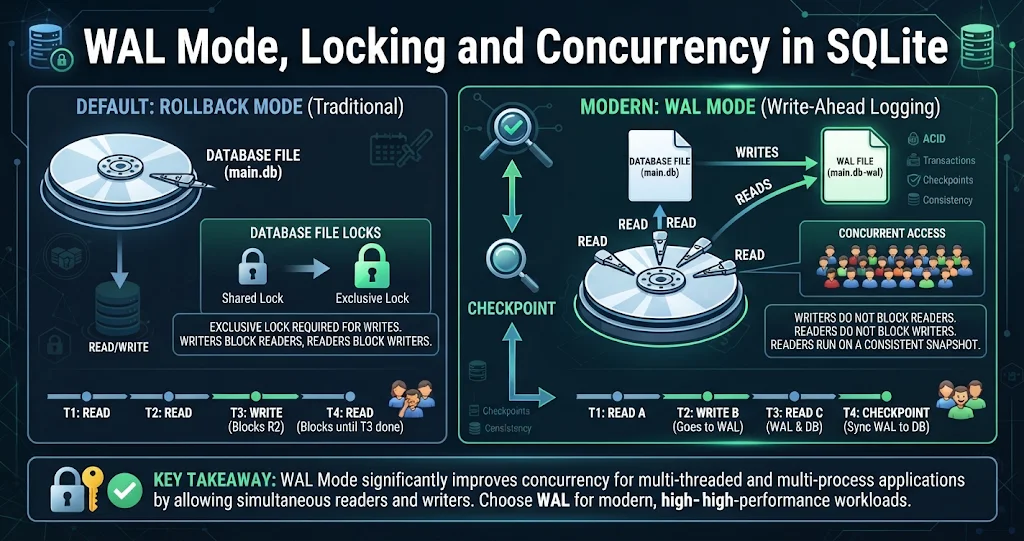
Sooner or later every SQLite user meets the same error: database is locked. It usually appears the first time a second thread, process or tool touches the database while something else is writing. The fix is rarely “use a different database” — it is understanding how SQLite coordinates access to a single file. This tutorial walks through SQLite’s locking model, the journal modes, what Write-Ahead Logging (WAL) changes, how checkpoints work, and the settings that make concurrent apps run smoothly.
The ground rule: many readers, one writer
SQLite lets any number of connections read at the same time, but only one connection can write at a time. There is no row-level or table-level locking; locks apply to the whole database file. Everything else in this article is about how SQLite enforces that rule, and how WAL mode lets readers and the writer stop getting in each other’s way.
Lock states in rollback-journal mode
In the traditional (default) mode, a connection moves through a series of file locks as it reads and writes:
| Lock | Meaning | Who else can proceed |
|---|---|---|
| UNLOCKED | No access to the file | Everyone |
| SHARED | Reading | Other readers; nobody may write to the file |
| RESERVED | Planning to write; changes held in memory | Existing and new readers; no other writer |
| PENDING | Ready to write, waiting for readers to finish | Existing readers finish; no new readers |
| EXCLUSIVE | Writing changes to the database file | Nobody |
The key consequence: at commit time the writer needs EXCLUSIVE, which means readers block the writer, and the writer briefly blocks readers. With one app doing occasional writes you will never notice. With a background job writing while a UI reads, you will.
Journal modes
To make commits atomic, SQLite records how to undo or redo changes in a journal. The journal_mode PRAGMA selects how:
| Mode | What it does | Use it when |
|---|---|---|
DELETE |
Default. Writes a rollback journal, deletes it at commit | Simple single-user use |
TRUNCATE |
Like DELETE, but truncates the journal instead of deleting it | File systems where delete is slow |
PERSIST |
Keeps the journal file, zeroes its header | Same idea, avoids re-creating the file |
MEMORY |
Keeps the journal in RAM | Speed over safety; a crash can corrupt |
WAL |
Appends changes to a separate write-ahead log | Concurrent readers and a writer; most apps |
OFF |
No journal at all | Throwaway data only — no safe rollback |
How WAL mode works
WAL flips the model around. Instead of changing the database file and keeping an undo copy, the writer appends new versions of changed pages to a separate -wal file, and the main database file stays untouched until later. A small shared-memory index, the -shm file, tells each reader where the newest version of each page lives.
When a read transaction starts, it notes how far the WAL goes at that moment and sees a consistent snapshot as of that point, even while the writer keeps appending. The result:
- Readers do not block the writer, and the writer does not block readers.
- There is still only one writer at a time.
- Commits are usually faster, because appending to one file needs fewer disk syncs.
Turning it on is one statement, and the setting is stored in the database file, so it persists for every future connection:
PRAGMA journal_mode = WAL;     -- returns 'wal' on success
PRAGMA journal_mode;           -- check the current mode

-- A common pairing for WAL: still crash-safe (no corruption),
-- but the last commits may roll back after a power loss
PRAGMA synchronous = NORMAL;SQLiteDesk — Check and Tune Your Database Settings
Want to see which journal mode a database is using, or try a checkpoint? Run the PRAGMAs above in the SQLiteDesk SQL workspace — syntax highlighting, schema-aware autocomplete, run the whole script or just the selection with F5, and cancel a long-running query with Stop. A “Run against” picker keeps each editor’s target database explicit, so you always know which file you are changing.
Checkpoints: keeping the WAL file in check
Because changes pile up in the -wal file, they must eventually be copied back into the main database. That is a checkpoint. By default SQLite runs one automatically when the WAL reaches about 1,000 pages (PRAGMA wal_autocheckpoint), and normally checkpoints and removes the WAL when the last connection closes.
You can also run one yourself, in four strengths:
| Mode | Behaviour |
|---|---|
PASSIVE |
Copies as much as it can without waiting for anyone. This is what auto-checkpoints use. |
FULL |
Blocks new writers and waits for readers on older snapshots, then copies everything. |
RESTART |
Like FULL, then waits so the next writer can start the WAL from the beginning. |
TRUNCATE |
Like RESTART, and also truncates the -wal file to zero bytes. |
PRAGMA wal_checkpoint(TRUNCATE);
-- returns three numbers: busy, log, checkpointed
--   busy         = 1 if it could not finish (a reader or writer was in the way)
--   log          = pages currently in the WAL
--   checkpointed = pages copied back into the database

PRAGMA wal_autocheckpoint = 1000;   -- the default threshold, in pages
Checkpoint starvation is the WAL problem to watch for. A checkpoint cannot copy pages past the point that the oldest active reader still needs. If some connection always holds a read transaction open — a forgotten cursor, a reporting query that never finishes — the WAL can grow without limit. Keep read transactions short, and if the -wal file keeps growing, look for a connection that never lets go.
Why you still get “database is locked”
WAL removes reader/writer conflicts, but two writers still collide. When a connection cannot get the lock it needs, SQLite returns SQLITE_BUSY. Three habits fix nearly all of these:
- Set a busy timeout. By default a blocked connection fails immediately. With a timeout it retries for up to that long first.
- Start write transactions with
BEGIN IMMEDIATE. A plainBEGINis deferred: it starts as a reader and tries to upgrade on the first write. If another connection wrote in the meantime, the upgrade can fail withSQLITE_BUSYstraight away — waiting would not help, because the snapshot is already out of date.BEGIN IMMEDIATEtakes the write lock up front, so it either waits politely or gets going. - Keep write transactions short. Do slow work (network calls, user prompts, heavy computation) before you open the transaction.
PRAGMA busy_timeout = 5000;    -- wait up to 5 seconds for locks (per connection)

BEGIN IMMEDIATE;               -- take the write lock now
UPDATE accounts SET balance = balance - 50 WHERE id = 1;
UPDATE accounts SET balance = balance + 50 WHERE id = 2;
COMMIT;
Note that busy_timeout is a per-connection setting, so set it every time you open a connection. journal_mode = WAL, by contrast, only needs to be set once.
WAL caveats
- Same machine only. The
-shmindex uses shared memory, so every process using the database must be on the same host. WAL does not work over network file systems. - Three files, not one. The
-waland-shmfiles are part of the database while it is in use. Never delete the-walfile — it may contain committed transactions that have not been checkpointed yet. - Copying is riskier. Copying just the
.dbfile of a busy WAL database can miss recent commits. Use a proper online backup instead. - Attached databases. A transaction that spans several attached databases is atomic per database, but not across all of them as a set, in WAL mode.
SQLiteDesk — Back Up a Live Database Safely
Copying a WAL-mode database by hand is risky. SQLiteDesk uses an online backup that is safe on a live database while writes are happening, and restores from a backup file just as easily. Backing up, restoring, encrypting and decrypting all preserve the database’s journal mode, user_version and application_id — a WAL database comes back as a WAL database.
A sensible default setup
For a typical desktop app or single-server web app with some concurrency, this combination works well:
-- once, when the database is created
PRAGMA journal_mode = WAL;

-- on every new connection
PRAGMA busy_timeout = 5000;
PRAGMA synchronous = NORMAL;   -- or FULL if every commit must survive power loss
PRAGMA foreign_keys = ON;      -- unrelated to locking, but also per-connection
Then write with BEGIN IMMEDIATE, batch inserts into a single transaction, and keep read transactions short so checkpoints can do their job.
SQLiteDesk — A SQLite Manager for Windows
SQLiteDesk brings browsing, editing, SQL, visual schema design, ER diagrams, import/export, backup and maintenance (VACUUM, ANALYZE, REINDEX, integrity check) into one window — including SQLCipher-encrypted databases. Runs 100% offline, with no telemetry and no accounts. Available on the Microsoft Store with a free trial.
Key takeaways
- SQLite allows many readers but only one writer, and locks the whole file, not rows or tables.
- In the default rollback-journal mode readers and the writer block each other at commit; WAL mode lets them run side by side.
PRAGMA journal_mode = WALis persistent;busy_timeoutandsynchronousare per connection.- Checkpoints copy the WAL back into the database; long-lived readers cause checkpoint starvation and an ever-growing
-walfile. - Use a busy timeout,
BEGIN IMMEDIATEfor writes and short transactions to make “database is locked” rare. - Never delete the
-walfile or hand-copy a live database; use an online backup such as the one built into SQLiteDesk.
Leave a Reply