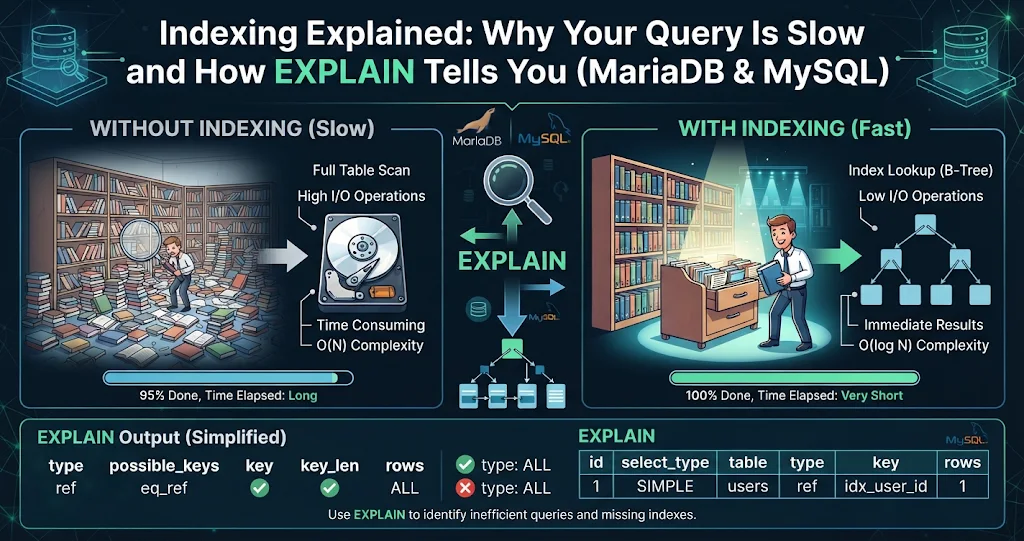
A query that took 20 milliseconds when the table had a thousand rows takes eight seconds now that it has five million. The server did not get slower; the query is doing the database equivalent of reading a phone book cover to cover to find one name. Nine times out of ten the fix is an index — and the tool that tells you whether one is being used is EXPLAIN. This guide explains how indexes work in MySQL and MariaDB, how to read an execution plan, and the everyday mistakes that make the server ignore an index you thought you had.
What an index actually is
Without an index, finding rows that match WHERE email = '[email protected]' means examining every row in the table: a full table scan. An index is a separate, sorted structure — in InnoDB a B-tree — that maps column values to the rows that contain them. Because it is sorted, the server can jump to the right place in a handful of steps, like using the index at the back of a book instead of reading every page.
Two InnoDB details are worth knowing:
- The primary key is the table. InnoDB stores rows in primary-key order (a clustered index), so lookups by primary key are the fastest possible.
- Every secondary index stores the indexed columns plus the primary key. A lookup through a secondary index finds the primary key first, then fetches the row — unless the index alone already contains every column the query needs.
Meet EXPLAIN
Put EXPLAIN in front of any SELECT (and, in current versions, UPDATE and DELETE) and the server shows the plan it would use, without running the query:
EXPLAIN SELECT id, total
FROM orders
WHERE customer_id = 4821 AND status = 'paid';

-- id | select_type | table  | type | possible_keys | key  | rows    | Extra
--  1 | SIMPLE      | orders | ALL  | NULL          | NULL | 4970132 | Using where
That output is a red flag on every line: type = ALL (full scan), key = NULL (no index used) and an estimated five million rows examined to return a handful.
The columns that matter
| Column | What it tells you | What you want to see |
|---|---|---|
type |
How rows are accessed | const, eq_ref, ref or range; worry about index and ALL |
possible_keys |
Indexes the optimizer considered | Not NULL |
key |
The index actually chosen | The one you expected |
key_len |
How many bytes of the index are used | Long enough to cover all your filtered columns |
rows |
Estimated rows examined | Close to the number of rows returned |
Extra |
Additional work | Using index is great; Using filesort and Using temporary deserve a look |
The type values from best to worst are roughly: system/const (one row via primary or unique key) → eq_ref (one row per join row) → ref (several rows via a non-unique index) → range (an index range such as BETWEEN or >) → index (scanning the whole index) → ALL (scanning the whole table).
Fixing it with a composite index
The query filters on customer_id and status, so index both, in that order:
CREATE INDEX idx_orders_customer_status
  ON orders (customer_id, status);

EXPLAIN SELECT id, total
FROM orders
WHERE customer_id = 4821 AND status = 'paid';

-- type | key                        | rows | Extra
-- ref  | idx_orders_customer_status |   12 | NULL
From five million rows examined to twelve. That is the whole game.
Column order: the leftmost-prefix rule
A composite index on (a, b, c) is sorted by a, then b within each a, then c. It can serve filters on a, on a, b and on a, b, c — but not on b alone or c alone, just as a phone book sorted by surname then first name cannot find “everyone called Sara”. Practical guidance:
- Put columns tested with equality (
=,IN) first. - Put a range column (
>,BETWEEN,LIKE 'abc%') last — columns after a range condition cannot be used for filtering. - If the query also sorts, an index whose order matches the
ORDER BYafter the equality columns can removeUsing filesortentirely.
Covering indexes
If an index contains every column a query reads, the server never touches the table rows at all, and Extra shows Using index. Adding total to the index above — (customer_id, status, total) — would make our query covering. Use this for hot queries, not as a habit: wider indexes cost disk and write time.
MyDBDesk — See Every Index a Table Already Has
Before adding an index, check what is there. In MyDBDesk, a table’s Structure tab lists its columns, indexes and foreign keys alongside the full table definition, so a missing or duplicate index is obvious at a glance. Then run EXPLAIN in the SQL console — select just that line and run the selection — and every statement you try is kept in the history drop-down across sessions.
Six ways to accidentally switch an index off
The most frustrating case is an index that exists but is ignored. These are the usual culprits:
- Wrapping the column in a function.
WHERE YEAR(created_at) = 2026cannot use an index oncreated_at. Rewrite it as a range:WHERE created_at >= '2026-01-01' AND created_at < '2027-01-01'. - A leading wildcard.
LIKE '%smith'cannot use a B-tree index;LIKE 'smith%'can. For real text search use aFULLTEXTindex. - Type mismatches. Comparing a
VARCHARcolumn to a number (WHERE phone = 5551234) forces a conversion on every row. Quote the value. - Skipping the leftmost column of a composite index, as described above.
ORacross different columns.WHERE a = 1 OR b = 2often falls back to a scan; aUNIONof two indexed queries can be faster.- Low selectivity. If a condition matches a large share of the table (say
status = 'active'on 90% of rows), the optimizer may rightly decide a scan is cheaper.
Going deeper: EXPLAIN ANALYZE and FORMAT options
EXPLAIN shows estimates. To see what really happened, run the query with timing:
-- MySQL 8.0.18+ : runs the query and reports actual rows and time per step
EXPLAIN ANALYZE SELECT ...;

-- MySQL : a readable tree of the plan, without running it
EXPLAIN FORMAT=TREE SELECT ...;

-- MariaDB : run the query and show estimated vs actual rows
ANALYZE SELECT ...;
ANALYZE FORMAT=JSON SELECT ...;
Note the dialect difference: MySQL spells it EXPLAIN ANALYZE, MariaDB uses a separate ANALYZE statement. Both actually execute the query, so be careful with slow or data-changing statements on production.
When estimates are wildly off from reality, the table statistics may be stale. ANALYZE TABLE orders; refreshes them and is cheap on InnoDB.
Finding the slow queries in the first place
You cannot tune what you have not found. Turn on the slow query log to capture every statement above a threshold:
SET GLOBAL slow_query_log = ON;
SET GLOBAL long_query_time = 1;        -- seconds
SET GLOBAL log_queries_not_using_indexes = ON;   -- optional, can be noisy

SHOW VARIABLES LIKE 'slow_query_log_file';
Make the settings permanent in the server configuration file once you are happy with them. Then run EXPLAIN on the worst offenders, one at a time.
MyDBDesk — Catch the Slow Query While It Is Running
When the server is crawling right now, MyDBDesk’s Server Status view shows the live process list with running connections and queries, with a filter box and the ability to end a connection right from the list. Paste the offender into the SQL console, stop it at any time if it runs long, and ask the private, on-device AI assistant to explain the query in the editor in plain English before you start tuning it.
Do not index everything
Indexes are not free. Every INSERT, UPDATE and DELETE must update each index on the table, and each one takes disk space and memory in the buffer pool. Signs you have gone too far: write-heavy tables with a dozen indexes, indexes that duplicate the leftmost columns of another (an index on (a) is redundant if (a, b) exists), and indexes no query uses.
Before dropping a suspect index, hide it and watch for regressions:
-- MySQL 8+
ALTER TABLE orders ALTER INDEX idx_old INVISIBLE;

-- MariaDB 10.6+
ALTER TABLE orders ALTER INDEX idx_old IGNORED;
The optimizer stops using it, but it is still maintained, so turning it back on is instant. If nothing gets slower after a week, drop it.
Key takeaways
- Most slow queries are full table scans; an index lets the server jump straight to matching rows.
- Run
EXPLAINfirst: watchtype,key,rowsandExtra.ALLwithkey = NULLon a big table is the classic problem. - Build composite indexes with equality columns first and range columns last; remember the leftmost-prefix rule.
- Avoid functions on indexed columns, leading wildcards and type mismatches — they quietly disable indexes.
- Use
EXPLAIN ANALYZE(MySQL) orANALYZE(MariaDB) for real timings, and the slow query log to find what to fix. - Indexes cost writes and space: hide before you drop, and remove redundant ones.
Leave a Reply