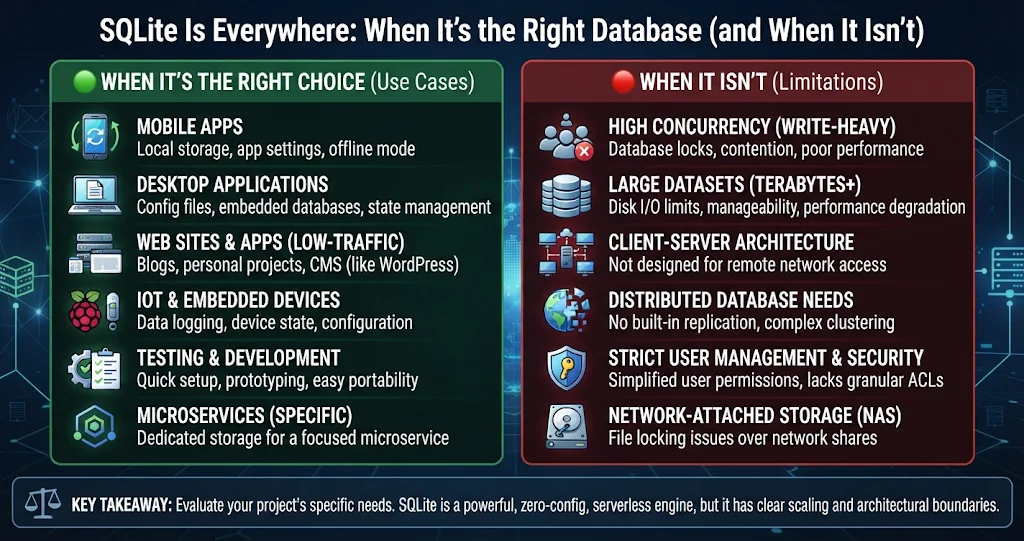
SQLite runs inside your phone, your browser and a long list of desktop apps — we covered what it is and how the single-file model works in SQLite Explained: The World’s Most-Deployed Database. This post answers the harder, more practical question: should your next project use it? Instead of a list of pros and cons, here is a decision guide — one question that settles most cases, the real limits you will hit, honest comparisons with the alternatives, and the anti-patterns that cause most SQLite horror stories.
The one question that settles most cases
Forget database size and “is it production-grade” for a moment. Ask this instead:
Do all the processes that write to this data run on the same machine as the file?
If yes, SQLite is very likely a good fit, and probably the simplest one. If no — if laptops in an office, several web servers, or a fleet of workers all need to write to the same data — you want a client-server database, because SQLite has no network protocol: every writer must open the file directly. Almost every situation where SQLite “fell over” turns out to be a violation of this rule, usually by putting the file on a network share.
A useful second question: how many writes per second, and how big is each transaction? SQLite allows only one writer at a time. Readers are cheap and can run in parallel, but writes queue up. For most applications this is invisible, because a well-batched write takes milliseconds. For a workload that is dominated by many independent writers hammering the database at once, it is the ceiling.
A scenario checklist
Here is how that reasoning plays out for common projects:
| Scenario | SQLite? | Why |
|---|---|---|
| Desktop or mobile app storing its own data | Yes | One machine, one app — the case SQLite was built for. |
| Local cache of remote data | Yes | Fast reads, real queries, easy to throw away and rebuild. |
| Small to medium website on a single server | Usually yes | Read-heavy traffic is handled well; enable WAL mode and keep writes short. |
| Data analysis of a dataset that fits on one disk | Yes | Full SQL, indexes and window functions with no server to install. |
| File format for documents or project files | Yes | Atomic saves and partial updates instead of rewriting a whole file. |
| Sensor or device logging on the device itself | Yes | Small footprint, crash-safe transactions. |
| Shared database on a file server for several PCs | No | Network file locking is unreliable; corruption risk. |
| Web app behind a load balancer with several servers | No | Writers on different machines need a server database. |
| High-volume multi-tenant SaaS with heavy concurrent writes | No | The single-writer design becomes the bottleneck. |
| Fine-grained per-user permissions on the data | No | SQLite has no users or roles; anyone who can read the file can read the data. |
SQLiteDesk — See What Is Really in the File
The fastest way to judge whether SQLite fits is to look at a real database. SQLiteDesk opens or creates a database in one click, shows tables, views, indexes and triggers in a searchable schema tree, and draws an ER diagram of an existing database from the live schema — so you can see how the data fits together before you commit to a design. The SQL workspace has syntax highlighting and schema-aware autocomplete for trying out the queries your app will need.
The limits that actually matter
SQLite’s theoretical limits are rarely the problem — the maximum database size runs into the hundreds of terabytes, and a single row can hold up to a gigabyte by default. The practical limits are different:
- One writer at a time. A write transaction locks the database for other writers until it commits. In the default rollback-journal mode it also blocks readers briefly; in WAL mode readers carry on undisturbed.
- Commit cost, not row cost. Every committed transaction waits for the disk to confirm the data is safe. Inserting 10,000 rows as 10,000 separate transactions is slow; inserting them in one transaction is fast. Most “SQLite is slow” complaints are really this.
- Same host only. SQLite relies on the operating system’s file locks. On network file systems (SMB shares, NFS) those locks are often unreliable, and WAL mode needs shared memory that only works on one machine.
- No built-in access control. Security is whatever the file system gives you, plus encryption such as SQLCipher if you need the file unreadable at rest.
- Loose typing by default. Columns accept values of other types unless you use
STRICTtables orCHECKconstraints.
The batching point is worth seeing in code, because it is the single biggest performance lever you have:
-- Slow: each INSERT is its own transaction and its own disk sync
INSERT INTO readings (sensor, value) VALUES (1, 20.5);
INSERT INTO readings (sensor, value) VALUES (1, 20.7);
-- ...thousands more...

-- Fast: one transaction, one sync at COMMIT
BEGIN;
INSERT INTO readings (sensor, value) VALUES (1, 20.5);
INSERT INTO readings (sensor, value) VALUES (1, 20.7);
-- ...thousands more...
COMMIT;

-- For a single-server web app, also consider:
PRAGMA journal_mode = WAL;     -- readers no longer block the writer
PRAGMA busy_timeout = 5000;    -- wait up to 5 s for a lock instead of failing
SQLite vs a client-server database
PostgreSQL, MySQL, MariaDB and SQL Server are not “better SQLite”; they solve a different problem. Compare them on the things that drive the decision:
| SQLite | Client-server database | |
|---|---|---|
| Setup | None — a library and a file | Install, configure, secure and update a server |
| Concurrent writers | One at a time | Many, with row-level locking |
| Access from other machines | Not supported | Built in, over the network |
| Users and permissions | None | Roles, grants, auditing |
| Latency per query | Very low (in-process) | Network round trip on every query |
| Backup | Online backup API or VACUUM INTO |
Dump tools, replication, point-in-time recovery |
| Deploying with your app | Ship the file | Ship and run a service |
Note the latency row: because SQLite runs inside your process, issuing many small queries is cheap. Patterns that would be an “N+1 query” disaster over a network are often perfectly fine against SQLite.
SQLite vs JSON, CSV and other flat files
The more common real-world competitor is not PostgreSQL — it is a JSON or CSV file. Flat files are fine for small, rarely changing data like a settings file. They start hurting as soon as the data grows or changes often:
| SQLite | JSON / CSV file | |
|---|---|---|
| Updating one record | Writes only the changed pages | Rewrite the entire file |
| Crash in the middle of a save | Transaction rolls back cleanly | Possibly a truncated or half-written file |
| Finding records | Indexed SQL queries | Load everything, filter in code |
| Memory use | Reads only what it needs | Usually whole file in memory |
| Human-readable in a text editor | No (needs a viewer) | Yes |
| Diffable in version control | Poorly | Well |
A good rule of thumb: if you find yourself writing code to search, sort, or partially update a JSON file, or to make its saves crash-safe, you are reinventing a database — use SQLite.
SQLiteDesk — Move Off JSON and CSV Without Losing Data
Outgrown a pile of JSON or CSV files? SQLiteDesk imports CSV and JSON with type inference and creates the table for you. Large CSV files are streamed, and values that would lose digits as numbers — ZIP codes, phone and account numbers — stay text, so leading zeros survive. And when you need to back up a database that is in use, its online backup is safe on a live database while writes are happening — no risky file copies.
Anti-patterns that give SQLite a bad name
Most SQLite failures are not SQLite’s fault. These are the patterns to avoid:
- The shared network drive. Putting one
.dbon a file server so several PCs can use it is the classic mistake. It may work for weeks, then corrupt under concurrent use. If several machines must write, use a server database. - Copying the file while it is open. A plain file copy taken mid-write can capture an inconsistent state — and in WAL mode, recent commits may still live in the
-walfile you did not copy. Use the online backup API, the CLI’s.backupcommand, orVACUUM INTO 'backup.db'. - Autocommit loops. Thousands of single-row transactions in a loop, as shown above. Wrap them in one transaction.
- Long-running write transactions. Holding a write lock while the app waits for user input or a network call blocks every other writer. Do the slow work first, then open a short transaction.
- No busy timeout. Without
busy_timeout, a second connection that finds the database locked fails immediately with “database is locked” instead of waiting a moment. - Everything in one JSON column. Storing whole objects as JSON text gives up indexes and constraints. SQLite has good JSON functions, but use real columns for anything you filter or join on.
- Trusting declared types. A column declared
INTEGERwill happily store the text'abc'unless the table isSTRICT. Validate, or let the database do it.
Three quick worked decisions
A point-of-sale app for a single shop till. One machine, modest writes, must survive power cuts. SQLite, with WAL mode and regular online backups to another drive. Easy call.
The same shop wants three tills sharing stock levels. Now there are writers on three machines. Do not put the SQLite file on a shared folder. Either run a small server database, or give each till its own SQLite database and synchronise through a central service.
An internal reporting site on one server with a few hundred users. Mostly reads, occasional writes from a nightly import. SQLite in WAL mode is a sensible, low-maintenance choice — and if it ever outgrows one server, migrating the schema to a server database is straightforward.
SQLiteDesk — A SQLite Manager for Windows
Decided SQLite is the right tool? SQLiteDesk is where you will spend your time with it: design tables visually with a live DDL preview, browse, sort and filter rows in an Excel-style grid, run SQL, export to CSV, JSON or SQL, and run VACUUM, ANALYZE, REINDEX and integrity checks from a menu. Runs 100% offline. Available on the Microsoft Store with a free trial — no subscription, no ads.
Key takeaways
- The deciding question is where the writers run: if every writer is on the same machine as the file, SQLite is usually the simplest correct choice.
- The practical limits are one writer at a time, same host only and no built-in access control — not database size.
- Most performance problems come from committing too often; batch writes into transactions and use WAL mode plus a busy timeout for concurrent apps.
- Against JSON or CSV files, SQLite wins as soon as you need partial updates, crash-safe saves or queries.
- Avoid the anti-patterns: no network shares, no copying open files, no long write transactions.
- SQLiteDesk lets you inspect, design, import into and back up SQLite databases on Windows from one window.
Leave a Reply