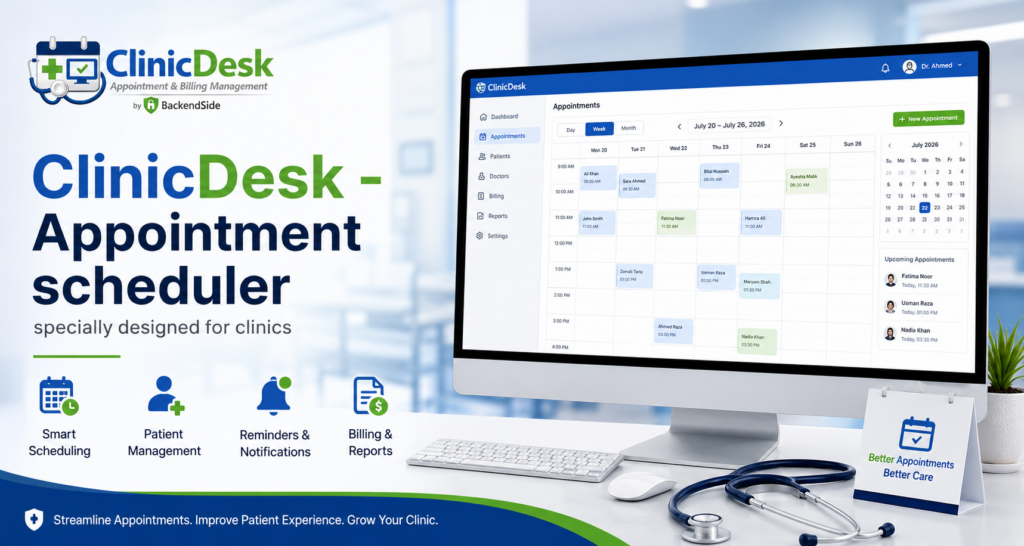
Plenty of clinics run their diary on a generic calendar — a shared office calendar, a booking widget built for hair salons, or a paper book with a ruler down the middle. It works, right up until it doesn’t: two receptionists double-book the same doctor, a no-show goes unrecorded and unmeasured, and nobody can say whether Thursday’s 10:15 is a two-minute prescription renewal or a forty-minute first consultation. The problem is not that these tools are bad calendars. It is that a clinic diary is not a calendar — it is a scheduling problem with its own rules. This article sets out what appointment scheduling software has to do differently when the appointments are patients, and how ClinicDesk was built around exactly those rules.
Why generic calendars fall short in a clinic
A general-purpose calendar models one thing: a block of time with a title. A clinic booking carries far more — and every missing field becomes a phone call, a sticky note, or a mistake.
| What a calendar entry holds | What a clinic booking needs |
|---|---|
| A title and a time | The patient, the assigned doctor, date, start time and duration |
| Maybe a colour | An appointment type — new, follow-up, consultation, check-up or emergency |
| Accepted / declined | A full status lifecycle: pending, confirmed, completed, cancelled, no-show |
| A description box | Call notes from the conversation that produced the booking |
| One shared view for everyone | Per-doctor diaries, with the front desk booking on behalf of assigned doctors |
None of this is exotic. It is simply what the front desk already keeps in their head — and what a scheduler designed for clinics writes down instead.
What a clinic booking should actually record
In ClinicDesk, every appointment records the assigned doctor, the date, the start time and the duration — so a diary is a set of measured slots, not a list of vague entries. Each booking also carries an appointment type: new, follow-up, consultation, check-up or emergency. Type matters because it drives duration and preparation: a first consultation and a ten-minute follow-up are not interchangeable when you are filling a day, and an emergency slotted into a full diary is a decision the whole clinic should be able to see and understand later.
Call notes: the field that saves the booking
Every ClinicDesk appointment has free-text call notes — the place where “patient asked to be seen before Thursday”, “needs a translator”, or “third call about the same pain” survives the gap between the phone ringing and the patient arriving. In a generic tool these details live in the receptionist’s memory, which means they leave the building at five o’clock. A booking that captures the conversation, not just the slot, is the difference between a schedule and a scheduling system.
ClinicDesk — Appointment Scheduling & Clinic Management for Windows
ClinicDesk is an appointment scheduler designed for how clinics actually book: per-doctor diaries, five appointment types, full status tracking from pending to no-show, call notes on every booking, and secretary-to-doctor assignment — with patient records, clinical notes, invoicing and reports attached to the same appointments. It runs on one Windows machine in your practice, and staff use it from any browser on the network with nothing to install. 30-day free trial.
The status lifecycle is where the money is
Every ClinicDesk appointment carries a status — pending, confirmed, completed, cancelled or no-show — and the status can be updated at any time. It is the least glamorous feature in the product, and it is the one that reshapes the front desk’s day:
- Pending vs confirmed is the morning call list. The front desk can see at a glance who still needs a reminder call, instead of ringing everyone or no one.
- Cancelled slots are visible, refillable clinic time. A cancellation recorded as a status — rather than an erased pencil mark — is a slot the next caller can take.
- No-show, recorded properly, is the only way to answer two questions every practice eventually asks: how much clinic time are we losing, and which patients need a different reminder approach? A wall planner cannot answer either; a scheduler that treats no-show as a first-class status answers both from its reports.
One diary per doctor, one front desk for many
The other structural difference between an office calendar and a clinic diary is who books whom. In a clinic, doctors rarely book their own appointments — secretaries do, often for several doctors at once. ClinicDesk models this directly instead of leaving it to convention:
- Doctors get a dedicated schedule view of their own upcoming and past appointments — and only their own. Doctors cannot see each other’s diaries, and they can open and complete an appointment record straight from the schedule.
- Secretaries are assigned to specific doctors by an administrator from a dedicated screen, and manage appointments only for their assigned doctors. Assignments take effect immediately across the system without a restart — which is exactly what you need on the morning someone is covering for a colleague.
- The rules are enforced on the server, not just hidden in the menu. Every protected request checks the user’s role, so a secretary cannot reach a doctor’s schedule form by knowing the address, and vice versa.
That combination — per-doctor diaries plus explicit secretary-to-doctor assignment — is the part that generic booking tools simply do not have a concept for, and it is the part that prevents both double-booking and the quieter failure of a diary nobody owns.
A booking that connects to everything after it
Scheduling is the first stage of a visit, not the whole of it — and a scheduler designed for clinics should hand the booking on rather than dead-end at the time slot. In ClinicDesk, the appointment is the spine the rest of the visit hangs off:
- The booking is linked to a complete patient profile — searchable, with allergies and emergency contact on the record rather than in a note from four years ago.
- When the visit happens, the doctor records diagnosis, treatment, prescription and a follow-up interval against that same appointment, from the browser.
- Invoicing is per appointment, with partial payments tracked and the balance visible — so the booking that started at the front desk finishes cleanly at the billing counter.
- Reports cover appointments filterable by date range, status, doctor and patient — which is how “how many no-shows last month?” becomes a lookup instead of a project. And every create, update and delete is written to a tamper-evident audit log, so a question about any booking has an answer.
We walked the full visit — records, consultation, attachments, invoicing and follow-up — in a companion article; this is the scheduling stage done properly so that the rest becomes possible.
Runs in your clinic, opens in any browser
ClinicDesk uses a client/server design: the server runs on one Windows machine in the practice, holds the data, and serves the entire interface as browser pages — login, appointment forms, patient profiles, schedules, invoices. Doctors and secretaries open a browser on a PC, tablet or phone, point it at the server’s address and log in. Nothing is installed on client devices, and an embedded database with write-ahead logging gives reception, consulting rooms and the back office reliable concurrent access to the same live diary at once — the technical property that makes double-booking a solved problem rather than a discipline problem.
For a single-site practice that keeps everything on hardware you own, on your own network. A group that needs several locations on one diary can install the same server on a VPS with a public IP and reach it over the internet instead.
Frequently asked questions
What makes a clinic appointment scheduler different from a normal calendar?
Per-doctor diaries, appointment types, a full status lifecycle including no-show, call notes on every booking, and front-desk staff booking on behalf of assigned doctors — plus links from each booking to the patient record, the clinical note and the invoice.
Can one secretary manage several doctors’ diaries?
Yes. In ClinicDesk an administrator assigns secretaries to specific doctors, and each secretary manages appointments for exactly their assigned doctors. Assignments take effect immediately, without a restart.
Can doctors see each other’s schedules?
No. Each doctor’s schedule view is restricted to their own sessions, and the restriction is enforced server-side on every request — not just hidden from the menu.
How does ClinicDesk help with no-shows?
No-show is a first-class appointment status, and reports are filterable by status, date range, doctor and patient — so lost clinic time is measurable, and patterns show up instead of being anecdotes.
What do staff need on their devices?
Just a modern web browser. The whole interface is served from the Windows server component, so any PC, tablet or phone on the network is a working terminal with nothing to install.
Key takeaways
- A clinic diary is not an office calendar: it needs per-doctor columns, measured slots, appointment types and a booking record richer than a title and a time.
- The status lifecycle — pending, confirmed, completed, cancelled, no-show — drives the front desk’s call list, refills cancelled slots, and makes lost clinic time measurable.
- Secretary-to-doctor assignment with server-side role enforcement models how clinics actually book — the structural feature generic tools lack.
- A good scheduler hands the booking on: in ClinicDesk the appointment links to the patient record, the clinical note, the invoice and the reports.
- ClinicDesk runs on one Windows machine and serves every diary to any browser on the network — no client installs, one live schedule for the whole practice.
ClinicDesk — Appointment Scheduling & Clinic Management for Windows
ClinicDesk is an appointment scheduler designed for how clinics actually book: per-doctor diaries, five appointment types, full status tracking from pending to no-show, call notes on every booking, and secretary-to-doctor assignment — with patient records, clinical notes, invoicing and reports attached to the same appointments. It runs on one Windows machine in your practice, and staff use it from any browser on the network with nothing to install. 30-day free trial.
Leave a Reply