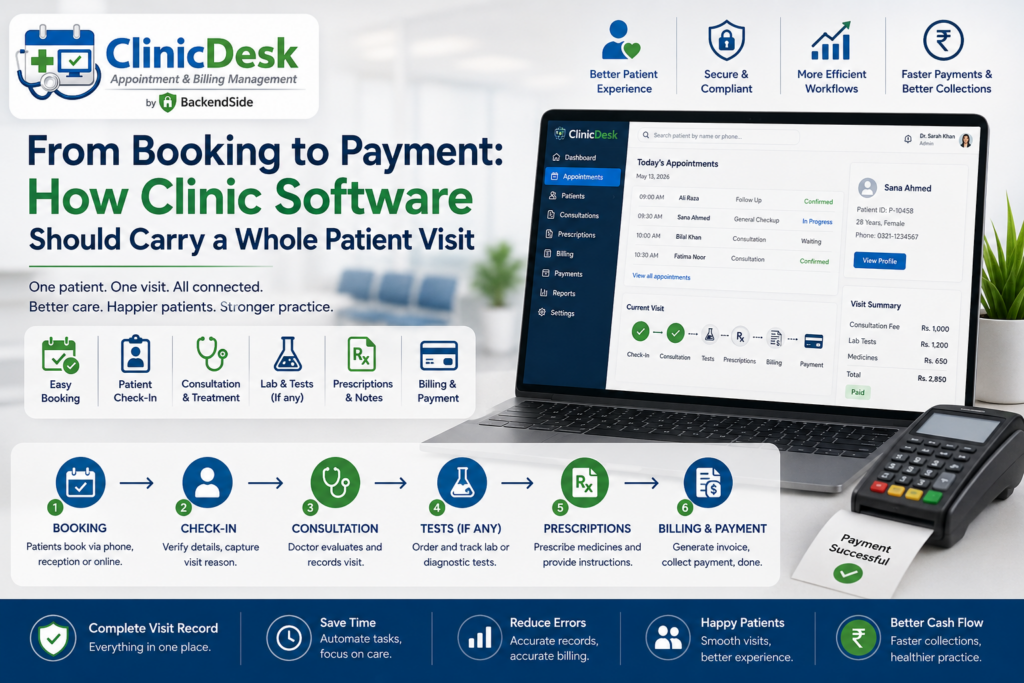
One patient visit touches at least three different jobs. The secretary books it and confirms it. The doctor sees the patient and writes up what happened. Someone raises the invoice and, often on a later date, records the payment. In a great many clinics each of those stages lives in a different place — a scheduling app, a paper chart, a billing spreadsheet — and the visit is stitched together by staff carrying information between them. That stitching is where the working day actually goes. This article walks the patient visit stage by stage and sets out what clinic management software should do at each one.
Stage 1: Booking the appointment
A booking is not just a name in a time slot. To be useful later it has to record who the patient is seeing, when, for how long, and what kind of visit it is — because a ten-minute follow-up and a first consultation are not interchangeable when you are filling a diary.
ClinicDesk records the assigned doctor, date, start time and duration, plus an appointment type — new, follow-up, consultation, check-up or emergency — and free-text call notes from the conversation that produced the booking. Those call notes matter more than they look: they are where “patient asked to be seen before Thursday” survives the gap between the phone ringing and the patient arriving.
Status tracking is the feature that pays for itself
Every appointment carries a status: pending, confirmed, completed, cancelled or no-show, updatable at any time. This is the least glamorous feature in any clinic system and the one that changes the most. Confirmed-versus-pending tells the front desk who still needs a reminder call. Cancelled slots are visible slots that can be refilled. And recording no-shows — properly, as a status rather than a blank — is the only way to ever answer the question of how much unattended clinic time actually costs you, or which patients might need a different reminder approach.
Stage 2: The patient record behind the booking
The appointment should hang off a real patient profile, not duplicate it. ClinicDesk keeps a complete record for every patient: first and last name, date of birth, gender, phone, email, address, blood type, allergies, emergency contact name and phone, and free-text notes.
Two of those fields deserve a mention because they are the ones staff reach for under pressure: allergies and emergency contact. Both belong on the patient profile rather than buried in a visit note from four years ago, precisely because the moment you need them is the moment nobody has time to search.
And search is the other half of it. Records are searchable and filterable, with full-name indexing for fast lookup across large patient lists — which is what stops the front desk from creating a duplicate patient every time a name is spelled slightly differently.
ClinicDesk — Clinic Management System for Windows
ClinicDesk covers the whole visit: appointment scheduling with status tracking, complete patient profiles, clinical visit records with diagnosis and prescription, document attachments, invoicing with partial payments, a per-doctor schedule view, secretary-to-doctor assignment, and reports across all of it. It runs on one Windows machine in your practice and serves doctors, secretaries and admins through their browsers — nothing to install on the client side. 30-day free trial.
Stage 3: The consultation
This is where most systems hand off to paper, and where the value leaks. If the clinical outcome is not captured in the same system as the appointment, then the patient’s history is a filing cabinet and nobody can see it from anywhere else.
In ClinicDesk the doctor records the outcome directly from the browser: diagnosis, treatment, prescription and additional notes, plus a follow-up interval in days. Each visit record is linked to both the appointment and the patient, so a clinical history builds up over time on its own — no separate filing step, no chart to pull, and the whole sequence of visits visible from the patient’s record.
The follow-up interval is a quiet piece of workflow design. Written at the moment the doctor decides it, it turns “come back in a fortnight” from something the patient has to remember into something the practice knows.
Attachments: the things that are not text
Real clinical work generates documents — lab results, scans, referral letters. ClinicDesk attaches files directly to an appointment or to a specific clinical visit record, storing the filename, file path, file type, a description, and the user who uploaded it with a timestamp. The point of attaching them to the visit rather than dumping them in a shared folder is context: six months later, the result is still sitting next to the consultation that ordered it.
Stage 4: Invoicing and payment — including the partial ones
Billing is where clinic software most often turns into a spreadsheet, usually because the software assumes every invoice is paid once and in full. Real practices deal with deposits, instalments, part-payments at the counter and balances settled weeks later.
ClinicDesk generates an invoice per appointment with subtotal, tax, total amount, due date and balance due, and supports partial payments as a first-class case: each payment records the amount, date, payment method (cash, card, bank transfer or other) and the staff member who recorded it, and the invoice status automatically reflects unpaid, partial or paid.
| Recorded on the invoice | Recorded on each payment |
|---|---|
| Subtotal, tax, total amount | Amount and date |
| Due date | Method — cash, card, bank transfer, other |
| Balance due | Staff member who recorded it |
| Status: unpaid / partial / paid |
That “who recorded it” field settles a surprising number of end-of-day disagreements, and the running balance means the answer to “what does this patient still owe?” is on the screen rather than in someone’s head.
Stage 5: Everyone sees their own slice of the day
A visit workflow spans several jobs, so the software should present each one with the view it needs rather than one interface everybody has to navigate around.
- Doctors get a dedicated schedule view of their own upcoming and past appointments, and can open and complete an appointment record straight from it. The view is restricted to their own sessions — doctors do not see each other’s schedules.
- Secretaries are assigned to specific doctors by an administrator, from a dedicated screen, and manage appointments only for the doctors they are assigned to. Assignments take effect immediately across the system without a restart — which matters on the morning someone is covering for a colleague.
- Administrators handle user accounts and see the whole practice.
Those three roles are enforced on the server for every protected request, not merely reflected in which menu items are shown. Alongside them, every create, update and delete across patients, appointments, clinical records, invoices and payments is written to a tamper-evident audit log recording the user, the record affected, a description of the change and a precise timestamp — so a question about any record has an answer, without anyone having to reconstruct it from memory.
Stage 6: Seeing the practice, not just the visit
Once the visit is captured end to end, reporting stops being data entry’s second job and becomes a by-product. ClinicDesk’s built-in reporting covers appointments, patient lists, clinical records, invoices and payment history, all filterable by date range, status, doctor and patient — and served as browser pages from the built-in web server, so any device on the network can open them without extra software.
That combination answers the questions a practice manager actually asks: how many no-shows last month, which doctor’s diary is filling, what is outstanding across all patients, how many follow-ups are due.
What makes the end-to-end version possible
None of the above works if the system is single-user or if the consulting room and the front desk are running separate copies. ClinicDesk uses a client/server design: the server runs on one Windows machine in the practice, holds the data, and serves the entire interface — login page, appointment forms, patient profiles, clinical record forms, invoice views and schedules — as browser pages. Doctors, secretaries and admins open a browser on a PC, tablet or phone, point it at the server and log in. Nothing is installed on client devices. An embedded database with write-ahead logging provides reliable concurrent multi-user access, so reception, consulting rooms and back office all work against the same live data at once.
For a single-site practice, that keeps everything on hardware you own, on your own network. For a group that needs several locations on one system, the same server can be installed on a VPS with a public IP and reached over the internet instead.
Frequently asked questions
What should clinic management software cover as a minimum?
The full visit: booking with status tracking, a patient record, a clinical note attached to the appointment, invoicing with payment tracking, and reporting over all of it. Anything narrower means staff move information between systems by hand.
Why does appointment status matter so much?
Because it drives the front desk’s day and the practice’s numbers. Confirmed-versus-pending tells you who to call; cancelled tells you which slots can be refilled; recorded no-shows are the only way to measure lost clinic time.
Can doctors write their own clinical notes?
In ClinicDesk, yes — diagnosis, treatment, prescription, notes and a follow-up interval, entered from the browser and linked to both the appointment and the patient, so the history builds itself.
Does it handle patients who pay in instalments?
Yes. Partial payments are supported directly: each payment is recorded with amount, date, method and the staff member who took it, and the invoice status moves between unpaid, partial and paid automatically.
Do staff need software installed on their devices?
No. The whole interface is served from the Windows server component, so any device on the network with a modern browser is a working terminal.
Key takeaways
- A patient visit spans booking, records, consultation, attachments, invoicing and follow-up — clinic software earns its keep by carrying all six, not one.
- Appointment status tracking (pending, confirmed, completed, cancelled, no-show) is the least glamorous feature and the one that changes the working day most.
- Clinical notes belong linked to the appointment and the patient, with attachments stored against the visit that produced them, so history accumulates without a filing step.
- Partial payments are the normal case, not the exception — invoices need a running balance and a status that updates itself.
- ClinicDesk covers the whole sequence from one Windows machine, with per-doctor schedules, secretary-to-doctor assignment, browser-based access for every device, and reporting across appointments, patients, invoices and payments.
ClinicDesk — Clinic Management System for Windows
ClinicDesk covers the whole visit: appointment scheduling with status tracking, complete patient profiles, clinical visit records with diagnosis and prescription, document attachments, invoicing with partial payments, a per-doctor schedule view, secretary-to-doctor assignment, and reports across all of it. It runs on one Windows machine in your practice and serves doctors, secretaries and admins through their browsers — nothing to install on the client side. 30-day free trial.
Leave a Reply