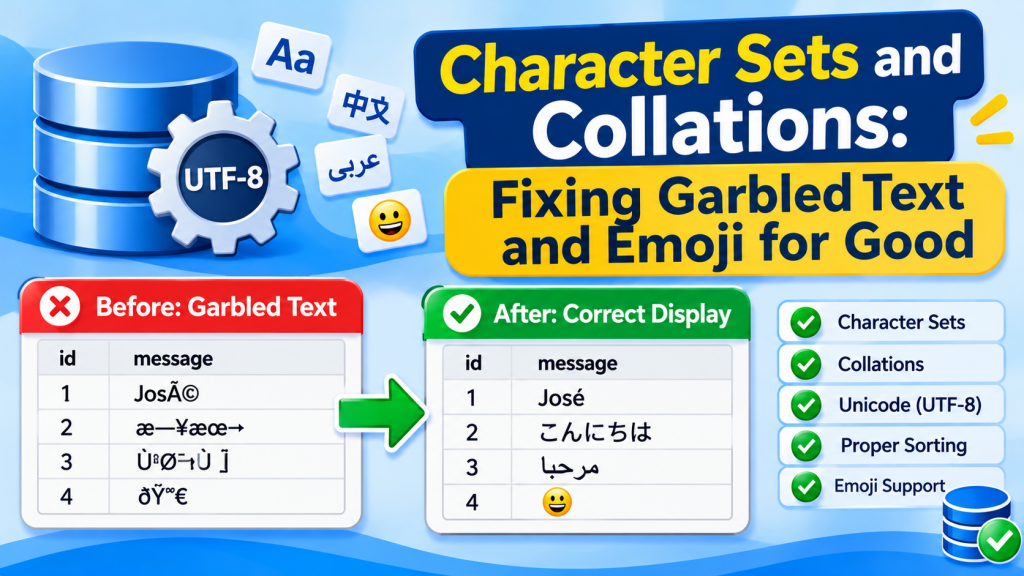
You save a customer named José and the screen shows José. A user posts a thumbs-up emoji and the database stores ???? — or rejects the row with Incorrect string value. A query that worked yesterday fails with Illegal mix of collations. These look like three different bugs, but they all come down to two settings that MySQL and MariaDB apply at several levels at once: the character set and the collation. Get them consistent and the problems stop for good.
Character set vs collation
A character set decides how text is turned into bytes — which characters can be stored at all, and how many bytes each takes. A collation is a set of rules for comparing and sorting text in that character set: whether a equals A, whether e equals é, and where ö sorts. Every collation belongs to exactly one character set.
The big gotcha: utf8 is not UTF-8
Real UTF-8 uses one to four bytes per character. Years ago MySQL implemented utf8 with a maximum of three bytes, which covers most living scripts but not emoji, many rarer CJK characters or various symbols — all of which need four. That three-byte version is now officially called utf8mb3, and utf8 is a deprecated alias for it. Full UTF-8 is utf8mb4.
| Character set | Bytes per character | Emoji? | Use it? |
|---|---|---|---|
latin1 |
1 | No | Only for legacy Western-European data |
utf8 / utf8mb3 |
1–3 | No | No — deprecated |
utf8mb4 |
1–4 | Yes | Yes, for everything new |
MySQL 8 defaults to utf8mb4 with the utf8mb4_0900_ai_ci collation. MariaDB’s default depends on version and packaging: recent releases default to utf8mb4 with the newer uca1400 collations, many Linux distribution packages have configured utf8mb4 for years, and older installs may still default to latin1. Do not assume — check:
SHOW VARIABLES LIKE 'character_set%';
SHOW VARIABLES LIKE 'collation%';

-- Per table
SELECT table_name, table_collation
FROM information_schema.tables
WHERE table_schema = 'shop';

-- Per column
SELECT column_name, character_set_name, collation_name
FROM information_schema.columns
WHERE table_schema = 'shop' AND table_name = 'customers';
Five levels, one rule
Character set and collation are set at the server, database, table and column levels, each one defaulting from the level above — and separately for the connection between your application and the server. The column is what actually stores the data; the connection decides how the bytes your app sends are interpreted. The rule is simply: make them all utf8mb4.
# my.cnf / my.ini  [mysqld]
character-set-server = utf8mb4
collation-server     = utf8mb4_unicode_ci

-- New databases and tables
CREATE DATABASE shop CHARACTER SET utf8mb4 COLLATE utf8mb4_unicode_ci;

-- The connection: most drivers take a charset option; in raw SQL:
SET NAMES utf8mb4;
The connection setting is the one most often missed. If the client claims to send latin1 while actually sending UTF-8 bytes, the server dutifully “converts” them, and you get garbage stored on disk. Set the charset in your driver’s connection string (charset=utf8mb4 or the equivalent) rather than relying on server defaults.
MyDBDesk — Check the Settings That Cause Mojibake
Diagnosing encoding problems starts with seeing what the server and the table actually use. MyDBDesk’s Server Status view shows the server’s current configuration variables with a filter box — type character_set or collation and the relevant settings are all there. A table’s Structure tab shows its full definition, including the character set and collation, and changing a column’s type keeps its default, comment and collation.
Reading the symptoms
| You see | What usually happened |
|---|---|
???? in place of emoji or other characters |
The column or connection could not represent them (often utf8mb3 or latin1) and they were replaced on the way in — the original data is lost |
Incorrect string value: 'xF0x9F...' |
Strict mode refused to store a 4-byte character in a 3-byte column — better than losing it silently |
José, ä, ’ |
Mojibake: UTF-8 bytes interpreted as latin1 somewhere along the way |
Illegal mix of collations |
Comparing or joining two columns (or a column and a literal) with incompatible collations |
To see what is really stored, look at the bytes rather than trusting any screen:
SELECT name, HEX(name), LENGTH(name), CHAR_LENGTH(name)
FROM customers WHERE id = 42;

-- 'José' correctly stored in utf8mb4:    4A6F73C3A9          (é = C3A9)
-- double-encoded mojibake:               4A6F73C383C2A9      (é = C383C2A9)
Converting a table to utf8mb4
If the stored bytes are correct and you simply need room for four-byte characters, convert the table. Take a backup first — this rewrites the whole table, which takes time and locks writes on large tables.
ALTER DATABASE shop CHARACTER SET utf8mb4 COLLATE utf8mb4_unicode_ci;

ALTER TABLE customers
  CONVERT TO CHARACTER SET utf8mb4 COLLATE utf8mb4_unicode_ci;
CONVERT TO converts every text column’s data. Changing only the table default (ALTER TABLE ... CHARACTER SET ... without CONVERT TO) affects new columns only.
One historical snag: with older row formats, InnoDB index keys were limited to 767 bytes, and a VARCHAR(255) at four bytes per character needs 1,020. That is where the old advice to use VARCHAR(191) came from. With the default DYNAMIC row format in current versions the limit is 3,072 bytes, so VARCHAR(255) indexes fine.
Repairing double-encoded text
If HEX() shows mojibake bytes, the data itself was mis-stored and converting the table will not fix it. The classic repair re-interprets the bytes: turn the text back into the latin1 bytes it was wrongly decoded from, then read those bytes as UTF-8. Test on a copy first, and only on rows that are actually affected:
SELECT name,
       CONVERT(CAST(CONVERT(name USING latin1) AS BINARY) USING utf8mb4) AS fixed
FROM customers
WHERE name LIKE '%Ã%';
When the preview looks right, apply it with an UPDATE on the same rows — and fix the connection setting that caused it, or new rows will arrive broken.
MyDBDesk — CSV Imports That Respect the Encoding
A lot of garbled text arrives through CSV files. MyDBDesk imports CSV in UTF-8, UTF-16 or ANSI — comma, semicolon, tab or pipe separated — through a column-matching window that shows sample values before anything is written, so mangled characters are visible up front. The import is all-or-nothing, and CSV exports read the same on every PC whatever its language settings.
Choosing a collation
Collation names follow a pattern: character set, algorithm, then sensitivity suffixes — _ci case-insensitive, _cs case-sensitive, _ai/_as accent-insensitive/sensitive, and _bin for plain byte comparison.
| Collation | Where | Notes |
|---|---|---|
utf8mb4_0900_ai_ci |
MySQL 8+ default | Modern Unicode rules; MySQL-only; a NO PAD collation, so trailing spaces count in comparisons |
utf8mb4_uca1400_ai_ci |
MariaDB 10.10+ | Modern Unicode rules on MariaDB |
utf8mb4_unicode_ci |
Both | Older Unicode rules, but portable — a safe choice if data moves between engines |
utf8mb4_general_ci |
Both | Fast and simplified; sorts some languages less correctly |
utf8mb4_bin |
Both | Exact byte comparison: case- and accent-sensitive |
Collation choice is not only about sorting. In a _ci collation, 'ali' = 'ALI' is true, so a UNIQUE index on usernames will reject ALI if ali exists — usually what you want. For tokens, hashes and codes where case matters, use _bin on that column.
Moving dumps between MySQL and MariaDB? A MySQL dump full of utf8mb4_0900_ai_ci may fail on older MariaDB versions with Unknown collation. Use a collation both understand (such as utf8mb4_unicode_ci) for portable schemas, or replace the collation name in the dump before loading.
To clear an Illegal mix of collations error, make the two sides match — ideally by converting the columns to the same collation, or for a one-off query with an explicit COLLATE:
SELECT *
FROM customers c
JOIN legacy_contacts l
  ON l.email = c.email COLLATE utf8mb4_unicode_ci;
Mismatched collations on join columns also hurt performance, because the index on one side may not be usable.
Key takeaways
- A character set decides which characters can be stored; a collation decides how they compare and sort.
- MySQL’s
utf8is reallyutf8mb3— no emoji. Useutf8mb4everywhere. - Set it at every level: server, database, table, column — and especially the connection.
- Diagnose with
HEX(): correctly stored data only needsCONVERT TO; double-encoded data needs a byte-level repair. - Pick collations deliberately:
_cifor names and search,_binfor codes, and a portable collation if data moves between MySQL and MariaDB. - Always back up before converting, and fix the cause, not just the data.
Leave a Reply