If you have ever added an Arabic or Urdu title to a video timeline, you know the routine before you know the software. Letters render backwards. Nastaliq comes apart into disconnected pieces. The font you want has to go into a system folder you may not have permission to write to. And somewhere in the middle of it you end up in a browser tab, pasting your sentence into a text-reversing website so the editor will draw it the right way round.
None of that is a limitation of your language. It is a stack of workarounds for decisions the software made, and every one of them is avoidable. This post is about what each detour actually costs you, which are genuinely necessary, and what titling looks like when none of them are.
The four detours, and what each one costs
It is worth counting them honestly, because in isolation each looks like a minor inconvenience. Together they are the reason people give up and burn their titles in from a different application entirely.
| Detour | What it actually costs | Necessary? |
|---|---|---|
| Add a system language pack | A trip through Settings, sometimes administrator rights, and it changes how you type in every application on the machine. Impossible on a shared, lab or locked-down PC. | No |
| Install fonts into the OS | Administrator rights, a permanent addition to the system font list that every other program now sees, and usually an editor restart. | No |
| Paste through a converter site | Your title stops being text. It cannot be edited a word at a time, searched or safely retyped — fix one letter and the whole line goes back through the converter. | No |
| Restart the editor | Whatever you had open, and your place in it. | No |
Four detours, none of them necessary. They persist because right-to-left text is usually treated as a configuration problem for the user to solve rather than a text problem for the application to solve.
Why the letters actually break
Briefly, because it explains why “install a better font” never fixes it. Two separate jobs stand between stored text and correct text on screen. Shaping chooses the right form of each letter from its neighbours — Arabic-script letters have isolated, initial, medial and final forms. Reordering works out that this run reads right-to-left while the English words and digits inside it still read left-to-right.
Skip the first and you get disconnected letters. Skip the second and you get backwards text. No font can rescue either, because both decisions are made before the font is ever asked for a glyph.
BackendStudio — Record, Edit, and Title in Your Own Script
BackendStudio is a screen recorder and multi-track video editor for Windows — capture any display with system audio, microphone and webcam, cut it together on a timeline, add effects, transitions and privacy blur, and play it back in real time with no render to wait for. Titles work in Urdu and Arabic, properly joined and right-to-left, with Noto Nastaliq Urdu and Amiri in the box and three keyboards built in. Free to use, with a one-time Pro upgrade that removes the export watermark.
What the workflow looks like without them
Here is the same job in BackendStudio, start to finish. It is worth reading as a specification of what to expect from any editor, not just this one.
1. Type the title. That is the whole step.
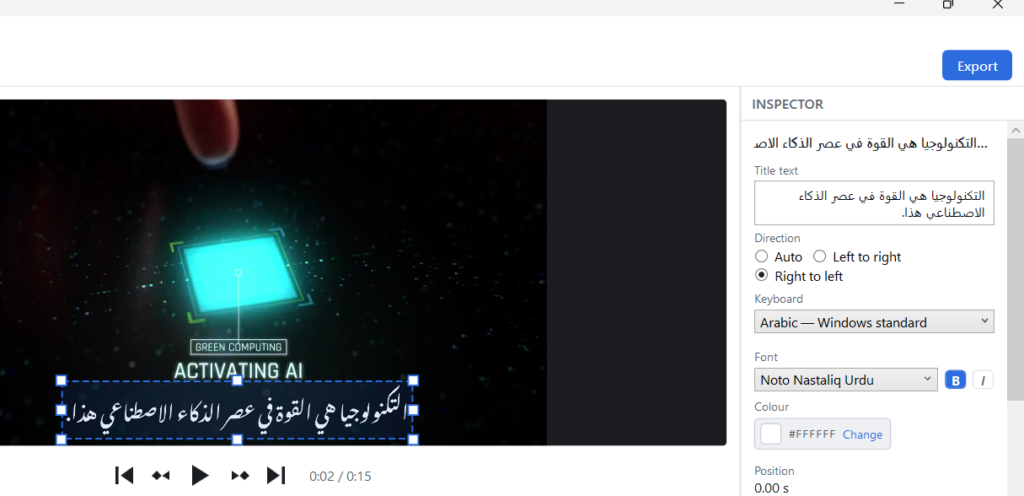
Add a text label and type Urdu or Arabic straight into the Title text box. Letters join, take their correct contextual forms, and read right-to-left — in the Inspector as you type, in the preview, and in the exported video. All three are drawn from the same rendered image, so they cannot disagree with one another.
Mixed text is handled too: Latin words and digits inside an Urdu sentence land where they belong, with no manual reordering.
There is one case no automatic rule can get right, and it has its own control. A title that opens with a Latin word but is mostly Urdu — “BackendStudio کا تعارف” — has to be read as left-to-right by any rule that looks at the first strong character, which puts the Urdu on the wrong side. The Direction control (Auto, Left to right, Right to left) lets you say so directly. Auto is correct nearly always; this is the exception it cannot see.
2. Pick a keyboard, in the panel where you are typing
A Keyboard dropdown sits in the Inspector right beside the title text — not buried in a menu, because switching script mid-sentence should not cost you a trip across the window. The same choice is on Tools ▸ Keyboard, and the two stay in step.
- Urdu — Windows standard and Arabic — Windows standard put the letters exactly where the real Windows drivers put them, so existing muscle memory transfers unchanged.
- Urdu — phonetic (CRULP) types by sound —
a→ ا,b→ ب,s→ س — with capitals giving the retroflex forms. The one to start with if you do not type Urdu daily. - Araabs sit on AltGr, plus wherever the source standard puts them on Shift.
No language pack, no administrator rights, and it works on a machine you do not own. Two things make it safe to leave on: while a keyboard is active its name shows beside the title box, so you always know why your keystrokes are producing what they are; and it affects the title box only — not the rest of the editor, and nothing at all outside the application. Turning it on cannot change how you type anywhere else.
3. Choose a face you can actually see
Start with the fact that decides this whole category: Windows ships no Nastaliq face at all. None. Nastaliq is the style most Urdu is genuinely written and set in, and a stock Windows machine cannot produce it — which is why so much Urdu on video ends up in Naskh by default, reading roughly the way a novelty font reads on a legal contract.
So BackendStudio brings its own: Noto Nastaliq Urdu and Amiri (Naskh), both under the SIL Open Font License, present from the moment you install it.
The font dropdown then does something small that matters more than it sounds: beside every font name it draws the same few words set in that face. For Latin fonts that is a convenience. For Arabic-script fonts it is the difference between working and guessing, because the name tells you nothing — not whether a face is Naskh or Nastaliq, not whether it covers Urdu’s ٹ, ڈ, ڑ and ے rather than only the Arabic letters it shares, not whether it survives at title size. You can switch the sample between Urdu, Arabic and English.
4. Add your own fonts, without installing them
If you have a calligraphic Arabic face or a particular Nastaliq you prefer, Tools ▸ Install Fonts takes font files you have already downloaded — .ttf, .otf or .ttc, several at once — and adds them to BackendStudio’s own font folder. They appear in the dropdown immediately, with no restart.
They are not installed into Windows. That means no administrator rights, nothing added to your system font list, and no change for any other application on the machine. Your fonts stay organised inside the app, and Open fonts folder shows you exactly where they live if you want to move them to another PC.
Four detours, zero
| The usual routine | What it looks like here |
|---|---|
| Add a Windows language pack | Pick a keyboard in the panel you are already typing in |
| Install fonts into the OS, restart | Nastaliq and Naskh already there; add your own with no restart, no admin rights |
| Paste through a converter website | Type it. It is correct as you type. |
| Guess a font from its name | See a real sample of your script beside every name |
Key takeaways
- None of the four usual detours are necessary. Language packs, system font installs, converter websites and restarts are workarounds for an application that does not shape and reorder text itself.
- Disconnected letters and backwards text are two different failures — missing shaping and missing reordering. Neither is fixable by changing font.
- A converter website costs you more than the detour. What comes back is no longer editable, searchable text, so every typo means doing the line again.
- Windows has no Nastaliq face, so an editor that does not bundle one cannot set Urdu in the style it is actually written in.
- A font sample beside each name is what turns an Arabic-script font list from guesswork into a choice.
- Keyboards that live in the app work on shared, lab and locked-down machines — and cannot change how you type anywhere else.
Stop paying a tax to write in your own language, and get back to the timeline.
BackendStudio — Record, Edit, and Title in Your Own Script
BackendStudio is a screen recorder and multi-track video editor for Windows — capture any display with system audio, microphone and webcam, cut it together on a timeline, add effects, transitions and privacy blur, and play it back in real time with no render to wait for. Titles work in Urdu and Arabic, properly joined and right-to-left, with Noto Nastaliq Urdu and Amiri in the box and three keyboards built in. Free to use, with a one-time Pro upgrade that removes the export watermark.
Leave a Reply