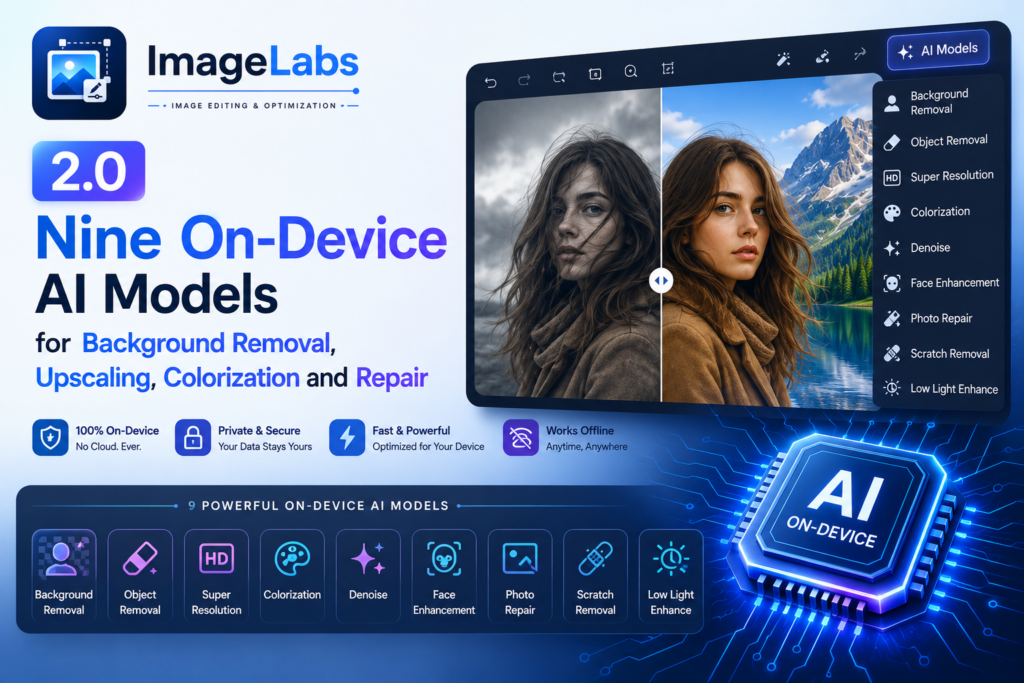
Version 1.0 of ImageLabs was a tidy, task-based Windows editor with one trick up its sleeve: an offline AI background remover. Version 2.0 is a different animal. It ships a managed library of nine on-device AI models covering background removal, click-to-select object editing, 4× super-resolution, photo colorization and scratch repair — and, true to the original promise, every last one of them runs on your own machine. No uploads, no accounts, no cloud round-trips. Here is the full tour.
Five models for background removal — and four things to do with the subject
Background removal is no longer a single button. ImageLabs 2.0 gives you a spectrum of open-source segmentation models so you can trade speed for quality as the job demands:
- U²-Netp — the fast, bundled model (4.7 MB). It works the instant you install the app, no download required.
- Silueta — a balanced middle ground (43 MB) when the tiny model isn’t quite clean enough.
- U²-Net — the best all-round quality (176 MB).
- U²-Net Human — tuned specifically for people and portraits (176 MB).
- ISNet — the sharpest, crispest cut-out edges (176 MB), ideal for hair and fine detail.
Once the subject is detected, the new Background task offers four modes instead of a plain cut-out:
| Mode | What it does |
|---|---|
| Remove | Cut the subject out to transparency. Add a sticker outline, a drop shadow, or trim tightly to the subject. |
| Blur | A portrait/bokeh look — subject sharp, background softly blurred. |
| Color pop | Keep the subject in colour while the background turns greyscale. |
| Replace | Drop the subject straight onto another photo. |
Because the AI mask is cached per image, the model runs once — after that first pass, switching between Remove, Blur, Color pop and Replace, or dragging any slider, re-composites instantly.
Click any object with MobileSAM
Auto-detection is great when there’s one obvious subject. When there isn’t, MobileSAM (43 MB) lets you simply click the exact object you want, and the app traces its true silhouette. That single capability powers three tasks: Background → Pick object (cut out or blur one specific thing among many), Crop → Select object (snap the crop box to what you clicked), and object-shaped Blur / Mosaic for redaction. No more wrestling a rectangle around an irregular shape.
Real-ESRGAN: 4× upscaling that actually looks sharp
Resize now has an enlargement engine choice. Pick Standard for an instant scale, or AI 4× (Real-ESRGAN) when you’re making something bigger and want it crisp — enlarging a small logo, a low-res product shot, or an old scan. The 67 MB model runs tiled and seam-free, keeps transparency intact, and then fits the result to your exact target size. It’s the difference between a soft, blocky enlargement and one that holds its edges.
ImageLabs 2.0 — An Offline AI Photo Studio for Windows
ImageLabs packs nine specialised AI models — background removal, click-to-select, 4× upscaling, colorization and scratch repair — into one focused Windows app, alongside crop, resize, watermark, OCR, redaction and batch. Every model runs entirely on your PC with GPU acceleration; no account, no cloud, nothing uploaded. Free to try on the Microsoft Store.
Restore old photos: DDColor and LaMa
A new RESTORE group brings two of the most satisfying AI tasks to the desktop:
- Colorize (DDColor) — add natural, realistic colour to a black-and-white or faded photo in one click. The original detail (luminance) is preserved at full resolution; only colour is generated. Crucially, it works on true greyscale files — scanned or exported pure B&W images — not just colour photos that happen to look grey. (935 MB model, downloaded on first use.)
- Repair / Scratch removal (LaMa) — paint over scratches, tears, creases or small unwanted objects with an adjustable brush, then press Repair. Only the painted areas are filled in; everything else is untouched, with undo-per-stroke and clear. (88 MB model.)
Together they make a genuine two-step photo restoration: colourise a heirloom print, then paint out the cracks and scratches.
Beyond the AI: a proper editor around it
The models sit inside a workspace that grew up in 2.0. The task rail is now grouped into EDIT / AI & COLOR / RESTORE / ANNOTATE / TOOLS, with an Overview screen offering Quick actions, live Image info, and a visible History of every edit. That history is what powers Batch: perfect one image (say crop → AI remove background → resize), then replay the exact chain — AI steps included — across a whole folder of product shots.
The everyday tools are all here too, and several are new:
- Extract Text (OCR) — read text out of an image fully offline, with a language picker, an editable box, Copy and Save .txt.
- Replace Color — detected colours become clickable swatches; recolour with a hex value or an eyedropper, including a Transparent plate that erases a colour.
- Blur / Mosaic for redacting faces, plates and addresses — by rectangle or by exact object shape.
- Add Text, Auto enhance, Compress / Convert with a live file-size estimate, and a Metadata viewer with a Strip-EXIF-on-save toggle.
Add Redo, keyboard shortcuts, clipboard paste/copy, hold-to-compare, a split Save button and a modern colour picker on every colour input, and the workflow finally matches the ambition of the AI.
The full model roster
| Model | What it powers | Size | License |
|---|---|---|---|
| U²-Netp (bundled) | Background removal — fast | 4.7 MB | Apache-2.0 |
| Silueta | Background removal — balanced | 43 MB | Apache-2.0 |
| U²-Net | Background removal — best quality | 176 MB | Apache-2.0 |
| U²-Net Human | Background removal — people | 176 MB | Apache-2.0 |
| ISNet | Background removal — sharpest edges | 176 MB | Apache-2.0 |
| MobileSAM | Click-to-select any object | 43 MB | MIT |
| Real-ESRGAN | AI 4× super-resolution | 67 MB | BSD-3-Clause |
| DDColor | Colorize B&W / faded photos | 935 MB | Apache-2.0 |
| LaMa | Repair / scratch removal (inpainting) | 88 MB | Apache-2.0 |
Every model is open-source, is integrity-verified (SHA-256) before it’s ever used, and runs with GPU acceleration and automatic CPU fallback. One is bundled; the rest download on demand the first time you use a feature that needs them — and an AI Models manager lets you download, delete, or import a model file on fully offline machines.
The part that hasn’t changed: it all stays on your PC
The headline of 2.0 is the AI, but the principle underneath it is the same one ImageLabs launched with. There is no server doing the heavy lifting. Every model — segmentation, upscaling, colorization, inpainting — runs locally, in memory, on your machine. The only time ImageLabs touches the network is the one-time, verified download of an optional model. Your photos never leave your computer, which is exactly how photo editing should work.
Key takeaways
- ImageLabs 2.0 ships nine on-device AI models: five background removers (U²-Netp, Silueta, U²-Net, U²-Net Human, ISNet), MobileSAM, Real-ESRGAN, DDColor and LaMa.
- The new Background task adds Blur, Color pop and Replace modes on top of Remove, with cached masks so mode changes are instant.
- MobileSAM lets you click the exact object to cut out, crop to, or redact; Real-ESRGAN adds sharp 4× upscaling.
- A new RESTORE group colourises old photos (DDColor) and paints out scratches (LaMa).
- OCR, redaction, batch, and a redesigned workspace round it out — and every model runs entirely on your PC, nothing uploaded.
ImageLabs 2.0 — An Offline AI Photo Studio for Windows
ImageLabs packs nine specialised AI models — background removal, click-to-select, 4× upscaling, colorization and scratch repair — into one focused Windows app, alongside crop, resize, watermark, OCR, redaction and batch. Every model runs entirely on your PC with GPU acceleration; no account, no cloud, nothing uploaded. Free to try on the Microsoft Store.
Leave a Reply