
ImageLabs – Offline AI Photo Editor for Windows
Open an image, apply one task at a time, save the result. ImageLabs is a focused editor for Windows powered by a library of twelve on-device AI models — remove, blur or replace backgrounds, hide or crop to faces, click to select any object, upscale 4×, colorize old photos, and paint out scratches — alongside the everyday tasks: crop, resize, rotate, adjust, watermark, redact, OCR and batch. Every model runs entirely on your machine — no account, no cloud, nothing leaves your PC.
Download Version 2.2.1
Available on the Microsoft Store — no subscription, no ads.
Or view the listing at apps.microsoft.com.
Twelve AI models — all on your device
ImageLabs turns your PC into an offline AI darkroom. Five background removers (fast to sharpest-edge), face detection for hiding, cropping and watermark placement, depth estimation for a portrait blur with no cut-out line, click-to-select any object, 4× super-resolution in separate photo and line-art engines, one-click colorization of black-and-white photos, and paint-to-fill scratch repair — every model runs locally with GPU acceleration and automatic CPU fallback, is open-source, and is integrity-verified before it's ever used. Two small models are bundled so the app works out of the box; the rest download on demand.
Changelog — what's new in each release
2.2 adds face tools (hide, crop to, watermark around), a depth-based portrait blur with no cut-out line, a second 4× enlarger for drawings, and a background blur that went from 69 seconds to about one.
View the full changelogUser Guide — every task explained
A plain-English walkthrough of every task, all twelve AI models, the model manager, save formats, keyboard shortcuts and tips — from a transparent cut-out to restoring an old photo.
Read the User GuideFeatures
🪄 AI Background Removal — 5 models
Automatic subject cut-out with five open-source models — from a fast bundled one to sharpest-edge and a people-tuned option. Remove, blur (portrait/bokeh), color pop, or replace the background with another photo. Blur can fall off by distance instead of around a cut-out, so there is no hard edge giving it away — and you choose which distance stays sharp. Add a sticker outline, drop shadow, or trim to subject.
🎯 Click-to-Select Any Object
Point at the exact thing you want and let the AI trace its true silhouette. Shift-click adds another part to the selection, right-click leaves one out. Powers Pick object in Background, Crop → Select object, and object-shaped blur / mosaic — no more rough rectangles.
🔍 AI 4× Upscaling — photo & line art
Enlarge small images, logos and old photos with AI super-resolution — noticeably sharper than a plain resize. Two engines: one trained on photographs, and one for anime and line art that keeps linework hard and fills clean instead of inventing texture in flat colour. Runs tiled and seam-free, keeps transparency, and fits your exact target size.
🎨 Colorize & Repair Old Photos
Colorize adds natural color to black-and-white or faded photos in one click. Repair / Scratch lets you paint over scratches, tears and blemishes, then fills them in — only the painted areas change, each reconstructed at full resolution so the fix matches the detail around it.
👥 Face Tools — Hide, Crop, Avoid
Find the people in a photo without sending it anywhere. Hide every face, or keep one and hide the rest — posting a picture of your own child at an event without exposing the other children in it. Crop to faces frames a portrait with the eyes on the upper third, re-measuring every photo in a folder. Watermarks can step around faces. Face detection is bundled — nothing to download — and every face count is shown, including none.
🔗 Chainable Edits, History & Batch
Each Apply stacks onto the last (crop → remove background → resize), with Undo / Redo and a visible History. Batch replays that whole chain — AI steps included — across a folder of images, scaling crops and text to each one, with a preview of the first result before you commit. If the chain hides or crops to faces, Batch checks the folder and warns you about photos with no face in them before it writes anything. Save the chain as a recipe and reuse it on another photo next week.
✂️ Crop, Resize, Adjust & Watermark
Interactive crop with corner handles and a live pixel readout, resize with keep-aspect and don't-enlarge, brightness / contrast / grayscale / sepia / blur / sharpen with Auto enhance, and a text watermark that can auto-avoid the subject — or just the faces, which on a portrait leaves the mark somewhere it can actually go.
🛡️ Redact, OCR & Metadata
Blur / Mosaic hides faces, plates and addresses — a rectangle, an exact object shape, every face at once, or keep one face and hide the rest. It always reports how many faces it found, including none. Extract Text (OCR) reads text offline with a language picker. View and strip EXIF metadata on save.
💾 Any Format, Fast Workflow & 100% Local
Save to PNG, JPEG, WebP, BMP, TIFF, GIF and multi-size ICO — or name a target file size and let ImageLabs find the highest quality that fits. Paste from the clipboard (Ctrl+V), keyboard shortcuts, hold-to-compare, split Save, light / dark theme — and every AI feature, including OCR, runs on your computer. Nothing leaves your PC.
Screenshots
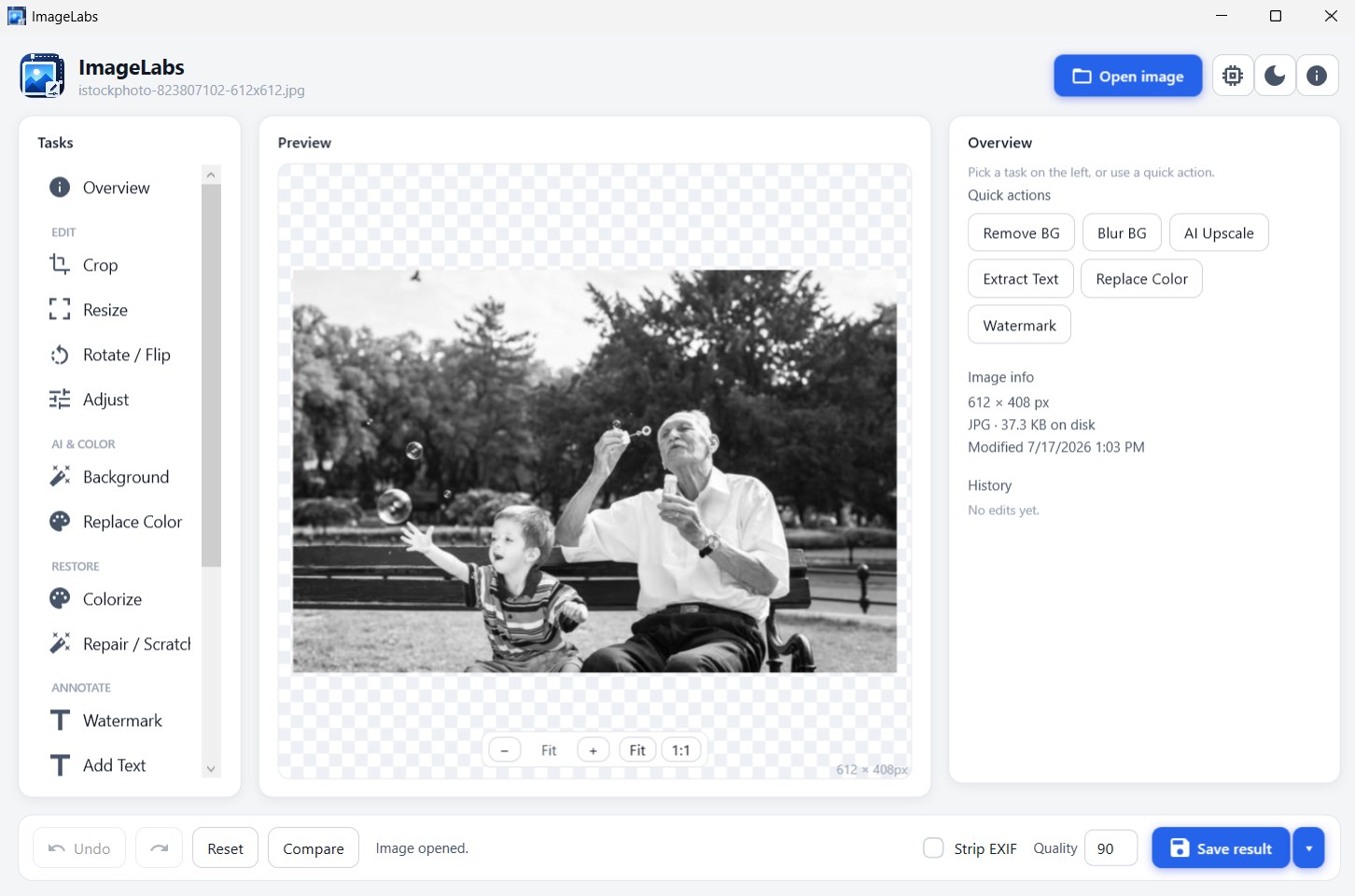
One Task at a Time — Pick It on the Left, Watch It in the Preview
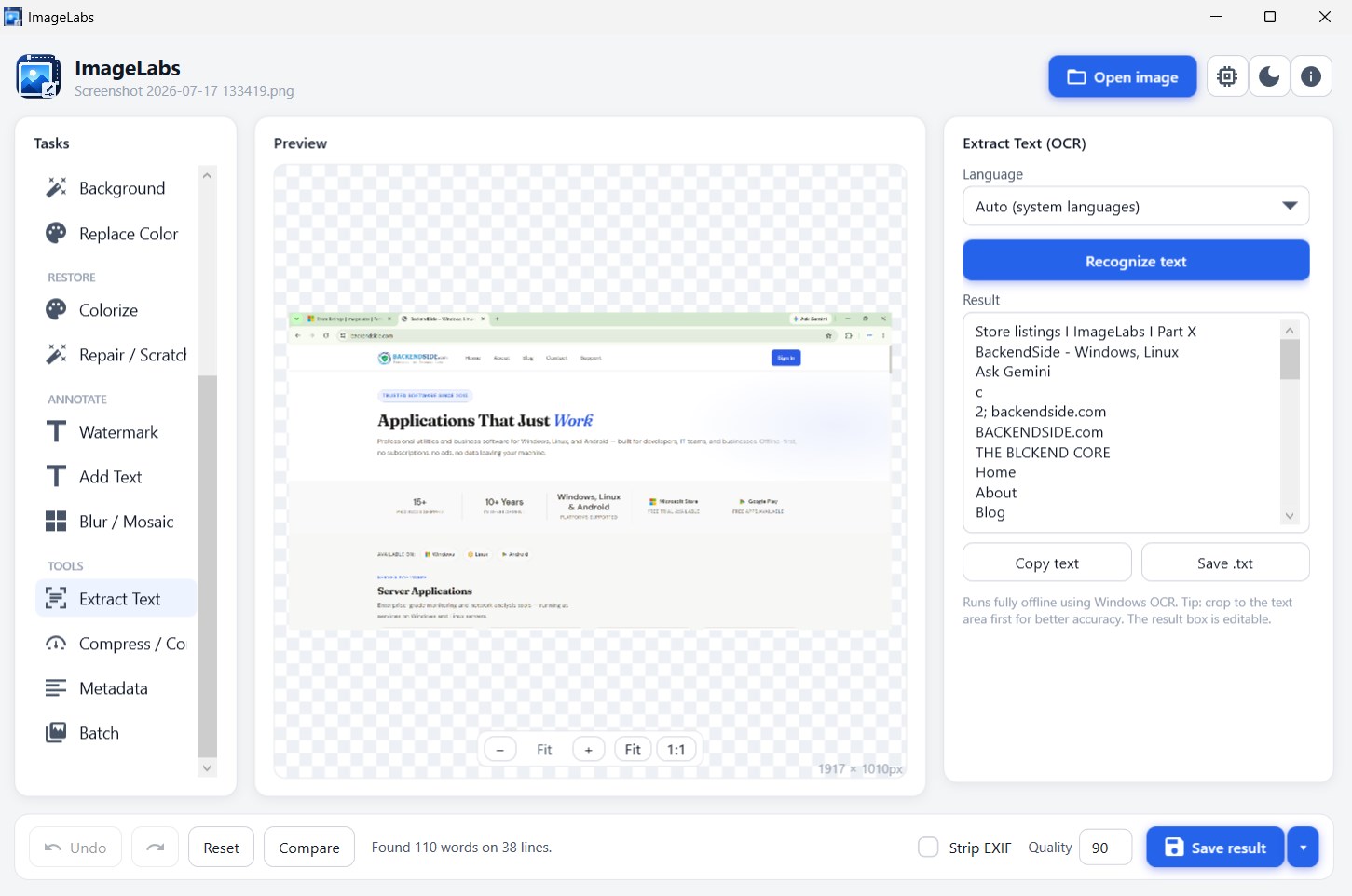
Extract Text — Pull the Words Out of an Image, Entirely Offline
Latest Release
Version 2.2.1 — September 2026
A packaging fix worth installing. On a computer that had never had developer tools on it, every AI feature failed to start — while the app itself ran normally and every ordinary edit worked. Four small system libraries the AI engine needs were missing from the 2.0, 2.1 and 2.2 packages; they are now in the box, and the same download simply works. Before it, 2.2 brought faces, depth, and a second AI enlarger — three new models, one of them bundled. Hide faces in Blur / Mosaic (all of them, or keep one and hide the rest), crop to faces, and watermarks that step around faces. Background blur can now fall off by distance rather than around a cut-out edge, with a focus plane you choose. Resize gains an AI 4× engine for anime and line art. Batch warns about photos with no face in them before it writes, the status line names the step it is on, and background blur dropped from 69 seconds to about one.