

Likhari – Nastaliq Word Processor for Urdu, Pashto, Arabic & Sindhi
Likhari is a word processor built specifically for Urdu, Pashto, Arabic and Sindhi — the complex, Nastaliq-style scripts most word processors treat as an afterthought. Type with phonetic (Roman→script) or positional on-screen keyboards, mix right-to-left and left-to-right text freely, justify Nastaliq with proper kashida letter-stretching, catch mistakes with built-in offline spell check, and lay out real documents with columns, tables, frames, shapes, images and paired verse-and-translation text. And what you see on screen is exactly what you get on export — page for page, table for table.
Download Likhari
Available on the Microsoft Store — free to use, with an optional one-time Likhari Pro unlock. No subscription, no ads.

Or view the listing at apps.microsoft.com.
Free to use — with a one-time Pro upgrade
The whole word processor is free — every language, keyboard, table, column, image and export feature is unlocked. The free tier marks the page itself: a faint “Free version of Likhari” watermark across the page on the diagonal, seen while you write as well as in exported and printed pages, plus a small “Created with Likhari” line along the bottom of exported files. A one-time Likhari Pro purchase removes both, on screen and in output alike. Pro is a one-time purchase, not a subscription. It is recognised however you came by it — bought inside Likhari, bought on the Microsoft Store website, redeemed from a gift or promotional code, or already bought on another PC you sign in on — and it keeps working when you are offline.
Changelog — what’s new in each release
Full release history — from the multilingual keyboards and kashida justification through frames, named styles and the complete table toolkit, to sections, page borders, in-place headers & footers, ruler guides, shapes, mid-page column bands, checklists and list formatting, offline spell check, paired text for verse-and-translation layouts, resizable inline images, decorative page and frame borders, ornamental bullets with colourable list markers, a Text effects panel for headings, and a welcome screen that starts you on the page size you want with chapter breaks onto right-hand pages.
View the full changelogUser Guide — every feature explained
A plain-English walkthrough of getting started and page sizes, keyboards & languages, typing Nastaliq, text effects, styles, lists & checklists (ornamental bullets included), tab stops, columns, frames, tables, images, shapes, page setup & page styles, chapter breaks onto right-hand pages, sections, ruler guides, find & replace, spell check, paired text, headers & footers, InPage import and export — and the keyboard shortcuts.
Read the User GuideFeatures
📄 Start on the Right Page Size
Likhari opens on a welcome screen rather than a blank sheet you didn’t choose. Pick A4, A5, B5, Letter or Legal, portrait or landscape — each card draws the paper to scale, so you can see the shape you’re choosing — and a new document opens at it. Custom size… takes you straight to Page Setup for anything else, and your recent documents sit beside the sizes, each with its folder and when you last saved it. Page Setup offers the same five sizes, so A5 and B5 — the sizes most Urdu books are set at — no longer mean typing the numbers in every time. Nothing is locked in: change the page size whenever you like.
🖋️ True Nastaliq for Four Scripts
Proper Nastaliq / complex-script rendering for Urdu, Pashto, Arabic and Sindhi — letters join and stack correctly with accurate dot placement, the way fine Urdu typesetting should look, rather than the flat fallback most word processors produce.
🗂️ Bring Your Own Fonts, See Them First
Every font picker draws each font, not just names it — a sample of real words beside the name, in the language your cursor is in, so you can tell a Nastaliq face from a Naskh before you pick it. Tools → Install Fonts adds your own .ttf, .otf or .ttc files to the pickers — no administrator rights, and nothing changes for your other programs. They’re available immediately and every time you start Likhari; a font of yours wins over a Windows font of the same name.
⌨️ Thirteen Keyboard Layouts
Type your language with a built-in phonetic (Roman→script) keyboard or a positional layout for Urdu, Pashto, Sindhi, Farsi/Persian, Arabic, Punjabi (Shahmukhi), Saraiki or Balochi — plus real Windows-standard layouts matching Windows’ own built-in Urdu, Pashto and Persian keyboards (two distinct Persian ones, since they genuinely disagree on the digit row) — each with a live on-screen key preview. Prefer your own OS input method? Choose “Direct”, or force plain “English” regardless of what Windows is set to. A left-hand panel and Ctrl+Space flip between your OS keyboard and your chosen layout without leaving the page — handy for an English name in the middle of an Urdu line.
↔️ Mixed RTL/LTR & Kashida
Mix right-to-left Urdu/Arabic with left-to-right English and numbers on the same line and it all sits the right way round. Justify Nastaliq paragraphs with authentic kashida (kasheeda) letter-stretching instead of ugly word gaps.
🗞️ Columns, Including Mid-Page
Lay out pages in newspaper-style columns with a configurable gutter. Text fills the first column top to bottom, then flows into the next — ideal for newsletters, bulletins and articles. Apply to decides how far a column change reaches: the whole section, just the selected text (the previous count resumes right after it), or from the cursor on — so a single page can carry a masthead or an introduction at the top and a multi-column story below, with no section break needed.
📊 A Complete Table Toolkit
Insert tables inline or floating with text wrap. Insert and delete rows and columns, merge and split cells, set per-cell borders and background fills, relative column widths and minimum row heights — and a tall table splits cleanly across pages. A floating table can be dragged, resized and turned on its side, just like a floating image. A cell takes full paragraph formatting — alignment, indents, line spacing, lists, tab stops and named styles, not just bold and colour — carries its own font, and sits top, middle or bottom of its row. A contextual toolbar gathers the table actions when your cursor is in a cell.
🖼️ Images, Inline & Floating
Place images inline as their own centered block that moves with your edits, or floating with text wrapping around the left or right side. Click either one and drag its handles to resize it — an inline image resizes symmetrically about its centre since its top follows the surrounding text, a floating one keeps its proportions from a corner or stretches one side from an edge. Cut a picture to a shape — oval, triangle, diamond, pentagon, hexagon, star or arch — and a floating picture can wrap to that shape instead of a plain square edge, with its own Distance from text. Images are embedded in the document, so a .lkhdoc file is fully self-contained.
🖼️ Frames — Pull Quotes & Sidebars
Draw an empty frame anywhere on the page and type straight into it, or box paragraphs you already have — a pull quote, a notice, a sidebar — while the rest of the text wraps around. Give the box a border of its own — solid, dashed, dotted or double with a width and colour, or a decorative ornament from the same gallery the page border uses — that prints and exports. The text inside moves in to clear the ornament and the frame grows to keep its words, so nothing is written over. Drag the border to move it and its handles to resize it; the text inside stays ordinary document text you can type, format, style and search. Remove the frame and the paragraphs simply rejoin the flow.
◻️ Shapes on the Page
Draw lines, rectangles (square or round-cornered), ovals, triangles, diamonds, pentagons, hexagons, stars and arches straight onto the page — the drag is the insertion, with no dialog first, and the outline you drag shows the shape itself. They are the same shapes a picture can be cut to, so a star you draw and a picture cut to a star match exactly. Dedicated Vertical Line and Square tools always come out constrained; Shift constrains the general ones. Set each shape’s border, fill, corner radius and whether it sits in front of the text or behind it. A shape floats freely and never reflows your writing, so a box can frame a paragraph or a rule can cross a heading.
🔠 Named Styles & Paragraph Control
Capture a paragraph’s look as a named style and redefine it once to restyle every paragraph that uses it. A style can name the style that follows it — so alternating paragraphs, like a verse and its translation, style themselves — its own keyboard layout, switched to automatically as the cursor moves in, and an outline level that marks it as a heading for the Table of Contents and Navigator. Save your styles as this computer’s defaults for every new document. Add tab stops with leader characters (dot, dash or underscore), draggable ruler indents, paragraph rules above and below (solid/dashed/dotted/double) and a paragraph background — a flat colour or a picture — with a width of its own, so a rule can hug the text over a fill that runs the full measure. Pagination control (keep together, keep with next, widow/orphan, and a break before that can start a column, a page, or the next odd or even page for chapter openings) rounds it out for serious documents.
☑️ Lists — Bulleted, Numbered & Checklists
Three kinds of list — bulleted, numbered and checklists — nesting up to nine levels deep, with Tab and Shift+Tab to move an item in and out. Click straight on a checkbox in the text to tick it off without losing your place, or press Ctrl+K. Pick a bullet shape — disc, ring, square, diamond, triangle or dash — or let it cycle as you nest deeper — or swap the dot for one of thirty decorative ornaments (Classic, Floral, Geometric and Manuscript), each previewed at the size your own text will give it. Markers take a colour of their own, whether they are an ornament, a plain bullet, a checklist box or the digits of a numbered item. Number items as 1, 2, 3 (Urdu digits ۱، ۲، ۳ automatically in right-to-left text), a, b, c, i, ii, iii, the traditional abjad sequence, or compound outline numbers like 1.2.1, with a custom start number and “restart here” for any level. Everything is on a Lists tab in the Paragraph dialog and the tool panel, or one click from the quick-pick arrows beside the list buttons. Bullets and checkboxes are drawn shapes, not typed characters, so they come out right in Nastaliq and every other face.
📑 Table of Contents & Navigator
Insert → Table of Contents builds one automatically from your headings, indented by level, with a choice of leader before each page number — dots, dashes, an underline or none — and whether to show page numbers at all. Re-running it keeps its settings. A collapsible Navigator panel on the left sidebar shows your whole document as an outline of sections and headings, with page numbers — click any row to jump straight there, and it rebuilds itself as you write.
ٰ Araabs & Diacritics
An Araabs palette lists every tashkeel/diacritic mark Likhari knows — core marks, rarer extended marks and honorific ligatures like ﷺ — as one-click buttons, usable in body text, table cells or header/footer bands. The Phonetic keyboard types many of them directly with Shift+key, matching the real CRULP Urdu Phonetic keyboard, and AltGr shortcuts reach the rarer marks and honorifics on every Urdu/Perso-Arabic layout.
✅ Offline Spell Check
Red wavy underlines catch misspellings as you type — Urdu, Arabic and Persian via built-in dictionaries, English via Windows’ own checker — entirely on your machine, nothing uploaded. Right-click a squiggled word for suggestions, or to add it to your dictionary or ignore it — and now, since Right-click → Set Language works on any text, not just words already flagged, you can fix a wrongly-checked passage before it ever gets underlined. A Spell-Check language panel, alongside Tools → Spell Check Languages, shows exactly which dictionary is checking your cursor’s text and why — following the document’s own language, or set on purpose and no longer following it — so quoted Arabic verse inside Urdu prose isn’t flagged as misspelled Urdu. New installs start with Urdu and English checked, Arabic and Persian off, all four adjustable any time. Reaches table cells and header/footer bands too, and never appears in a PDF or PNG export.
📖 Paired Text — Verse & Translation
Insert → Paired Text pairs lines one above another, line for line — a Quranic verse with its tarjuma, a hadith with its translation, a Persian couplet with an Urdu rendering. Choose 2, 3 or 4 tracks; each is ordinary text with its own cursor, wraps on its own, and Undo walks back across every track you touched. Give each track its own named style (font, size, even keyboard layout switch automatically), and Dissolve turns a block back into plain paragraphs any time, losing nothing but the pairing.
📂 Open Your InPage Files
Open your old InPage (.inp) documents with their layout intact — the fonts each run was written in, text and cell colours, tables with their real column widths, borders, fills and merged cells, embedded pictures, page size and margins, and the running header and footer. The most faithful InPage import we’ve shipped.
🔍 Zoom, Rulers & Guides
Zoom the page from 25% to 400% without changing the document. Rulers show your margins, draggable indent markers and the current paragraph’s tab stops. Drag a non-printing ruler guide off either ruler to line things up — pictures, tables and resize handles snap to it, to the margins and to the page’s own centre line. A left tool-windows panel holds Find / Replace, Keyboard layouts and a live document readout; a right tool-palettes panel gives one-click icons for tables, formatting and inserting. Both remember how you left them between sessions.
📖 Built for Long Documents
Typing stays fast however long the document gets — a keystroke in a 36-page document costs a fraction of what it once did, and justified Nastaliq with kashida benefits most of all. Move around with a proper scrollbar, the Page Up / Page Down keys, or the ◀ ▶ arrows beside the page number, which move the cursor to that page so you can carry on typing where you land. Click or drag in the selection bar — the margin on the side your lines start from — to select whole lines at a time.
🔤 Per-Character Typography
Apply bold, italic, underline, colour, font and size to exactly the text you select, plus decorations (double underline, overline, outlined glyphs) and fine control over letter spacing, horizontal scale and baseline shift. One colour picker is used everywhere — a saturation/brightness plate, hue strip, R/G/B spinners, hex box, 40-colour palette and a row of your recently-used colours. Cut, copy and paste keep all of it, even between open tabs. Saved with the document and reproduced faithfully on export.
✨ Text Effects for Headings
A Text effects panel decorates selected text with an outline, a glow, a drop or long shadow, an inner shadow, and a bevel or emboss — over a solid, gradient or chrome fill, any of them on at once. Start from the row of twelve live preset samples, then open a group and set its colours and sliders with the text updating as you drag, and save your own preset beside the built-in ones. Every value is a fraction of the font size rather than a measurement in points, so one preset looks right on a 12pt line and a 72pt title without a second version of it. Meant for headings and display text: decorated text is slower to redraw, so Likhari asks before decorating more than five lines at once.
📄 Headers, Footers & Page Numbers
Headers and footers are typed and formatted right on the page — double-click into the band and bold, italic, colour and size it like any other text — and can carry a letterhead, logo or ornament picture of their own. Page numbers get their own font, size and colour, in Urdu (۱ ۲ ۳), Arabic, Roman or Latin numerals, in the header or footer, left, centred or right — the number alone or “page X of Y”. File → Page Styles sets it all per set of pages: every page, the first page alone, left/right pages separately, or one section on its own.
🖼️ Page Borders, Mirror Margins & Sections
Add a ruled, ornamental or picture page border. Pick an ornament from a gallery of fifty-three border arts — Classic, Floral, Geometric, Manuscript and Rules — with a live preview, a thickness and a colour, and the writing moves in to clear it by itself; the ornament sits alongside the plain line rather than replacing it. Measure the border from the paper’s edge or from the text, so it can either stay pinned to the sheet or follow your margins. Or use a picture: Likhari finds the clear space in the middle of an ornamental Urdu/Islamic border automatically and moves your writing in to fit. Any of them on every page, the first page only, or all but the first. Turn on Mirror Margins for a bound book so the wider margin always falls at the spine — and set a chapter heading’s Break before to Odd page (right-hand) so every chapter opens on a right-hand page the way a printed book does, Likhari leaving a blank page (header, footer and page number intact) whenever one is needed. Choose Portrait or Landscape, give the page a background of a flat colour or a full-page picture, and split a long document into independent Sections — each with its own paper size, orientation, margins, header, footer, border and background, reopened any time from File → Section Setup.
🖨️ WYSIWYG PDF & PNG Export
Export to PDF and PNG that match the screen exactly — columns, tables, inline and floating images, per-character formatting, and header/footer bands with page numbers all render page-for-page as you laid them out. No surprises when you print or share.
🔍 Find & Replace, Recent Files
A non-modal Find & Replace with match-case, Replace and Replace All, and an Open Recent list of your last documents so you can jump straight back into your work.
💾 Autosave & Crash Recovery
Closing a document with unsaved changes prompts you to save rather than silently discarding, and open documents are snapshotted periodically — so after an unexpected close, Likhari offers to recover your unsaved work.
🔒 Private by Design
Likhari works entirely offline — no account, no sign-in, no telemetry or analytics. Your documents are saved only where you choose and never leave your device.
Screenshots
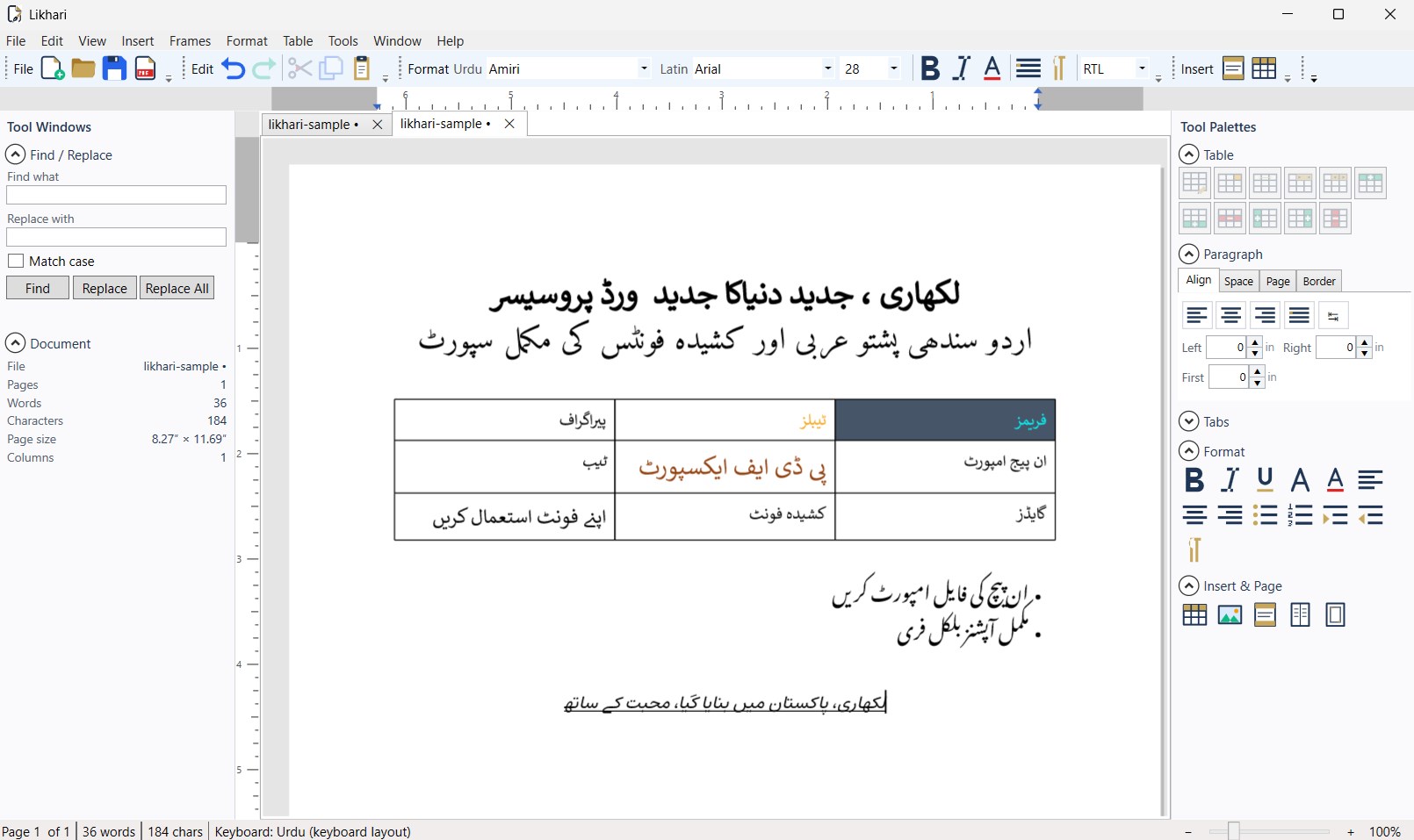
The editor — Nastaliq text, tables and lists, with the tool windows and tool palettes docked either side
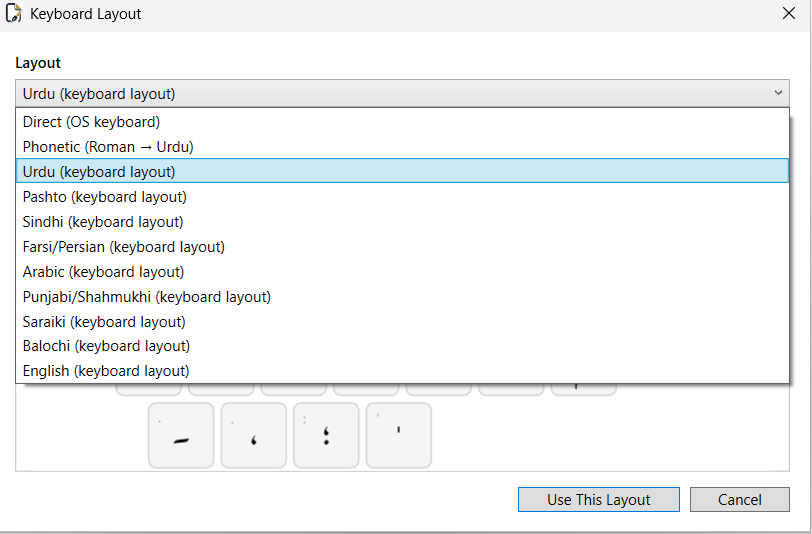
Choosing a keyboard — nine phonetic and positional layouts, with a live on-screen preview
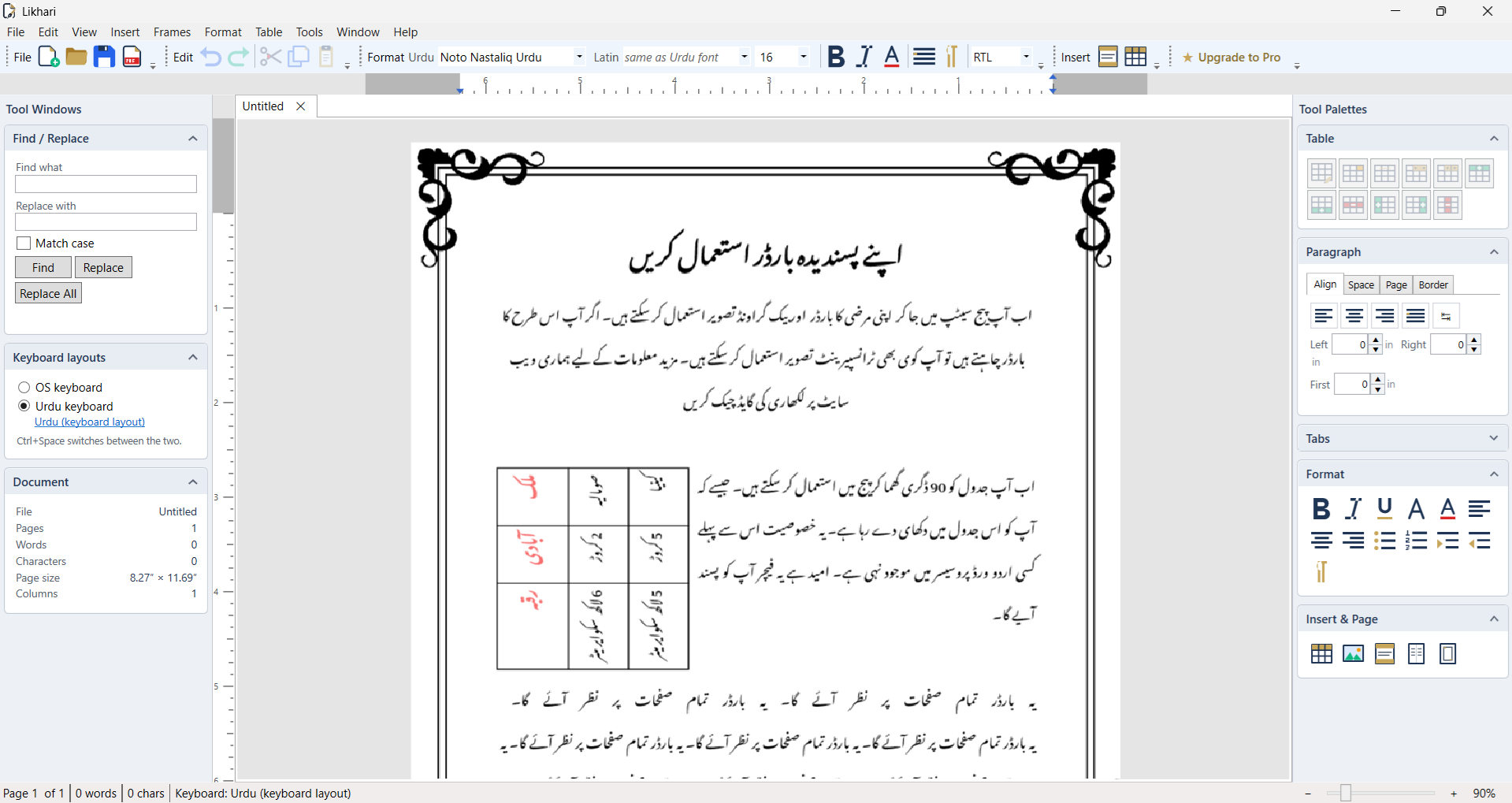
A decorative page border framing an Urdu document, with the Keyboard layouts panel and tool palettes docked either side
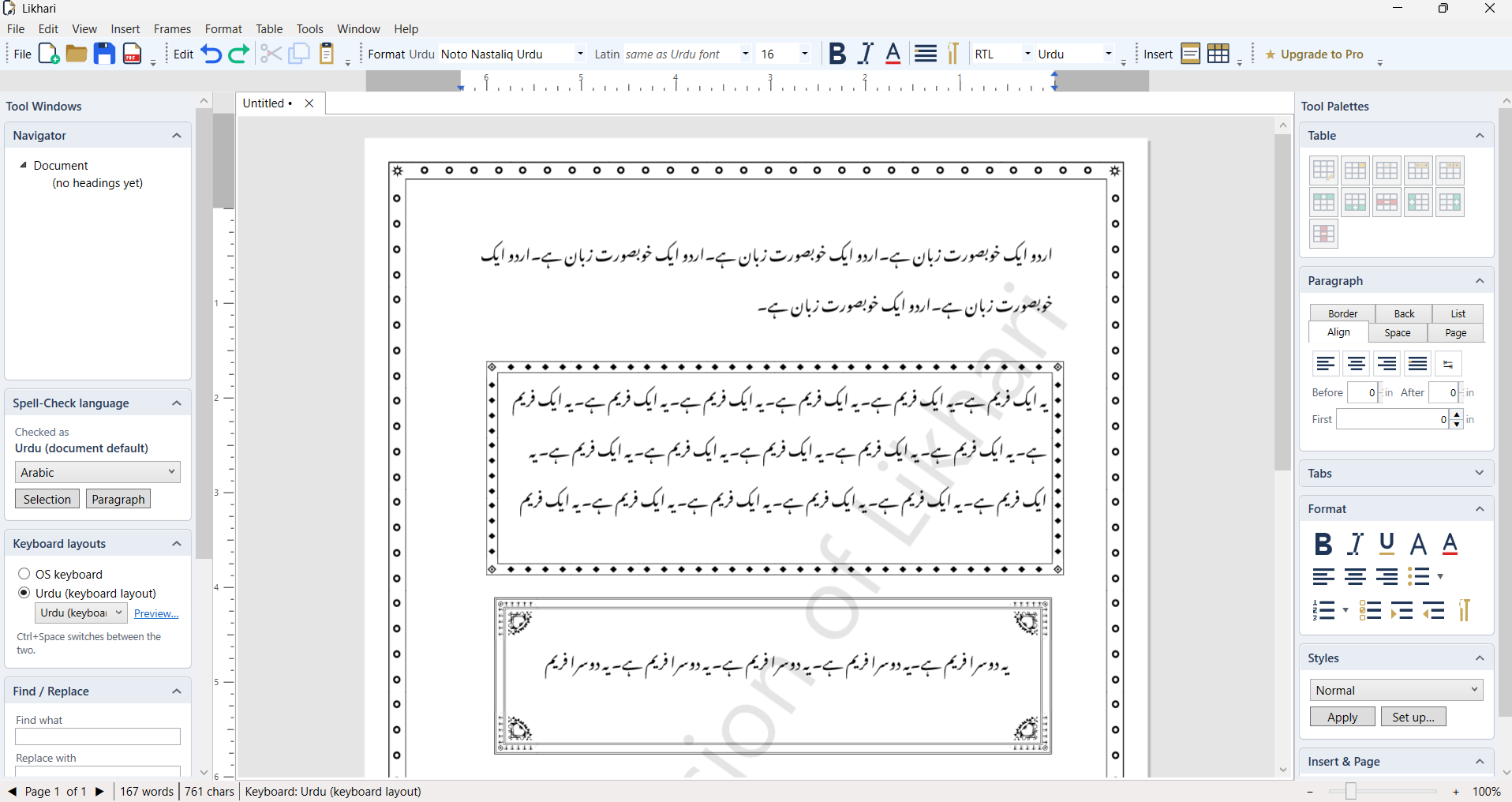
Ornamental borders on the page and on the frames inside it — the writing moves in to clear each one by itself
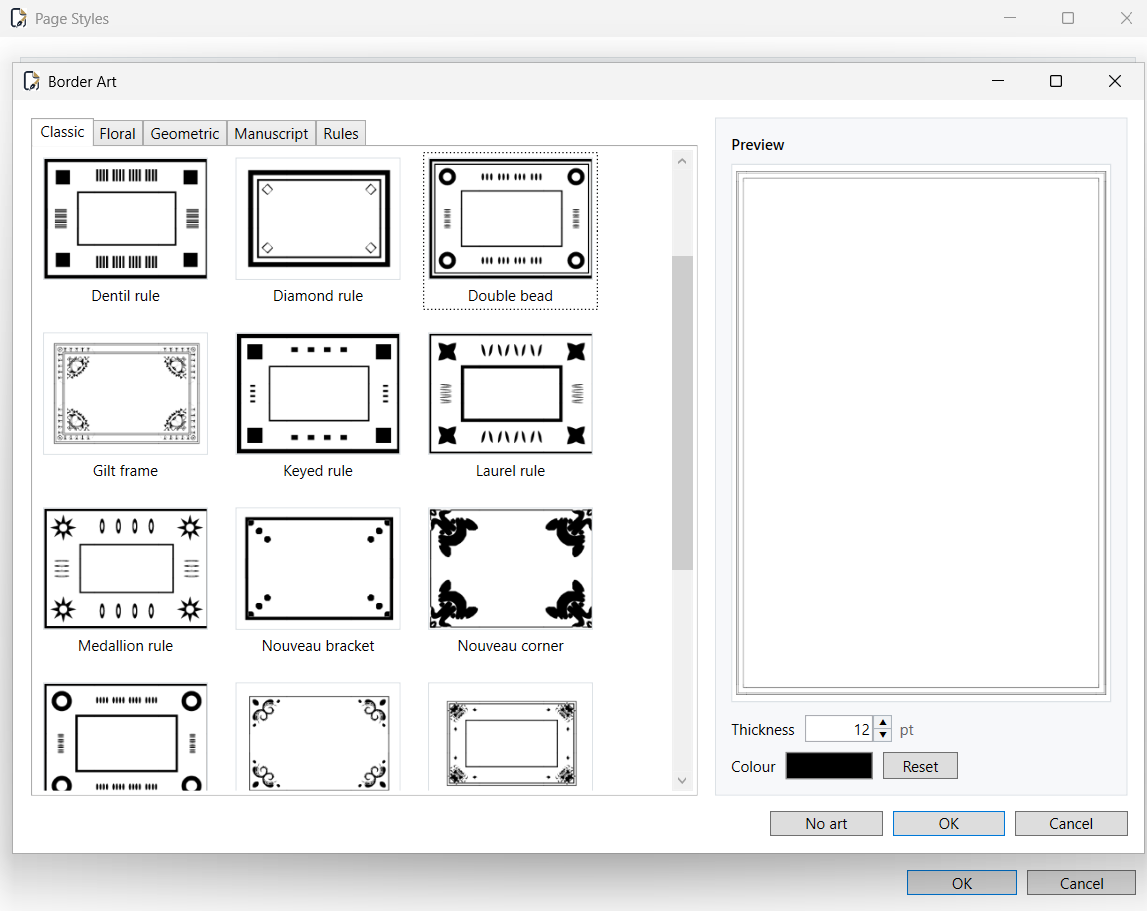
The Border Art gallery — fifty-three ornaments in five families, with a live preview, thickness and colour

Built for Urdu, Arabic, Pashto, Sindhi and more — RTL typing, multi-script composition and keyboard tools
Latest Release
Version 2.18 — October 2026
An on-screen keyboard and a dark theme. A new keyboard button on the toolbar opens a keyboard docked under the page that follows your current layout, the way a phone keyboard does — letters first, then digits and punctuation, the rest of the symbols, and a diacritics page with every araab — and it types into body text, table cells, headers and footers alike. View → Theme → Dark turns everything around the page mid-grey while the page itself stays white, so what you see is still what prints. This release also stops the view jumping to the end of the page while typing in paired text.
2.17.1–2.17.3 are three fix releases on top of 2.17. Likhari Pro is recognised however you bought it — a gift or promotional code, the Store website, or a purchase you made on another PC — and a Likhari that cannot reach the Store no longer takes Pro away, so working offline never brings the free-version mark back; and two frame faults are gone: inserting a frame no longer makes a picture, table or paired-text block below it vanish, and text beside a frame no longer runs off the page once a line uses a larger font.
In 2.17: a welcome screen. Likhari now opens on a page you can start from: pick A4, A5, B5, Letter or Legal, portrait or landscape — each card drawing the paper to scale — and a new document opens at that size, with your recent documents beside them. Page Setup offers the same five sizes, so A5 and B5, the sizes most Urdu books are set at, no longer mean typing the numbers in by hand. A chapter can now always open on a right-hand page: set Break before to Odd page on its heading and Likhari leaves a blank page when it needs to, mirror margins and all. And there are six more shapes to draw — triangle, diamond, pentagon, hexagon, star and arch. This release also fixes a run of layout faults around floating pictures and tables moved off the margin, rulers at any zoom other than 100%, and headings inside floating tables missing from the Table of Contents.