
PublishingDesk – Multilingual Desktop Publishing for Windows
Design flyers, posters, books, newsletters and social-media graphics — with first-class support for Urdu, Arabic, Persian and Pashto. PublishingDesk typesets proper Nastaliq with correct letter-joining and dot placement — the kind of complex-script shaping ordinary word processors can’t do — and lets you mix right-to-left Urdu/Arabic with left-to-right English and numbers on the same line. Lay it all out with tables you can type straight into, document layers, facing-page spreads, master pages and multi-page documents, pair verse with translation in Row Layout, open your existing InPage (.inp) and InDesign (.idml) files as editable layouts, then export to print-ready PDF.
Download PublishingDesk
Available on the Microsoft Store — free to use, with a one-time Pro upgrade for print-ready output. No subscription, no ads.
Or view the listing at apps.microsoft.com.
Free to use — with a one-time Pro upgrade
The whole designer is free — Urdu/English text, kashida, images, shapes, master pages, autoflow and your own fonts, plus PNG and PDF export (with a small watermark). A one-time Pro upgrade removes the watermark and unlocks PDF for Print (bleed + crop marks), SVG export and Preflight. Pro is a one-time purchase, not a subscription.
Changelog — what’s new in each release
Full release history — fifty-three decorative border ornaments for pages and text frames, live font previews, fourteen keyboard layouts, ruled page borders, text & paragraph backgrounds, the multilingual designer, in-canvas tables, document layers, facing-page spreads, Row Layout, master pages, InPage (.inp) and InDesign (.idml) import, and the freemium Pro features.
View the full changelogUser Guide — every section explained
A plain-English walkthrough of documents, pages, facing-page spreads, master pages, border ornaments, layers, tables, English and Urdu text, kashida, Row Layout, styles, effects, opening InPage and InDesign files, find & replace, exporting, fonts — and the keyboard shortcuts.
Read the User GuideFeatures
🖋️ True Nastaliq Typesetting
Proper Nastaliq shaping for Urdu, Arabic, Persian and Pashto — letters join correctly with accurate dot placement, the way fine Urdu typesetting should look. Fourteen built-in keyboard layouts let every language type in its own script — Urdu, Persian and Pashto each in multiple flavours, plus Arabic, Sindhi, Punjabi/Shahmukhi, Saraiki and Balochi — switchable from a dropdown on the format bar or Ctrl+Space, and an araab palette (or AltGr shortcuts, for typing marks directly) puts every diacritic — zabar, zer, pesh, tashdeed and more — one click or keystroke away.
↔️ Kashida (Kasheeda) Justification
Justified Urdu/Arabic lines fill the column by elongating the script’s connecting strokes (tatweel) — not by opening ugly word gaps. It engages on fonts with a real tatweel glyph (e.g. Amiri, Scheherazade, or a kasheeda Nastaliq font you add); other fonts fall back to clean word-spacing.
🔤 Mixed Right-to-Left & Left-to-Right
Put English words and numbers inside a right-to-left Urdu/Arabic line and they sit the right way round automatically. English and Urdu now share one text frame — threading, columns, drop caps, styles, tables and every other tool works the same in both, and a frame’s language can be switched at any time.
🗂️ Layers, Master Pages & Facing-Page Spreads
Stack text, shape and image layers with a Layers panel (lock, show/hide, drag-to-reorder, full z-order), plus document-wide layers so a master’s furniture can sit above or below your own content. Turn on facing pages for spreads with mirrored inside/outside margins, and design repeating headers/footers/page-numbers once on a master page.
🎯 Precise Direct Manipulation
Drag to move, resize with rotation-aware handles, and spin with an on-canvas rotate handle (hold Shift to snap to 15°). Smart guides, snapping, grid, rulers (px/mm/cm/in), and align & distribute keep everything tidy. An advanced colour picker and named, editable swatches with tints keep every fill, stroke and text colour consistent — change a swatch once and everything using it updates.
✨ Composable Text Effects & Backgrounds
Stack outline, glow, shadow, inner-shadow, bevel and fill (solid, gradient or chrome) on both English and Urdu frames, plus bold, italic, underline and strikethrough that show their real state under the caret. Give selected words a text background colour like a highlighter, or fill a whole paragraph background — full measure or hugging just the text — both linkable to a named swatch. Pick from a live text-effect preset gallery or save your own — per-layer opacity is honoured on canvas and in every export.
📄 Templates, Import & Autoflow
Start from a template gallery — paper sizes, social-media presets, print formats, or custom dimensions. Import text and autoflow it across as many pages as it needs, threading the layout through each copy, and import SVG as editable vector shapes you can recolour — fill, stroke and stroke thickness — like anything you drew yourself.
📂 Open Your InPage Files
Open your old InPage (.inp) documents as a real, editable layout — pages, master pages and every frame with its position, border and background; linked text that flows box to box; per-word formatting; tables with merged cells; pictures; rules and guides. Files from InPage 2.21 through 2024 are supported, and import is one-way so your original is never touched.
📐 Open Your InDesign Files
Open InDesign (.idml) documents — the files InDesign exports and template packs ship — as an editable layout. Every page of every spread comes across: master spreads as master pages, text frames with position, rotation and columns, stories that flow frame to frame the way they were linked, paragraph and character styles, tables, shapes, lines, colours and placed images cropped by their frame. Fonts packaged beside the file load automatically, and import is one-way so your original is never touched.
📊 Tables You Can Type Straight Into
Click directly into a table cell and get a real caret — in the real typeface, Nastaliq included — with bold/italic/underline/strikethrough, font, size, colour and alignment on any selection, Tab between cells, and Escape to step back out. Merge cells across a row, and set row heights, column widths, cell backgrounds and vertical alignment. Let a table float with the body text wrapping around it, just like a wrap image. Turn paragraphs into bulleted or numbered lists that count per level and nest, with numbers in Urdu digits (۱، ۲، ۳) in right-to-left text.
📖 Row Layout — Verse with Translation
Stack two or three independently-typed lines in every row — a Quranic verse above its tarjuma, a hadith above its translation, Persian poetry above an Urdu rendering. Each track keeps its own language, font, size and alignment; if a row won’t fit, every track breaks together, so the pairing can never drift apart across a page.
🖌️ Named Styles, Story Editor & Regex Find
Create named paragraph and character styles with a based-on chain, plus keep-with-next, keep-lines-together and widow/orphan control — edit a style once and every paragraph using it updates. The Story Editor shows a frame’s whole story as a continuous galley, and Find & Replace now has a regex option for pattern-based search.
🖼️ Pictures That Fit the Shape, Borders That Draw Themselves
Clip a photo to a circle, oval, arch, star or any other shape instead of a rectangle, and let text hug the curve with Contour Wrap rather than pushing away in a straight-edged box. Anchor a wrap image to its paragraph so it travels with the copy it illustrates, and place a decorative page border — ornamental art idiomatic to Urdu and Islamic publishing — with margins set automatically to its clear centre, mirrorable on facing pages. Insert → Page Border Line draws a plain ruled border instead — solid, dashed, dotted or double — with the page-fit arithmetic done for you.
🪩 Fifty-Three Decorative Border Ornaments
A library of fifty-three ornamental borders ships with the app — Classic, Floral, Geometric, Manuscript and Rules — the ornamental frames common to Urdu and Islamic publishing, alongside classical bands and plain rules. Frame a page with Insert → Page Border Ornament, or a text frame from the Ornament button in its properties panel; one picker serves both, with a gallery by category, a live preview on a scale model of the page, a thickness in your own units and a colour for the single-colour designs. A page ornament is a property of the page, not an object dropped onto it — it can’t be nudged, picked up in front of your text or deleted by accident — and setting one on a master frames every page that uses it. Round a frame, the text moves in to clear the ornament by itself. Thickness alone sets the size: corners never stretch and edges repeat, so the same ornament is the same weight on A4 as round a small frame. It all reaches PDF, PNG, SVG and the printer exactly as it looks on screen.
🔠 Typographic Polish
Drop caps, hyphenation and optical margin alignment for English text, alongside kashida for Urdu/Arabic. Baseline-grid snap, first-baseline offset, vertical justify, balanced columns and column span give every frame the fine control a real page layout needs.
🔍 Find & Replace Everywhere
Search and replace across all text frames — Urdu and English, with an optional regex mode for pattern-based search. Type Urdu via the in-app keyboard, or toggle it off to find embedded English; matches highlight right in their frames.
🖨️ Export & Print
Export to PNG and vector PDF (Urdu shaping preserved as crisp outlines), and — with Pro — SVG, print-ready PDF with bleed and crop marks, and a Preflight check. Print the current page or a range straight from the app.
🔠 Bring Your Own Fonts, See Them First
Every font in the picker draws a live sample of real text beside its name, in the language of the frame you’re working in and shaped by the same engine that sets your page — so a Nastaliq face shows properly joined Nastaliq before you pick it, and a second column shows how it handles English. Ships with a curated set of free Nastaliq/Arabic fonts (Noto Nastaliq Urdu, Gulzar, Amiri, Scheherazade and more) and uses your installed system fonts too. Drop in any .ttf/.otf — including popular Nastaliq fonts like Jameel Noori — and it appears in the picker.
💾 Autosave & Crash Recovery
Your work is saved to a self-contained .pubdesk file (images embedded), with coalesced undo/redo across every kind of edit. Periodic autosave and crash recovery mean an unexpected close won’t cost you your layout.
🔒 Private by Design
PublishingDesk works entirely offline — no account, no telemetry, nothing leaving your device. Light and dark themes, per-document zoom and remembered window placement round out the everyday polish.
Screenshots
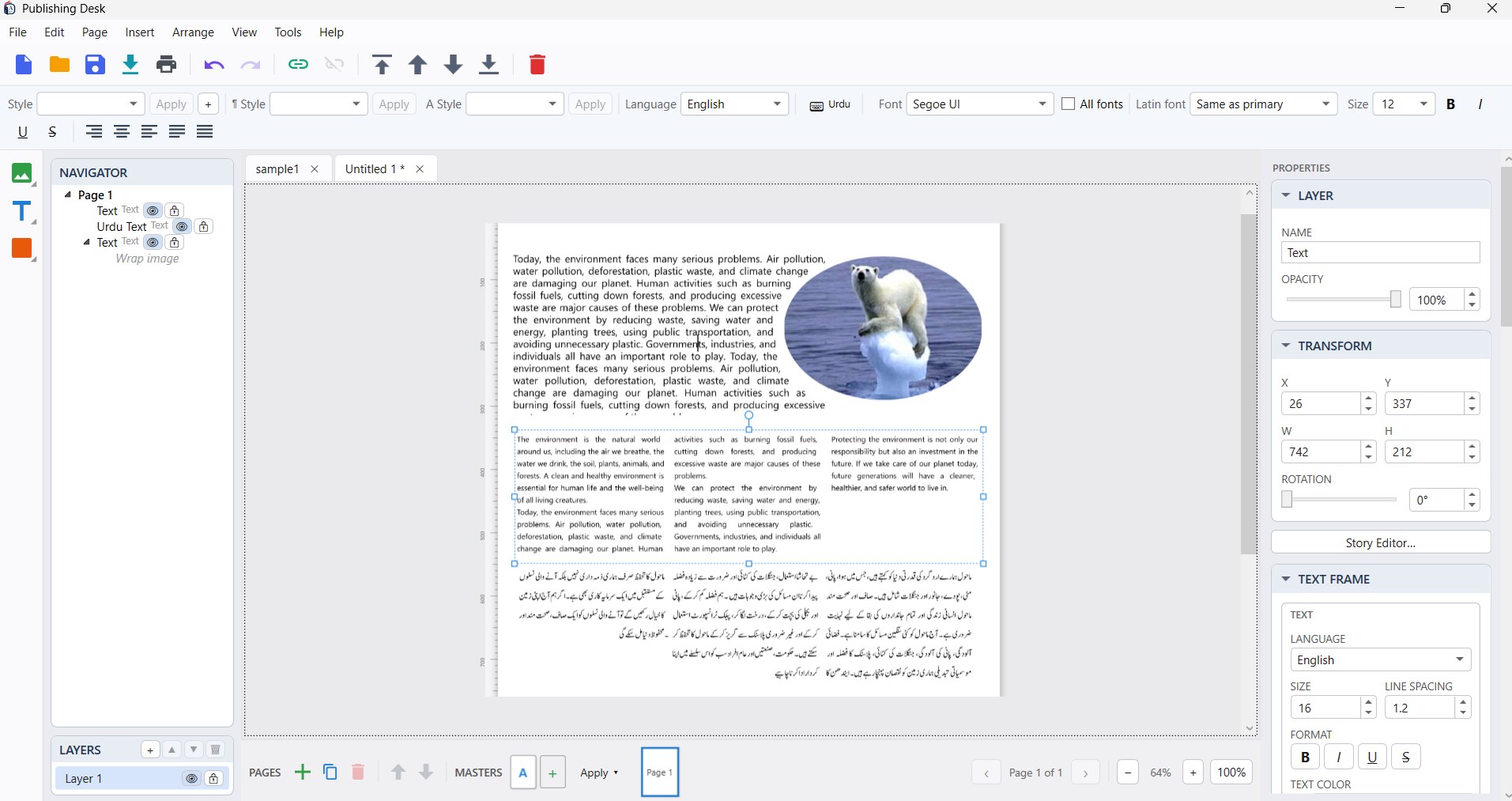
The Workspace — Urdu and English on One Page, With Navigator, Layers & Properties
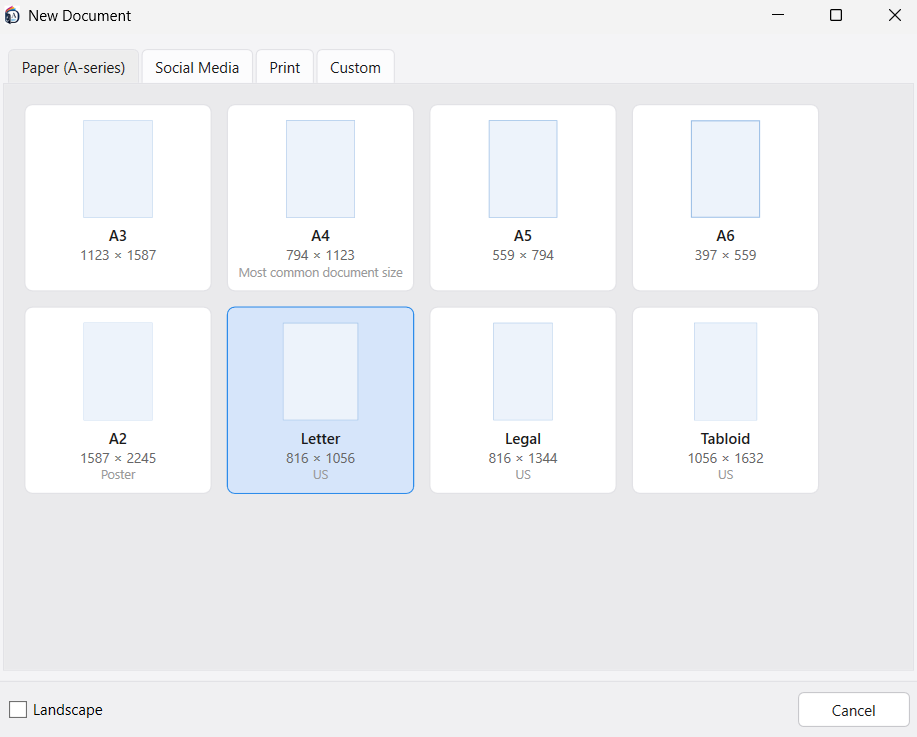
New Document — Paper Sizes, A-Series and US, Portrait or Landscape
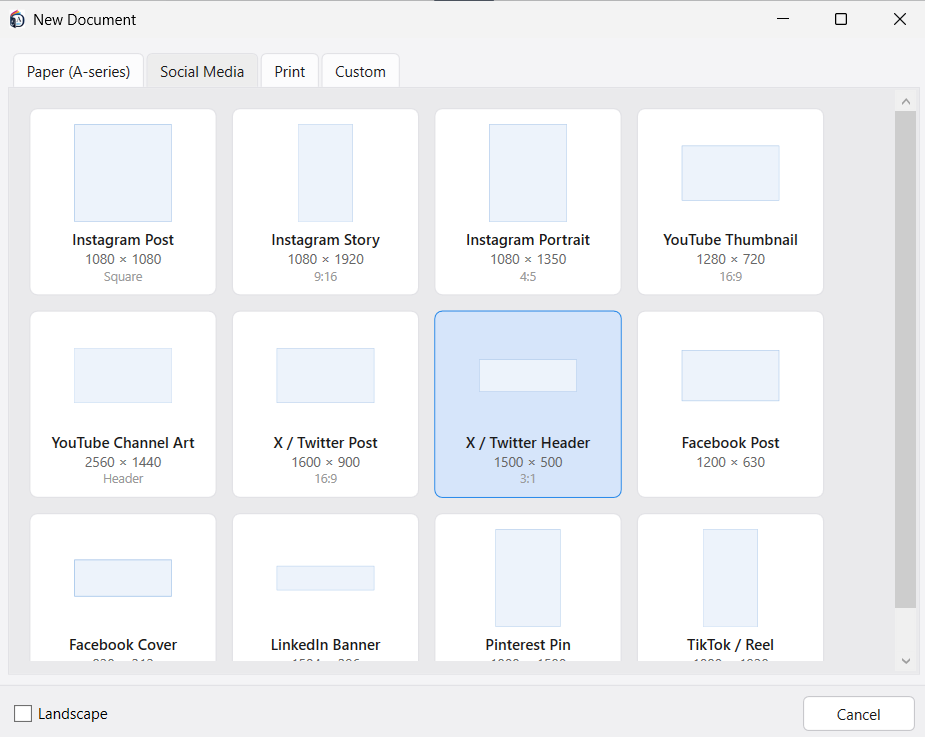
Social-Media Presets — Every Common Post, Story, Header and Cover Size
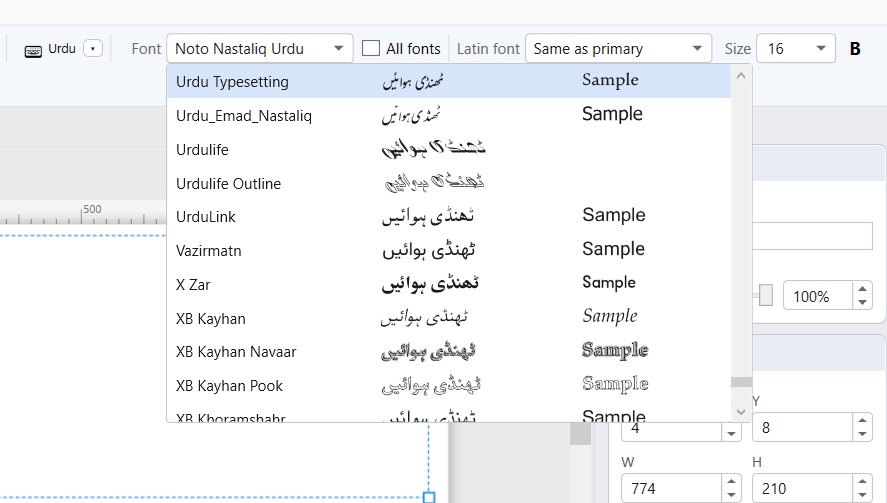
The Font List Draws Every Face — in Your Script, and in English
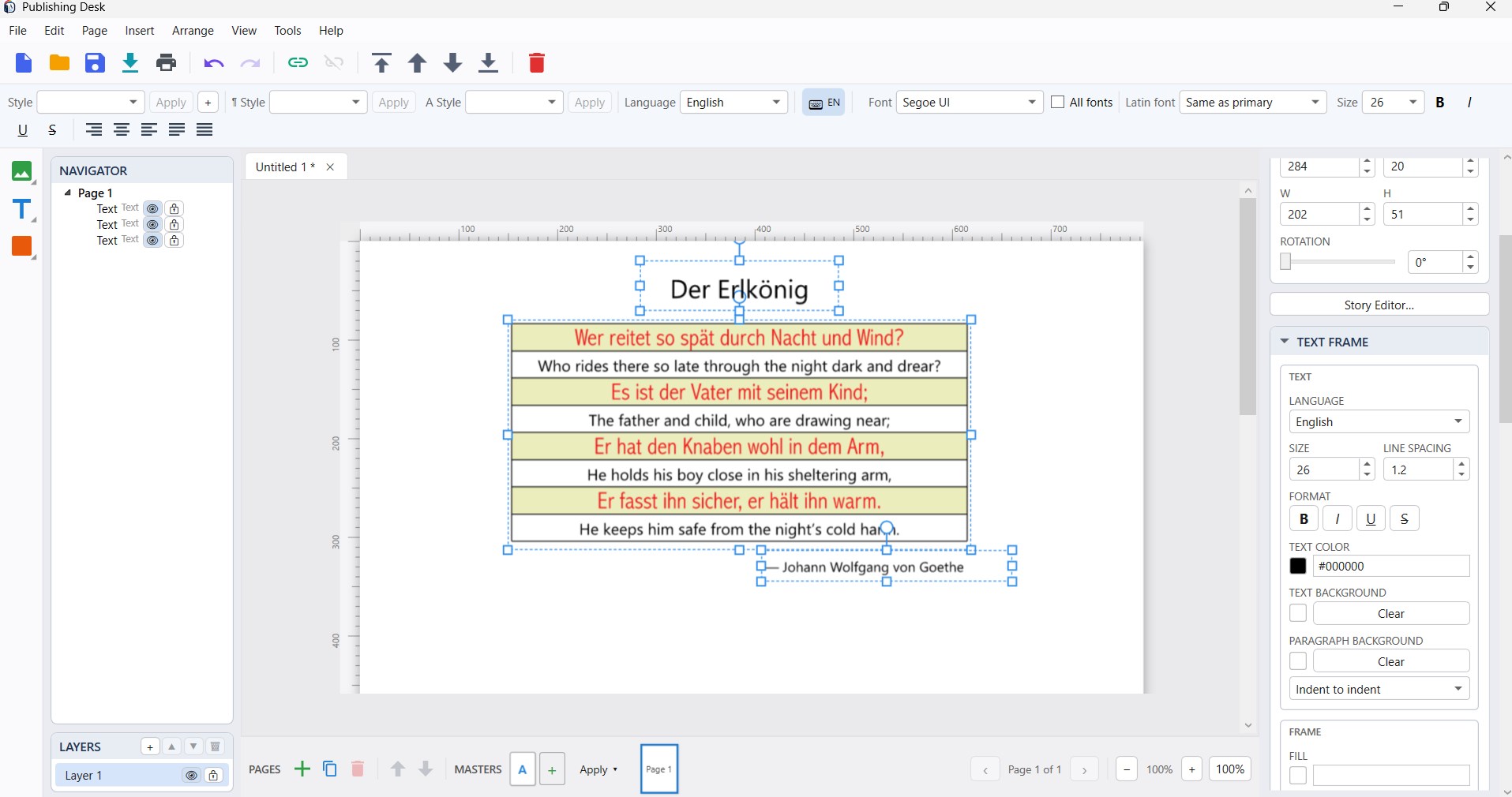
Verse and Translation, Paired — With Text and Paragraph Backgrounds
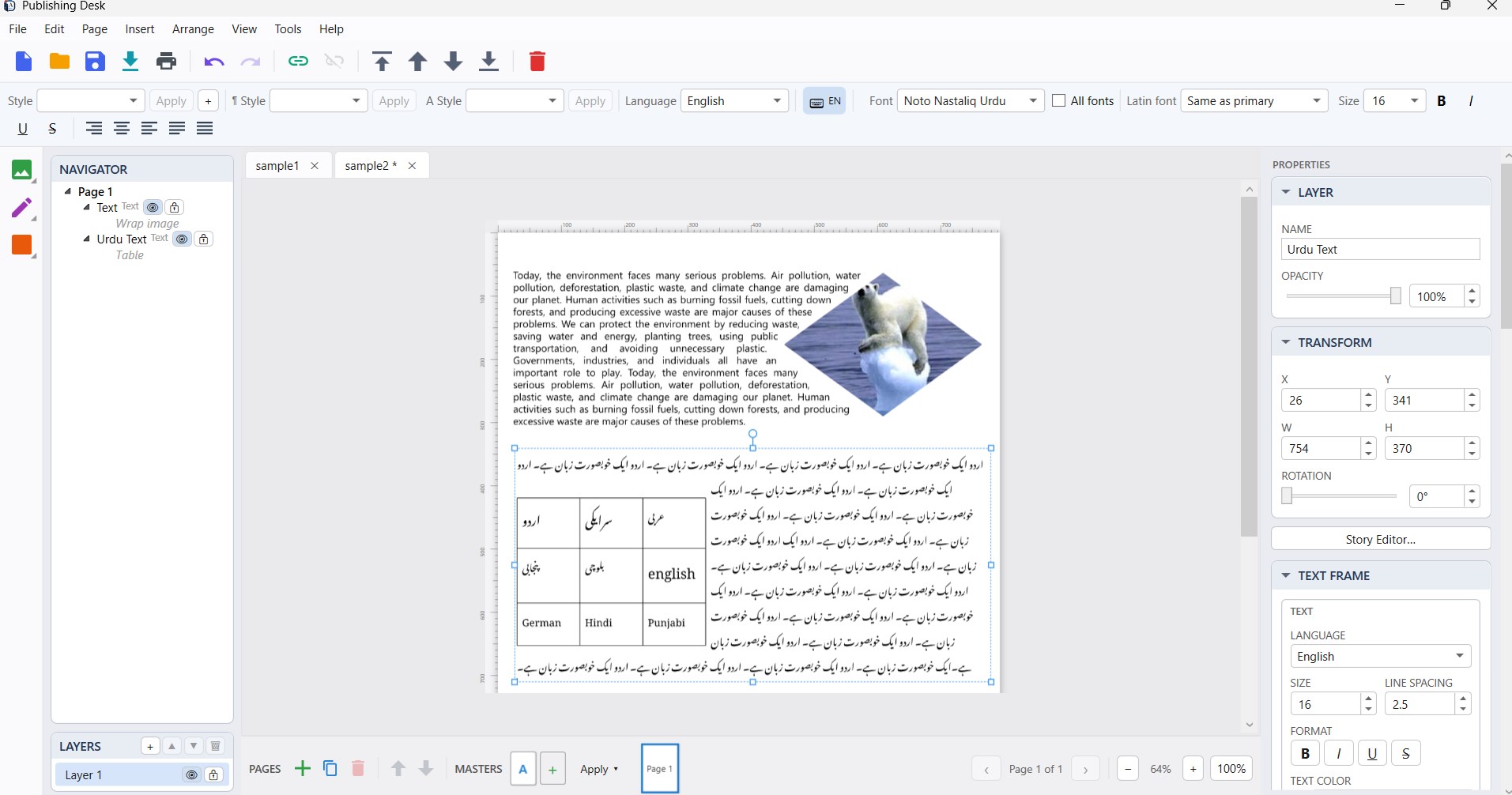
Tables and Shaped Pictures — Text Flowing Around Both, in Either Direction
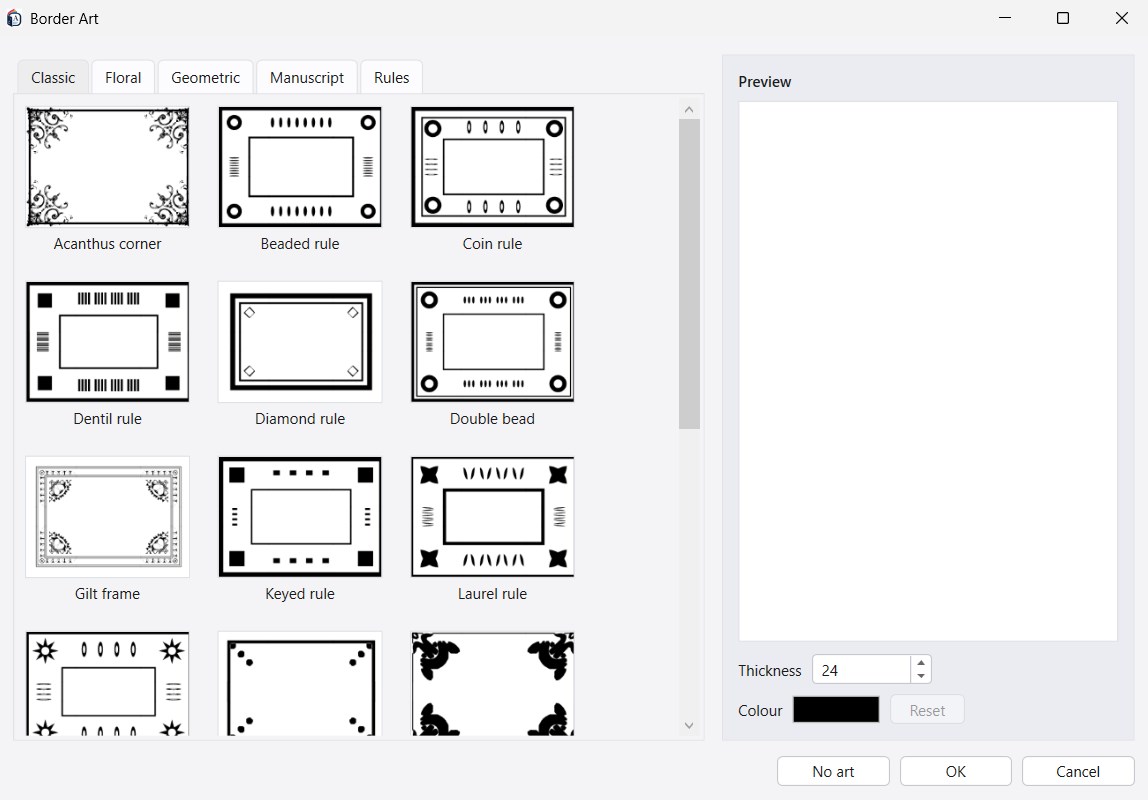
Fifty-Three Border Ornaments — Classic, Floral, Geometric, Manuscript and Rules
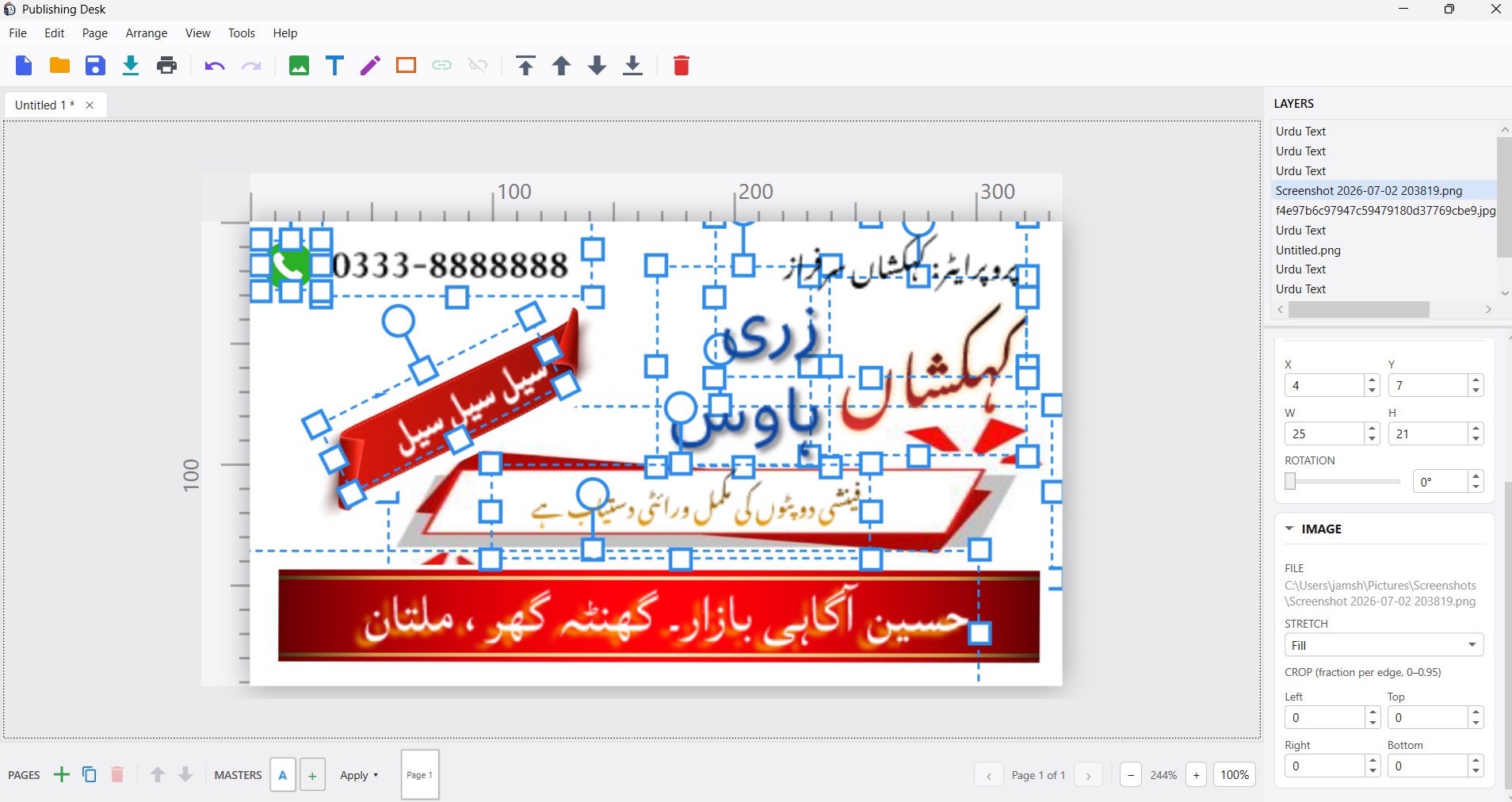
Real Work — A Layered Urdu Banner, Every Element Still Editable
Latest Release
Version 2.4.1 — September 2026
Pro stays bought. If you came by Pro any way other than buying it inside the app — a gift or promotional code, a purchase made on the Store website, or Pro you already owned on another machine — the app could fail to see it and quietly treat you as a free user, bringing the export watermark back mid-document. It now asks the Store two different questions, treats a check it could not make as no answer rather than a “no”, and says which of those actually happened. Before it, 2.4 added decorative border ornaments — a library of fifty-three across Classic, Floral, Geometric, Manuscript and Rules, the ornamental frames common to Urdu and Islamic publishing. Frame a page from Insert → Page Border Ornament, or a text frame from its properties panel; on a page it’s a property of the page itself, so it can’t be nudged, selected in front of your text or deleted by accident, and setting one on a master frames every page that uses it. Round a frame, your text moves in to clear it automatically. Earlier still, 2.3 made the Font list draw a live sample of every face and gave every language its own script to type in, with fourteen built-in keyboard layouts.