
FontDesk – Font Manager for Windows
Your fonts. Organized.
FontDesk is a font manager for Windows built to make a sprawling font collection usable again. Add a folder and browse every font in it without installing anything — then judge each face properly with a size ladder, a complete glyph map, an OpenType feature playground and a side-by-side comparison that is normalised by cap height rather than point size. Organise with sets, smart lists, tags and ratings, and install for yourself with no administrator prompt or for everyone on the machine, or activate a font for one session and leave nothing behind. Every install and removal is reversible.
Download Version 1.1.287
Available on the Microsoft Store — free trial included, no subscription, no ads.
Or view the listing at apps.microsoft.com.
Previews that tell the truth
Every rendering engine on your machine will quietly borrow a missing character from some other font — which is exactly why a broken font survives a preview and then fails in the document. FontDesk never substitutes another font’s glyphs. If it drew a specimen, that font drew it. Each face is also shown a sample it can actually render, chosen from its own coverage rather than from its name, so nothing displays a row of empty boxes because it was handed the wrong text.
Changelog — what's new in each release
Full release notes for FontDesk, from the first public release to 1.1.287 — a reliability release with safer undo and installs.
View the full changelogUser Guide — every screen, every workflow
Step-by-step walkthrough of FontDesk — libraries, the dashboard, judging a font, comparing two faces, sets and smart lists, installing and activating, undo, specimens and backup.
Read the User GuideFeatures
📚 Libraries — Read Without Installing
Add a folder, or drop it on the window, and FontDesk reads every font in it and its subfolders. Nothing is installed, nothing is copied, nothing is moved. Audition a hundred candidates, install the three you chose, and the other ninety-seven never enter your font list. Reads TrueType, OpenType, TrueType/OpenType collections, WOFF and WOFF2 (web fonts can be previewed and analysed; Windows can only install TTF and OTF), and treats each face inside a collection as a font in its own right.
👁 Truthful Previews
Each font is shown a sample it can actually render, chosen from its own coverage rather than from its name. Type your own string — your headline, a client’s name — and every font sets it; a font that cannot falls back to its own sample and says so, so you keep a useful screen and learn which faces fail at the same time. No glyph is ever borrowed from another font.
🔍 Size Ladders, Glyph Map & Features
A size ladder that shows where a face stops working — the hairline that vanishes at 9pt, the display cut that only holds together above 40. A complete glyph map with coverage by Unicode block, glyph ids, advances and sidebearings. And an OpenType feature playground: untick liga, calt or ss01 and see exactly what a font’s advertised alternates actually do.
⚖️ Compare Two Faces
Ctrl-click two fonts for an onion-skin overlay normalised by cap height rather than by nominal point size — two faces set at 24pt can differ wildly in apparent size, because every foundry draws to its own em. Plus their metrics side by side as em fractions, which codepoints one has and the other lacks, and their feature differences. Similar-font search and headline/body pairing suggestions come from your own library.
📊 Dashboard
What your collection actually is: how many families and faces, how much of it Windows already has, what it weighs, and the formats and foundries it came from. Then Worth a look — restricted licences found before a face goes into a client PDF rather than after, name conflicts where two files claim the same family, and files that could not be read at all.
🏷️ Sets, Smart Lists, Tags & Notes
Sets you assemble by hand and activate or deactivate as a whole — one gesture puts a project’s typefaces on the desktop, another takes them away when it ships. Smart lists that keep themselves current. Tags, ratings, colours and notes keyed to the font’s own content, so they survive the file being moved, renamed or reinstalled from somewhere else.
🔍 Filters & Search
Faceted filters on weight, width, italic, variable axes, licence, foundry and format. Paste any text and see only the fonts that can render every character of it — a product name with an accented letter, a price with a currency symbol, a heading with an em dash and curly quotes. Search matches metadata — family, full name, PostScript name, foundry — not filenames.
⬇️ Install for You, or for Everyone
Install for me registers a font for your Windows account with no administrator prompt. Install for everyone puts it in the system font folder, usable straight away — and refuses a download whose file name would replace one of Windows’ own fonts. Safe uninstall refuses to remove the faces Windows draws its own interface with, and says which and why, so pruning a font list cannot break your desktop.
⚡ Temporary Activation
Activate a font for this session and it becomes usable in every application on the desktop until FontDesk closes — with nothing copied, nothing written to the registry and nothing to uninstall afterwards. The answer to “I need this face for one document” — the situation that has quietly filled everyone’s font list with faces they used once.
↩️ Undo History
Every install and removal is listed, newest first, one line per thing you did — a batch of two hundred is one line and undoes in one click. Uninstalling keeps a copy first, so undo really does put the font back, for the same users. Undoing an install removes only the installed copy — never the file you installed from.
🌐 Language & Script Coverage
FontDesk goes further than any other font manager on Windows in answering which fonts can actually set the language you work in. For Latin that usually means naming the accented characters a face is missing. For cursive scripts it is a much bigger question — Arabic, Urdu, Persian, Pashto, Sindhi, Kashmiri, Saraiki, Uyghur and Sorani Kurdish each add their own letters on top of a shared core, so a font can honestly advertise Arabic support and still be unusable.
🔗 Joining & Mark Positioning
In a cursive script every letter takes a different shape depending on its position in the word, so a font can contain every character and still lack the rules that connect them. FontDesk shapes every letter isolated, initial, medial and final, counts unattached and colliding marks against real pairs, and flags pre-Unicode faces whose codepoints carry no Unicode meaning — instead of leaving you to guess whether the font or the text is at fault.
📄 Specimen PDF & Backup
Printable type specimens as real vector PDF — A4 or US Letter — not a picture of one, so they print at any size. Backup and restore of your libraries, sets, tags, ratings and notes; restoring merges, so work done since the backup survives it.
⌨️ Command Palette & Themes
Ctrl+K reaches every command and every destination by name, matched by subsequence — adlib finds Add library. Ctrl+F focuses search, F5 rescans. Light and dark chrome, or follow Windows — the dark theme is a neutral grey rather than black or navy, so the only colour on screen is the type you are judging.
🔒 Offline & Private
FontDesk works entirely offline. No account, no telemetry, and no network connections of any kind. Everything it keeps lives under %LOCALAPPDATA%\FontDesk.
Screenshots
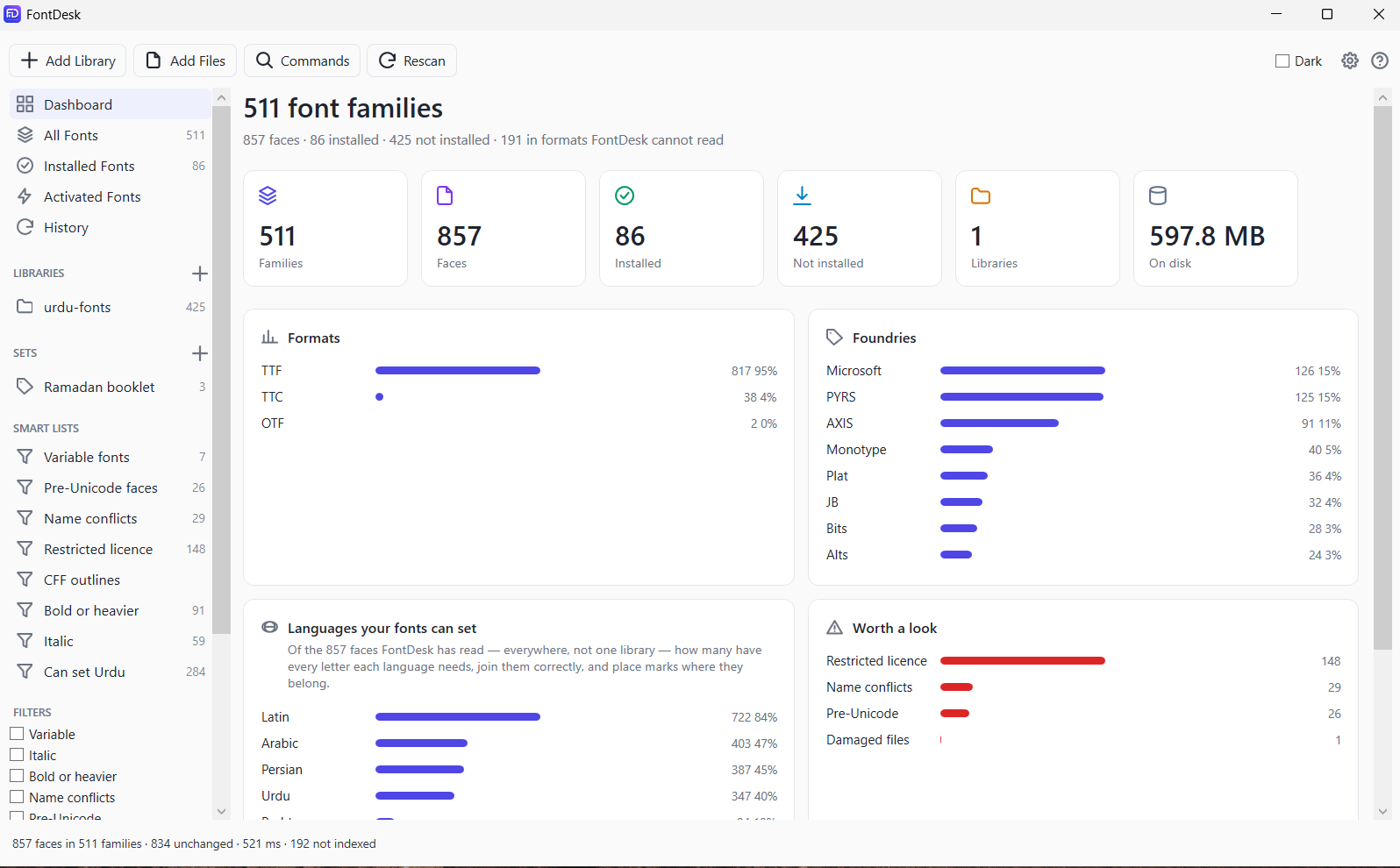
Dashboard — families, faces, formats, foundries, and what needs attention
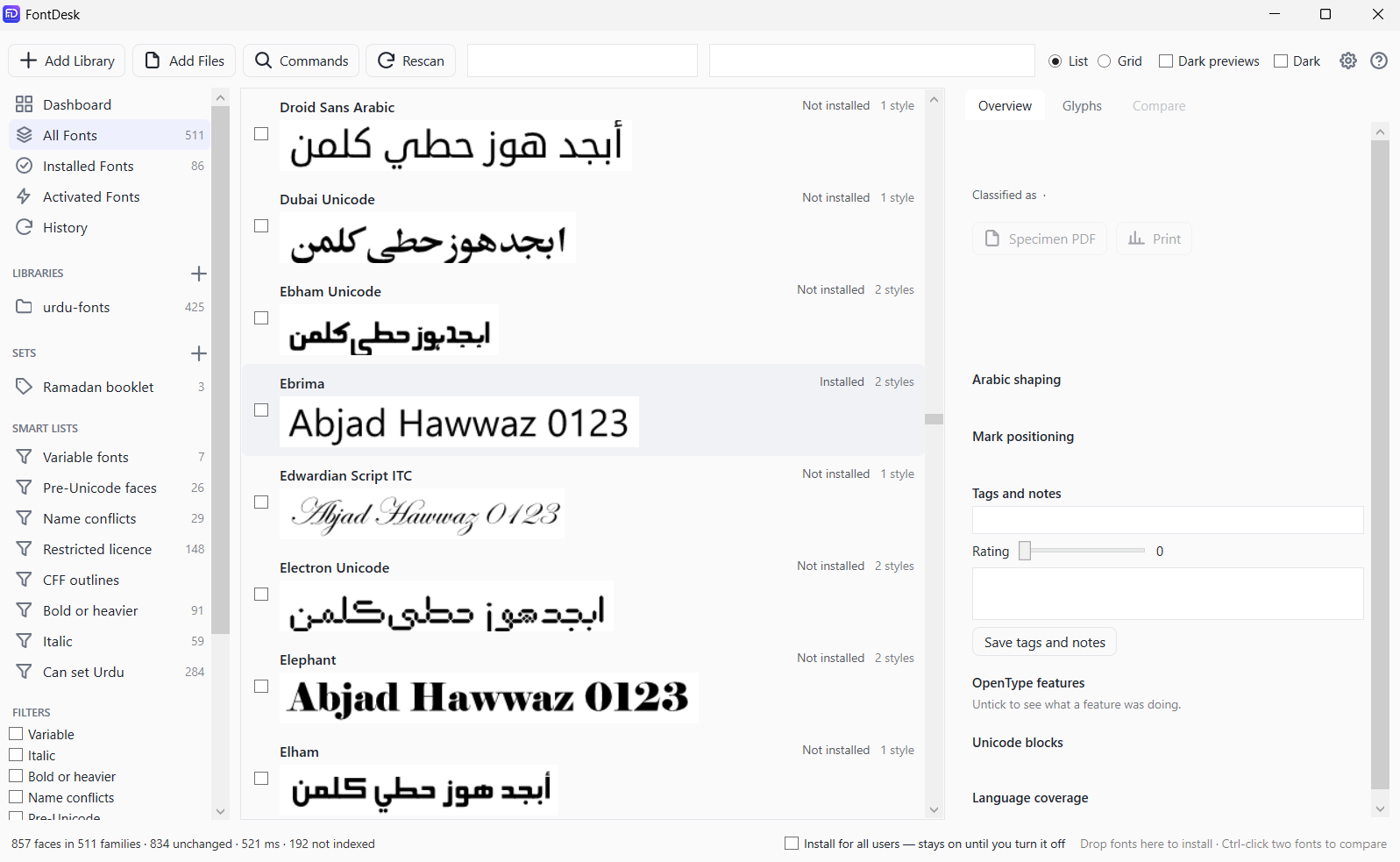
The library — every face previewed in something it can actually set
Latest Release
Version 1.1.287 — October 15, 2026
A reliability release. Undoing an install no longer deletes the file you installed from; WOFF and WOFF2 fonts now appear in libraries; installing for everyone refuses a file that would replace another font’s registration and works without signing out; a family previews the file that wins its conflict; and FontDesk no longer closes on a deleted font or an unexpected error. Only one copy runs at a time, and activating a set loads every style of each family.