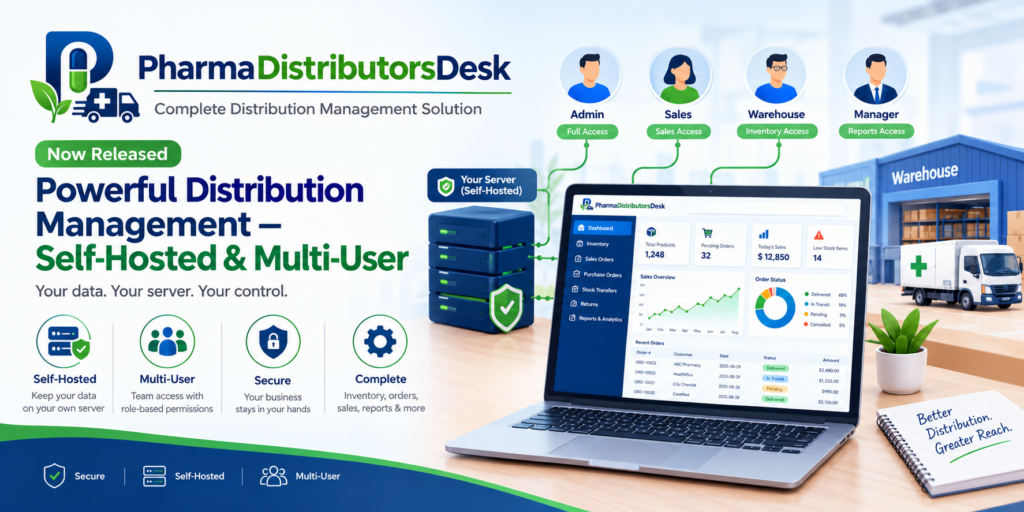
Most distribution businesses do not run on one desk. There is whoever takes the order, whoever picks it off the shelf, whoever raises the invoice, and whoever is out visiting pharmacies collecting last month’s payment. A piece of software that only one of those people can use at a time is not really distribution software — it is a filing cabinet with a nicer interface. PharmaDistributorsDesk was built the other way round: as software several people use at once, against the same stock, from wherever they happen to be standing.
The single-PC trap
A lot of business software, especially older desktop tools, quietly assumes one user, one machine, one moment in time. It works fine until the business outgrows the desk it was designed for:
- Only one person can be “in” the system at a time — or two people editing separate copies of the same file, which is worse, because now someone has to reconcile them by hand.
- Whoever needs the data has to be at that PC. A salesman in the field cannot check a customer’s balance before promising a delivery date; a warehouse picker cannot see today’s orders without walking to the office computer.
- The data lives on one hard drive. If that machine has a bad day, so does the business, unless someone remembered to back it up.
The fix people usually reach for is “put it in the cloud” — which solves the multi-user problem, but trades it for a different one: your stock levels, your customer list and your pricing now live on someone else’s server, reachable only for as long as you keep paying, and gone the day you stop.
What “real client/server” actually means here
PharmaDistributorsDesk takes a third path, the one distribution software used before “the cloud” became the default answer: a proper client/server system, self-hosted on hardware you own.
- One machine runs the server. Any Windows PC in the office — it does not need to be dedicated hardware, and it is the same install as the desktop app, just with the server switched on.
- Everyone else uses a browser. No client software to install on each computer, no version mismatch between machines, no “which PC has the latest copy.” A desktop in the office, a tablet in the warehouse, a phone in a salesman’s pocket — if it has a browser, it has the system.
- Everyone sees the same live data, at the same time. A warehouse picker marking a delivery complete is visible to the office raising the invoice a minute later, because there is only ever one copy of the stock ledger, not one per desk.
This is what makes the difference between four people sharing a spreadsheet and four people using a system — concurrent access with each person’s work correctly attributed and scoped, not a race to save last.
PharmaDistributorsDesk — Distribution Management Built for Pharmaceutical Compliance
PharmaDistributorsDesk runs as a small server on one Windows machine and serves everyone else through a browser — the office, the warehouse, and salesmen on the road. Batch and expiry tracking with automatic FEFO allocation, drug licences that block a delivery once lapsed, recall traceability to every customer who received a batch, and MRP-printed invoicing with free goods and tax. Four roles — admin, office, salesman, warehouse — and scheduled backup to your own Google Drive. No account, no cloud database, no per-seat subscription.
Self-hosted does not have to mean “hire an IT department”
The reason a lot of businesses end up on a cloud subscription instead of running their own server is not that self-hosting is a bad idea — it is that self-hosting a typical client/server business system usually means installing a separate database engine, configuring a separate web server, and opening firewall ports by hand. That is a fair reason to avoid it if nobody on staff does that for a living.
PharmaDistributorsDesk collapses that whole stack into one install. The same admin app that lets you start and stop the server is also where you:
- Create the database — pick a name, a location, the jurisdiction your business trades under, and set the initial admin username and password. That single screen is the entire “database server setup.”
- Configure the network side — web and secure ports, which of the machine’s IP addresses to listen on, an SSL certificate (or a self-signed one generated for you), and firewall rules by address — all from a form, not a command line.
- See it running — a status page confirms the server is up, shows the exact web and secure addresses to hand to staff, and reports CPU and memory use, so “is it working” is answered by looking at a screen, not by asking whoever set it up.
There is no separate database product to license or patch, because the database is a file the application manages itself. There is no separate web server to configure, because serving the browser client is the same process as running the business logic. The distance between “just installed it” and “the whole office is working in it” is one wizard, not a project.
What this buys you, concretely
| Old single-PC desktop tool | Typical cloud subscription | PharmaDistributorsDesk | |
|---|---|---|---|
| Where the data lives | One PC’s hard drive | The vendor’s servers | ✅ A machine you own |
| Concurrent multi-user | ❌ One at a time | ✅ Yes | ✅ Yes, role-scoped |
| Works from a phone/tablet | ❌ No | ✅ Yes | ✅ Yes, on the network (or a VPS you choose to expose) |
| Setup | Install and go | ✅ Sign up, nothing to install | ✅ One install, one wizard |
| Ongoing cost | One-time | ❌ Per seat, per month, forever | ✅ No per-seat fee |
| Who can see your data | ✅ Only you | ⚠️ The vendor’s infrastructure | ✅ Only you |
Comparison reflects typical configurations at the time of writing.
Roles keep “multi-user” from meaning “everyone sees everything”
Concurrent access only works if it is scoped sensibly. PharmaDistributorsDesk gives every login one of four roles — admin, office, salesman or warehouse — and the sidebar, the API and the data each person sees are all cut down to match. A salesman’s order and payment lists are automatically filtered to their own activity, regardless of what they submit; warehouse staff can move stock and fulfil deliveries but never see a customer’s outstanding balance; only admin can manage other users. It is the same server, the same live data, with each person seeing the slice of it that is actually theirs to work with.
Your own backup, still without the manual step
Self-hosted does not have to mean “the backup is your problem alone, manually, or it does not happen.” An admin can schedule automatic backups of the live database to your own Google Drive account, with a retention limit on how many to keep. It is still your data, on your storage, under your account — the automation is just there so getting an off-site copy does not depend on somebody remembering to run it.
PharmaDistributorsDesk — Distribution Management Built for Pharmaceutical Compliance
PharmaDistributorsDesk runs as a small server on one Windows machine and serves everyone else through a browser — the office, the warehouse, and salesmen on the road. Batch and expiry tracking with automatic FEFO allocation, drug licences that block a delivery once lapsed, recall traceability to every customer who received a batch, and MRP-printed invoicing with free goods and tax. Four roles — admin, office, salesman, warehouse — and scheduled backup to your own Google Drive. No account, no cloud database, no per-seat subscription.
Key takeaways
- A distribution business has several people who need the system at the same time, from different places — software that only one person can use at once is not really multi-user.
- PharmaDistributorsDesk runs as a real client/server system: a server on one Windows machine, and every other device — desktop, tablet or phone — works from a plain browser.
- It is self-hosted: your database is a file on a machine you own, not a subscription to someone else’s cloud, and there is no per-seat monthly fee.
- Setup is one install and one wizard — there is no separate database engine or web server to configure by hand, and the same admin app is the whole control panel: start/stop, ports, SSL, firewall rules.
- Four roles keep concurrent, multi-user access scoped rather than wide open, and scheduled backup to your own Google Drive keeps a copy off-site without a manual step.
The result is software that behaves the way the business actually runs — one system, several people, all working against the same truth at the same time — without handing that truth to somebody else’s server to hold onto.
PharmaDistributorsDesk — Distribution Management Built for Pharmaceutical Compliance
PharmaDistributorsDesk runs as a small server on one Windows machine and serves everyone else through a browser — the office, the warehouse, and salesmen on the road. Batch and expiry tracking with automatic FEFO allocation, drug licences that block a delivery once lapsed, recall traceability to every customer who received a batch, and MRP-printed invoicing with free goods and tax. Four roles — admin, office, salesman, warehouse — and scheduled backup to your own Google Drive. No account, no cloud database, no per-seat subscription.
Leave a Reply