For content creators across the Middle East and South Asia, adding titles to a video has historically come with a tax. Not a creative one — an administrative one. Change your operating system’s language settings. Install font files into a system directory you need administrator rights to write to. Restart the editor. And when the letters still come out disconnected or running the wrong way, open a browser, paste your sentence into a text-reversing website, copy back whatever it gives you, and hope it survives the round trip.
None of that is editing. It is paperwork you do before you are allowed to edit.
BackendStudio 3.1.0 removes all of it. Urdu and Arabic titles now work the way titles in any other language have always worked: you type them, and they are right.
Why the letters break in the first place
It is worth understanding, because it explains why the problem is so widespread and why “just pick an Arabic font” never fixes it.
Text is stored in the order you say it, not the order it appears on screen. Turning one into the other takes two separate jobs. The first is shaping: in Arabic script most letters change form depending on what sits either side of them — a letter has an isolated form, an initial form, a medial form and a final form, and the correct one is chosen from context. The second is reordering: working out that this run of text reads right-to-left, while the English product name and the digits inside it still read left-to-right.
An application that skips shaping draws every letter in its isolated form, which is what “disconnected letters” actually is — each character technically correct, none of them joined to its neighbours. An application that skips reordering draws them in storage order, which is what “backwards text” actually is. Plenty of editors skip both, and no font can rescue either, because by the time the font is asked for a glyph the decision has already been made.
This is why the converter-website workaround exists. Those sites do the shaping and reordering for you and hand back text that is already in visual order — which looks right, and is no longer really text. It cannot be edited a word at a time, searched, spell-checked, or safely retyped. Fix a typo and the whole line has to go back through the converter.
BackendStudio — Record, Edit, and Title in Your Own Script
BackendStudio is a screen recorder and multi-track video editor for Windows — capture any display with system audio, microphone and webcam, cut it together on a timeline, add effects, transitions and privacy blur, and play it back in real time with no render to wait for. Titles work in Urdu and Arabic, properly joined and right-to-left, with Noto Nastaliq Urdu and Amiri in the box and three keyboards built in. Free to use, with a one-time Pro upgrade that removes the export watermark.
What’s new in BackendStudio
Native right-to-left support, out of the box
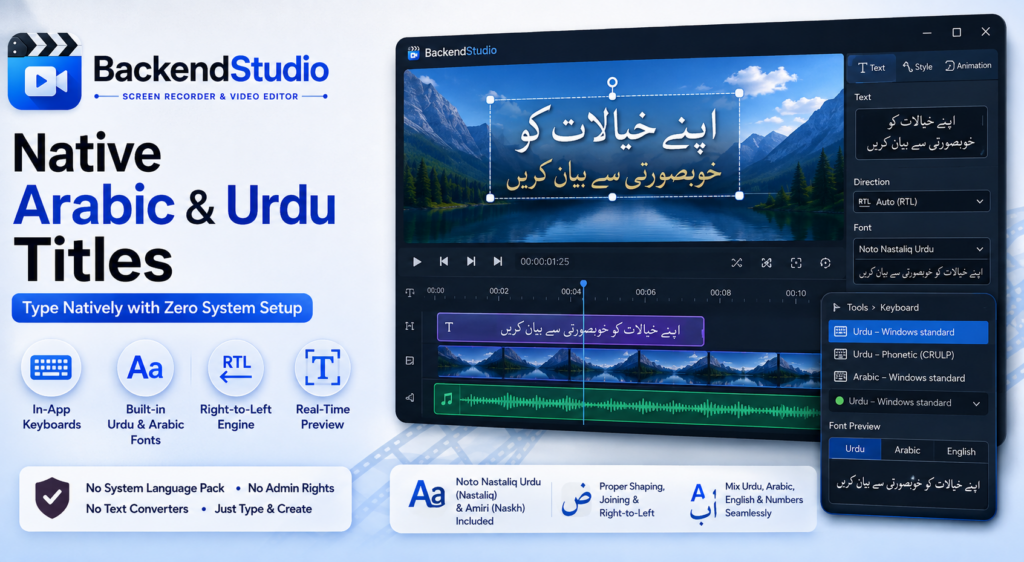
Type or paste Urdu or Arabic straight into the Title text box. Letters join, take their correct contextual forms, and read right-to-left — in the Inspector as you type, in the preview, and in the exported video. All three come from the same rendered image, so they cannot disagree with one another; what you approve on screen is what lands in the file.
Mixed text works too. Latin words and digits inside an Urdu sentence land where they belong, with no manual reordering and no round trip through a browser tab.
For the one case no automatic rule can get right, there is a Direction control — Auto, Left to right, Right to left. Auto decides from the first strongly-directional character in the label and is correct nearly always. The exception is a title that opens with a Latin word but is mostly Urdu, such as “BackendStudio کا تعارف”: Auto has to read that as left-to-right, which puts the Urdu on the wrong side. Set it to Right to left and it sits properly.
In-app keyboard layouts
Three keyboards live inside the editor. The Keyboard dropdown sits in the Inspector right beside the title text — where the typing actually happens, so switching script mid-sentence is not a trip into a menu — and the same choice is on Tools ▸ Keyboard. You can type Urdu or Arabic on a machine where you cannot add a Windows language pack at all — a shared PC, an internet café, a university lab, a locked-down work laptop. No trip through Settings, no administrator rights.
- Urdu — Windows standard and Arabic — Windows standard put the letters exactly where the real Windows drivers put them. If you already type Urdu or Arabic on Windows, your existing fingering transfers unchanged.
- Urdu — phonetic (CRULP) types by sound —
a→ ا,b→ ب,s→ س — with capitals giving the retroflex forms. Start here if you do not type Urdu every day. - Araabs sit on AltGr, plus wherever the source standard puts them on Shift.
Two details worth stating plainly. While a keyboard is on, its name shows beside the Title text box, so you are never left wondering why your keystrokes are producing what they are. And it affects the title box only — not the rest of the editor, and nothing at all outside BackendStudio. Turning it on cannot change how you type anywhere else on the machine.
Your fonts, without the system install
Here is the fact that reframes this whole feature: Windows ships no Nastaliq face at all. Not a limited one — none. Nastaliq is the style most Urdu is actually written and set in, and a stock Windows machine cannot produce it. Every Urdu title anyone has ever set on an untouched Windows install has been in Naskh by default, which reads to an Urdu speaker roughly the way a novelty font reads on a legal contract.
So BackendStudio brings its own. Noto Nastaliq Urdu (Nastaliq) and Amiri (Naskh) ship with the app, both under the SIL Open Font License. They are there the moment you install it.
If you have a calligraphic Arabic face or a particular Nastaliq you prefer, Tools ▸ Install Fonts takes any font file you have already downloaded and adds it to BackendStudio’s own font folder. It appears in the dropdown immediately, with no restart. It is not installed into Windows — so it needs no administrator rights, adds nothing to your system font list, and changes nothing for any other application. Your fonts stay organised inside the app, and travel with it.
The font picker shows you the font, not the name
This one is small and solves a problem anyone who has set Arabic-script type will recognise immediately.
The font dropdown lists every font on your system, the faces bundled with BackendStudio, and anything you have added yourself — and beside each name it draws the same few words set in that face.
For Latin fonts that is a convenience. For Arabic-script fonts it is the difference between working and guessing, because the name tells you nothing useful. It will not tell you whether a face is Naskh or Nastaliq. It will not tell you whether it covers Urdu’s ٹ, ڈ, ڑ and ے, or only the Arabic letters it shares. It will not tell you whether it is a display face that falls apart at title size. The sample answers all three before you commit a title to it, instead of after you have exported.
You can switch the sample between Urdu, Arabic and English, and that choice also decides what a new label starts as: working in Urdu, Insert ▸ Text label gives you Urdu placeholder text already set in a Nastaliq face, rather than the word “Text” in a Latin one.
One fix worth calling out
Nastaliq faces declare a line box roughly twice the height of their own ink — a consequence of how steeply the style descends. BackendStudio used to size a label’s image from that box, so a one-line Urdu title came out visibly smaller than the size you asked for, with the preview’s drag handles floating well below the visible text. Labels in those faces are now fitted to their ink. Latin titles are unchanged.
It is the kind of detail nobody writes on a feature list, and exactly the kind of detail that decides whether a script feels supported or merely permitted.
Key takeaways
- Urdu and Arabic titles shape, join and read right-to-left correctly — in the Inspector, the preview and the exported video, all from the same rendered image.
- No text-reversing website. Your title stays real, editable text at every stage, so fixing a typo does not mean redoing the line.
- No OS language pack and no administrator rights. Three keyboards live in the app; they affect the title box only and change nothing about how you type anywhere else.
- Windows has no Nastaliq face — so Noto Nastaliq Urdu and Amiri ship with BackendStudio, and any font you have already downloaded can be added without installing it into Windows.
- The font picker draws a real Urdu or Arabic sample beside every name, because on Arabic-script faces the name alone tells you nothing.
- A Direction control handles the case no automatic rule can: a title that opens with a Latin word but is mostly Urdu.
Whether you are cutting local news reels, social media content, documentaries or a tutorial for your own audience, adding rich localised titles to a multi-track timeline is now completely friction-free — and it happens entirely on your own machine, like everything else in BackendStudio.
BackendStudio — Record, Edit, and Title in Your Own Script
BackendStudio is a screen recorder and multi-track video editor for Windows — capture any display with system audio, microphone and webcam, cut it together on a timeline, add effects, transitions and privacy blur, and play it back in real time with no render to wait for. Titles work in Urdu and Arabic, properly joined and right-to-left, with Noto Nastaliq Urdu and Amiri in the box and three keyboards built in. Free to use, with a one-time Pro upgrade that removes the export watermark.
Leave a Reply