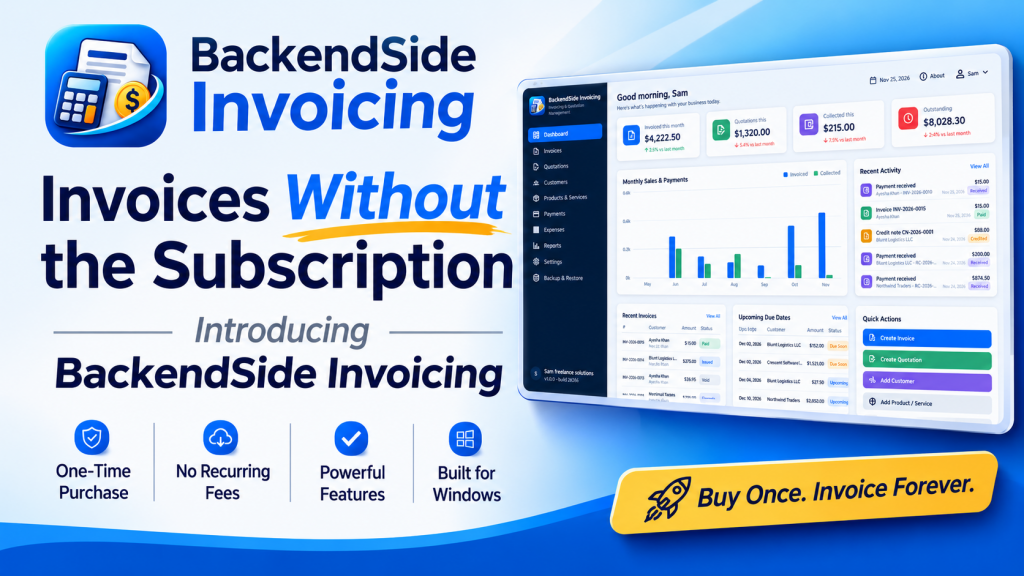
For a lot of small businesses, sending an invoice means one of two things: a word-processor template you fill in by hand and hope the sums are right, or an online invoicing service that charges every month and keeps your customer list on its servers. BackendSide Invoicing, out now on the Microsoft Store, is the third option — a fast, straightforward invoicing and quotation app for freelancers, shops and small businesses that runs on your own Windows PC, works offline, and has no account to create and no subscription.
An invoice in under a minute
Pick a customer, add your products or services, and the app does the arithmetic: line discounts, a discount on the whole document (percent or a fixed amount), one extra charge such as shipping with its own tax, and the tax broken down per rate. Totals update as you type. When it looks right, Issue invoice gives it the next number, and the preview window lets you Save PDF, Print, or Email — which opens your mail program with the PDF already attached.
Every document carries your logo, your business details and your bank details, so customers know exactly how to pay you. Drafts, void invoices, paid invoices and expired or rejected quotations carry a clear watermark, so a draft can never be mistaken for the real thing.
Two small decisions make a big difference in practice:
- Drafts never use up numbers. A number is assigned only when an invoice is issued, so your sequence has no gaps from invoices you started and abandoned. The format is yours: prefix, number of digits, the year, and a restart every January if you want one.
- Issued invoices are locked. They keep the customer’s details as they were on the day you issued them, even if you edit the customer later. Mistakes are fixed the proper way — with a credit note, or by voiding the invoice with a reason, which keeps the number on record.
BackendSide Invoicing — Invoices, Quotations & Payments for Windows
BackendSide Invoicing creates professional PDF invoices, quotations, credit notes and receipts with your logo and bank details, works out discounts, shipping and tax for you, and records payments against one invoice or several. Customer balances, recurring invoices, expenses with receipts, a dashboard and eight reports. Offline, on your own PC, with no account and no subscription.
Knowing who owes you
Sending invoices is the easy half. The hard half is keeping track of what came back. Record a payment and the invoice becomes Partially Paid or Paid on its own. One payment can cover several invoices — it is spread over the customer’s open invoices, oldest first, and you can change the split — and every payment gets its own receipt number and a receipt PDF.
Every customer has a running balance and an account history listing their invoices, payments and credit notes, so the answer to “what does this customer owe?” is one click away. Overdue invoices stand out on the Invoices page and on the dashboard.
| Document | What it’s for |
|---|---|
| Quotation | An offer. Mark it sent, then accepted or rejected; past its valid-until date it shows as expired. An accepted one converts to an invoice in one click. |
| Invoice | What the customer owes, with a due date from your payment terms (Net 7 to Net 60, or your own). |
| Receipt | Proof of a payment, numbered and printable. |
| Credit note | Reduces an issued invoice for returns or corrections — never by more than is still owed. |
| Recurring invoice | A schedule — weekly, monthly, quarterly or yearly — that issues invoices automatically or creates drafts for you to check. |
Recurring invoices deserve a special mention for anyone who bills a retainer or a monthly service. Set one up from any invoice with More → Make recurring, and the app creates what is due each time you open it — including anything it missed while the PC was off.
The business at a glance
The dashboard opens on the numbers that matter: what you invoiced, quoted and collected this month against last month, what is outstanding and how much of it is overdue, a seven-month chart of invoiced against collected, and what is due next. Quick actions start a new invoice, quotation, customer or product without hunting through menus.
When you need more than a glance, there are eight built-in reports: revenue by month, sales by customer, receivables aging, overdue invoices, quotation conversion, payments by method, expenses by category, and income against expenses. Each one exports to CSV (opens straight in Excel) or PDF — handy for your accountant at the end of the year. And because expenses live in the same app, with categories, tax and the receipt attached as a PDF or photo, “income vs expenses” is a real report, not a guess.
Your data, on your PC
Everything — customers, invoices, payments, expenses — is stored on your own PC. There is no account, no sign-in and nothing sent to us. That is a privacy win, but it also means the backups are yours to look after, and the app takes that seriously:
- Automatic backups once a day or every time the app closes, to any folder, USB stick or network drive, keeping the newest ten by default.
- Optional cloud backup to your own Google Drive or OneDrive. The app can see only the backups it creates there — never your other files.
- Restore in a couple of clicks, from this PC or from the cloud. Before replacing anything, the app keeps a safety copy of what you had, so even a restore can be undone.
- Separate books. Tried the app with test data, or running a second business? Start a new book backs up the current one and gives you a clean slate; restore the book backup to switch back whenever you like.
Moving to a new PC is the same idea: back up on the old one, install from the Store with the same Microsoft account, and restore.
Try every feature free for 7 days
The free trial unlocks everything. If you decide not to buy, nothing is deleted and nothing is held hostage: the app turns read-only, and you can still open, print, export and back up everything you created. The user guide walks through every screen, from your first invoice to starting a second book.
Good to know
- One currency per book, and prices are tax-exclusive with one tax rate per line. If you trade in two currencies, a second book keeps them apart.
- Single user, single PC. It is built for the owner of a small business, not a finance department; backup and restore move your data between PCs.
- Windows 10 (version 1809) or later, including Windows 11, from the Microsoft Store. Updates arrive through the Store automatically.
Key takeaways
- BackendSide Invoicing 1.0 is out on the Microsoft Store — invoicing and quotations for freelancers, shops and small businesses.
- Professional PDF invoices, quotations, credit notes and receipts with your logo and bank details, with discounts, shipping and tax worked out for you.
- Payments across several invoices, customer balances, overdue tracking and recurring invoices keep track of who owes what.
- A dashboard and eight reports, exported to CSV or PDF, plus expenses with attached receipts.
- Offline and private: your data stays on your PC, with automatic backups to a folder, Google Drive or OneDrive. No account, no subscription — and a 7-day free trial with every feature unlocked.
Screenshots, the full feature list, the changelog and the user guide are on the BackendSide Invoicing product page.
Leave a Reply