Designing a flyer, a book page or a social-media graphic is easy enough — until your text needs to be in Urdu. Suddenly the letters won’t join properly, the dots land in the wrong place, justified lines open up ugly gaps instead of flowing, and the polished tools everyone recommends simply weren’t built for the script. PublishingDesk is our answer: a modern desktop publishing app for Windows that treats Urdu, Arabic, Persian and Pashto as first-class citizens — with true Nastaliq typesetting — while still doing everything you expect from a layout tool.
It is available now on the Microsoft Store: free to use, with a one-time Pro upgrade for print-ready output. Here is what it does, and an honest look at how it stacks up against the two tools most people reach for — InPage and Adobe InDesign.
What makes it different: real Nastaliq
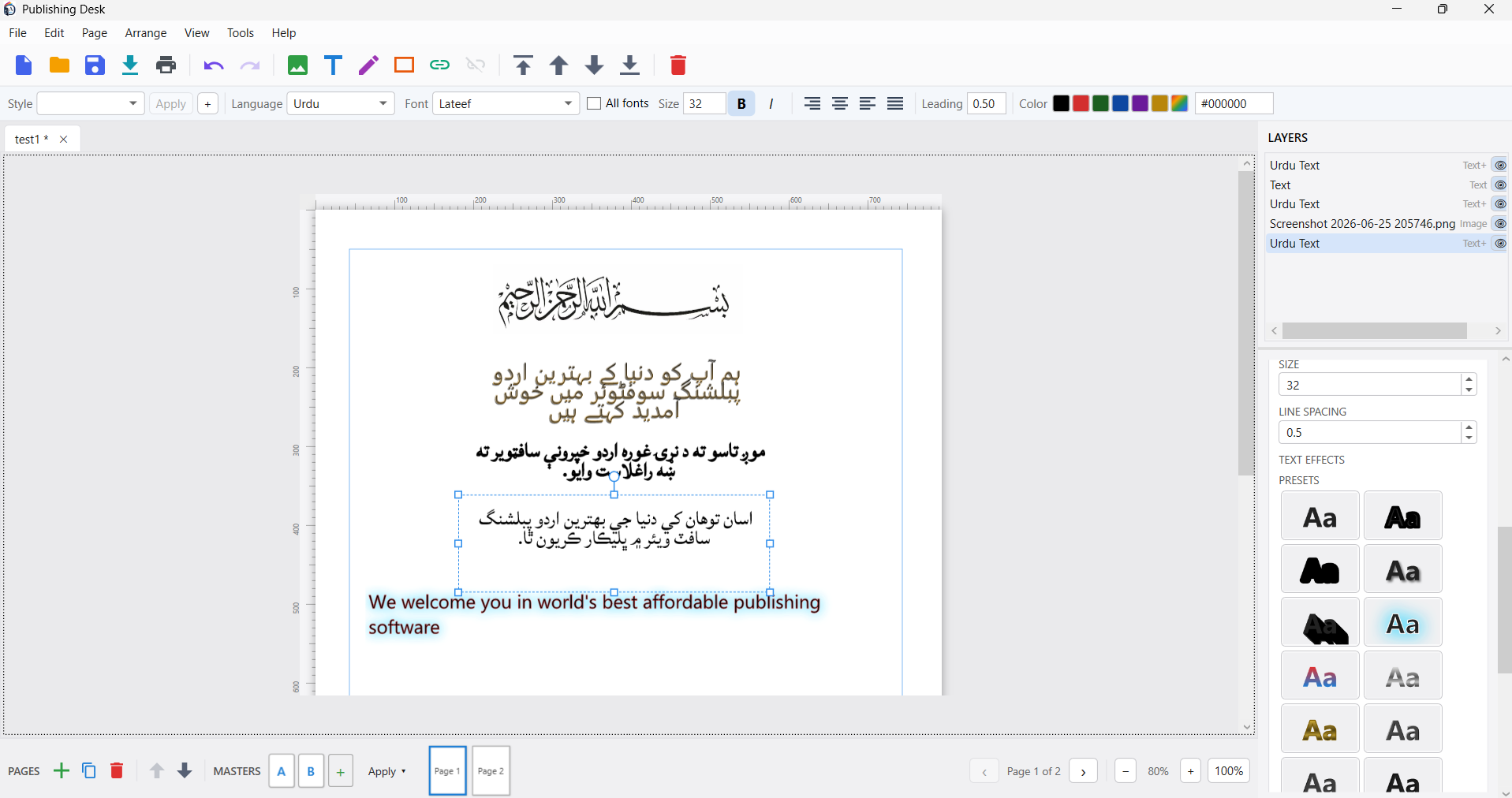
Most page-layout apps render Arabic-script text in the flat Naskh style, or lean on the operating system’s basic shaping. PublishingDesk does proper Nastaliq — the slanted, “hanging” calligraphic style Urdu readers expect — with correct letter-joining and dot placement. A built-in Urdu keyboard (standard, phonetic Roman→Urdu, or your system layout) lets you type straight onto the page, and English words or numbers inside an Urdu line sit the right way round automatically.
It also does kashida (kasheeda) justification: set a paragraph to Justified and lines fill the column by elongating the script’s connecting strokes (tatweel) — the hallmark of fine Urdu typesetting — instead of stretching the spaces between words. It engages on fonts that have a real tatweel glyph (the bundled Amiri and Scheherazade do, as do dedicated kasheeda Nastaliq fonts you add yourself), and it deliberately falls back to clean word-spacing on fonts that don’t, rather than inserting broken glyphs.
PublishingDesk — Multilingual Desktop Publishing for Windows
PublishingDesk typesets proper Urdu, Arabic, Persian and Pashto Nastaliq with real kashida (kasheeda) justification, mixes right-to-left and English on one line, and lays it all out with layers, master pages and multi-page documents — then exports to print-ready PDF. Free to use, with a one-time Pro upgrade for print output. No subscription, no ads, works offline.
A full layout tool, not just a text box
Nastaliq is the headline, but PublishingDesk is a complete desktop publishing app:
- Documents & pages — tabbed multi-document editing and multi-page documents, with a Pages strip to add, duplicate, reorder and navigate, plus per-page size, margins, columns and baseline guides.
- Templates — start from A-series and US paper sizes, social-media presets (Instagram, YouTube, X, Facebook, LinkedIn, TikTok…), print formats, or custom dimensions.
- Master pages — design repeating headers, footers, page numbers and borders once, then apply them to the pages you choose.
- Layers — stack text, Urdu text, shapes and images, with a Layers panel for lock, show/hide, drag-to-reorder and full z-order control.
- Direct manipulation — drag to move, rotation-aware resize handles, an on-canvas rotate handle, smart guides and snapping, grid, rulers (px/mm/cm/in), and align & distribute.
- Composable text effects — stack outline, glow, shadow, inner-shadow, bevel and fill (solid, gradient or chrome) on both English and Urdu frames, with a live preset gallery and save-your-own presets.
- Importing & autoflow — pour text into a frame and autoflow it across as many pages as it needs, and import SVG as editable vector shapes.
- Find & Replace across all text frames — Urdu and English — with an in-app keyboard toggle to find embedded English.
- Bring your own fonts — a curated set of free Nastaliq/Arabic fonts is included, and you can drop in any
.ttf/.otf(including popular Nastaliq fonts like Jameel Noori) and it appears in the picker. - Export & print — PNG and vector PDF, plus — with Pro — SVG, print-ready PDF with bleed and crop marks, and a Preflight check.
- Privacy & safety — works entirely offline with no account and no telemetry; self-contained
.pubdeskfiles, autosave and crash recovery.
PublishingDesk vs InPage vs Adobe InDesign
InPage is the long-standing default for Urdu/Nastaliq publishing; Adobe InDesign is the professional-grade page-layout standard. Here is how PublishingDesk compares on the things that matter for multilingual design.
| Capability | PublishingDesk | InPage | Adobe InDesign |
|---|---|---|---|
| True Urdu Nastaliq shaping | ✅ Yes — joining & dot placement | ✅ Yes (its specialty) | ⚠️ Naskh-style RTL (ME edition); true Nastaliq needs plugins |
| Kashida / tatweel justification | ✅ On tatweel-capable fonts | ✅ Yes | ⚠️ Limited / manual |
| Built-in Urdu keyboard (phonetic/standard) | ✅ Yes | ✅ Yes | ❌ Uses OS keyboard |
| Mixed right-to-left + English on one line | ✅ Automatic | ✅ Yes | ✅ Yes (ME edition) |
| Bring your own Nastaliq fonts (.ttf/.otf) | ✅ Any OpenType font | ⚠️ Centred on its own fonts | ✅ Any OpenType font |
| Layers panel | ✅ Lock, hide, reorder, z-order | ⚠️ Basic | ✅ Yes |
| Master pages | ✅ Apply any master per page | ⚠️ Limited | ✅ Parent pages |
| Multi-page documents + text autoflow | ✅ Threaded autoflow | ✅ Yes | ✅ Yes |
| Composable text effects (glow/bevel/gradient) | ✅ Stackable, with presets | ⚠️ Basic | ✅ Yes |
| Import SVG as editable shapes | ✅ Yes | ❌ No | ⚠️ Places SVG |
| Export PNG / PDF / SVG | ✅ All three | ⚠️ PDF / print | ✅ PNG / PDF (SVG limited) |
| Print-ready PDF (bleed + crop marks) | ✅ Pro | ✅ Yes | ✅ Yes |
| Preflight checks | ✅ Pro | ❌ No | ✅ Yes |
| Works offline, no account, no telemetry | ✅ Yes | ✅ Yes | ❌ Creative Cloud account |
| Platform | Windows 10 / 11 | Windows | Windows + macOS |
| Pricing | Free + one-time Pro upgrade | Paid one-time licence | Subscription (Creative Cloud) |
Comparison reflects typical configurations at the time of writing. InPage is a trademark of Concept Software; Adobe InDesign is a trademark of Adobe Inc. PublishingDesk is not affiliated with or endorsed by either.
Where each tool fits
InPage remains a familiar, capable choice for Urdu/Sindhi newspaper and book workflows, and many shops have decades of .inp files. Adobe InDesign is the professional standard for high-end commercial print and complex long documents, with an ecosystem no one else matches — but its Arabic-script support assumes the Middle East edition and leans toward Naskh, its Nastaliq story needs third-party help, and it is a recurring Creative Cloud subscription tied to an account.
PublishingDesk sits in the sweet spot for anyone who wants genuine Nastaliq and a modern, full-featured layout tool without a subscription: students, small print shops, social-media designers, publishers and anyone producing Urdu/Arabic material who wants layers, master pages, effects and print-ready export in one offline app — starting free.
Free vs Pro
The whole designer is free — Urdu/English text, kashida, images, shapes, master pages, autoflow and your own fonts, plus PNG and PDF export with a small watermark. A one-time Pro upgrade removes the watermark and unlocks PDF for Print (bleed + crop marks), SVG export and Preflight. Pro is a one-time purchase, not a subscription, and re-unlocks on your other Windows devices signed in to the same store account.
Key takeaways
- PublishingDesk does true Urdu/Arabic/Persian/Pashto Nastaliq with correct joining, dot placement and kashida justification — not flat Naskh.
- It is a complete layout tool: templates, layers, master pages, multi-page autoflow, composable text effects, and print-ready export.
- Versus InPage: a more modern, layered, effects-rich workspace that lets you use any font — starting free.
- Versus Adobe InDesign: real Nastaliq out of the box, fully offline, with no subscription.
- Free to use, with a one-time Pro upgrade for professional print output — on the Microsoft Store now.
If you have ever fought with Urdu text in a layout app, give PublishingDesk a try — it was built for exactly that.
PublishingDesk — Multilingual Desktop Publishing for Windows
PublishingDesk typesets proper Urdu, Arabic, Persian and Pashto Nastaliq with real kashida (kasheeda) justification, mixes right-to-left and English on one line, and lays it all out with layers, master pages and multi-page documents — then exports to print-ready PDF. Free to use, with a one-time Pro upgrade for print output. No subscription, no ads, works offline.
Leave a Reply