
ERPDesk – UML Designer for Windows
A clean, fast UML designer for ER diagrams, class diagrams, business-process flows, and sequence diagrams. Design tables visually and generate real SQL for PostgreSQL, MySQL, SQL Server, or SQLite — or import existing SQL and see it laid out as a diagram. Round-trip with other UML tools via XMI 2.1, and export to PNG, SVG, or PDF.
Download Desktop Version 1.3
Available on the Microsoft Store — free trial included, no subscription, no ads.

One project, many diagrams
A saved .umlproj file is a project that can hold many diagrams — an ER diagram, a class diagram, and a flowchart all in one place. Switch between them with the tab strip or jump to any element from the Model Explorer tree.
Design tables visually, generate real SQL
The Table (SQL) shape carries structured columns — name, type, length/scale, PK / FK / nullable / unique / auto-increment, default. ERPDesk emits a complete CREATE TABLE script for your choice of dialect:
PostgreSQL
MySQL
SQL Server
SQLite
— with the right identifier quoting, type mapping, and auto-increment idiom for each. Composite foreign keys with ON DELETE / ON UPDATE actions, UNIQUE and CHECK constraints and indexes are written in each database’s own syntax, and -- WARNING comments flag tables without a primary key, dangling foreign keys, unsupported actions and duplicate names.
Changelog — what's new in each release
Full release notes — from the first canvas engine through shape libraries, properties panel, toolbox, file / export, UX polish, multi-diagram projects, SQL generation, SQL import, auto-layout, branding, and XMI 2.1 round-trip — through 1.3, which added real table constraints, dump-file import and an undo History panel.
View the full changelogUser Guide — every panel, every workflow
Step-by-step walkthrough — welcome screen, toolbox, canvas, properties panel, multi-diagram projects, connecting shapes and turning a link into a real foreign key, the table designer, keys, constraints and indexes, the History panel, live SQL, SQL generation and import, XMI export and import, exporting to PNG / SVG / PDF, and keyboard shortcuts.
Read the User GuideFeatures
📐 ER, Class, Process & Sequence Diagrams
Full UML shape catalog — entities, weak entities, attributes, multivalued / derived attributes, relationships, classes (regular / abstract / interface / enum), processes (start / end / task / gateway / data object / data store), and sequence lifelines with activations and combined fragments.
🧰 Toolbox with Search & Recents
Left sidebar with a tab per diagram type, a search box that flat-filters every shape by name, and a Recently used section so your common shapes are always close at hand. Click to drop at the centre of the view or drag onto the canvas.
🗂️ Multi-Diagram Projects
One project, many diagrams — an ER diagram, a class diagram, and a flowchart all in one .umlproj. Tab strip above the canvas to switch; Model Explorer shows the project tree (diagrams → elements) and you can double-click any element to jump to it.
⚙️ Properties Panel — No Modal Dialogs
Right sidebar that follows your selection. Per shape: name, italic / abstract flags, stereotype, fill and border colour (swatches or hex), border style and thickness, font size. Per connection: label, routing, line colour and style, start / end arrowheads. Canvas: grid size, snap, background.
🗄️ SQL DDL Generation & Live Panel
Design tables with structured columns and generate a complete script for PostgreSQL, MySQL, SQL Server, or SQLite — correct identifier quoting, type mapping, and auto-increment per dialect. Live dialect switch, syntax-styled preview, copy or save as .sql. A live SQL panel docks under the canvas and regenerates as you edit, so you can see what a change does to your schema without opening a dialog. Tables carry composite foreign keys with on-delete / on-update actions, multi-column UNIQUE, CHECK constraints and named indexes, edited in one Constraints dialog and kept intact through renames. Tables are created in dependency order, DROP TABLE IF EXISTS and foreign-key indexes are export options, and tables spread across several diagrams can be written as one script.
📥 SQL Reverse Engineering
Paste a CREATE TABLE script or load a .sql file — ERPDesk parses tables, columns, primary and composite foreign keys with their actions, UNIQUE / CHECK constraints and indexes, draws them on a new diagram, and lays them out automatically. Handles quoted / bracketed / back-ticked identifiers, the four supported dialects, and mysqldump, pg_dump and SSMS “Generate Scripts” output as-is — and shows what it found before importing.
🔄 XMI 2.1 / UML 2.x Interchange
Export as OMG-standard XMI 2.1 + UML 2.x so other UML tools can read it — Visual Paradigm, Enterprise Architect, StarUML, Modelio, MagicDraw, ArgoUML. Lossless round-trip for ERPDesk: an extension block carries layout, colours, and full column metadata.
📏 Auto-Layout
A layered Sugiyama-style arrange that places nodes into columns by their distance along connections. Overlap-free, cycle-safe, and deterministic. One undoable click — reachable from the ⊞ Arrange toolbar button. Applied automatically to SQL imports, so reverse-engineered schemas come in tidy.
🖼️ Canvas with Snap, Zoom & Pan
Infinite grid (crisp 1px at any zoom), Ctrl + scroll to zoom to the cursor, middle-drag to pan, rubber-band multi-select, eight-handle resize. Fit-to-screen and reset-zoom in one click; the current zoom is always shown at the bottom-right.
🚀 5 Starter Templates
The welcome screen offers Blank, Basic ER, Basic Class Diagram, Basic Flowchart, Basic Sequence, and the SQL Schema starter — two linked tables ready to export as a DDL script.
🎨 Export: PNG, SVG, PDF
Save your diagram as a high-resolution PNG, a scalable SVG, or a single-page PDF — or export just the selected shapes as PNG, or Copy as Image to paste straight into another app.
⏪ Undo History & Safe Saving
Undo / redo (100 steps) covering every structural and property change, plus a History panel (Ctrl+H) listing every step by name — click any row to jump straight there. Undo switches to the diagram the edit was made on. Saves are atomic, each window has its own auto-save, and an unexpected error backs your project up instead of closing the app. The title bar shows an asterisk for unsaved changes, and ERPDesk asks Save / Don't Save / Cancel before discarding work.
🔗 Draw a Link, Get a Foreign Key
Draw a line between two Table shapes and ERPDesk offers to turn it into a real foreign key — pick an existing child column or let it create a conventionally-named one, choose the column it references, and say whether it is required — including composite keys, on-delete / on-update actions and a key name. One undo step, and it appears in your generated SQL rather than only on the diagram. Choose Just draw the line if you only want the picture.
📐 Align, Distribute & Nudge
Align, distribute and make-same-size for any multi-selection, with the same commands in the Edit menu, the canvas right-click menu and the Properties panel — which now stays open when more than one shape is selected, so appearance edits apply to all of them at once. Nudge with the arrow keys, hold Shift for a coarser step, and Fit to content sizes a shape to its own rows.
🌓 Light & Dark Themes
Toggle from the View menu — persisted across launches. Chrome follows the theme; the canvas keeps the document's own paper background. Press ? any time for the keyboard cheat sheet.
🔌 Offline & Private
Runs 100% offline — no telemetry, no cloud, no accounts. Settings live in %AppData%\ERPDesk; auto-save lands in %TEMP%.
Screenshots
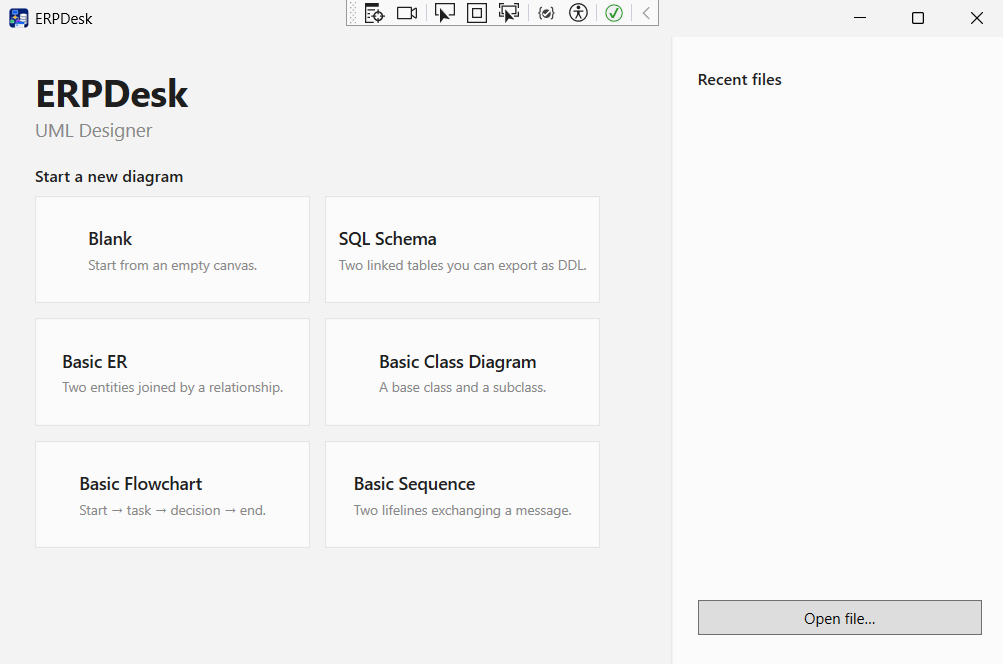
Welcome screen & templates
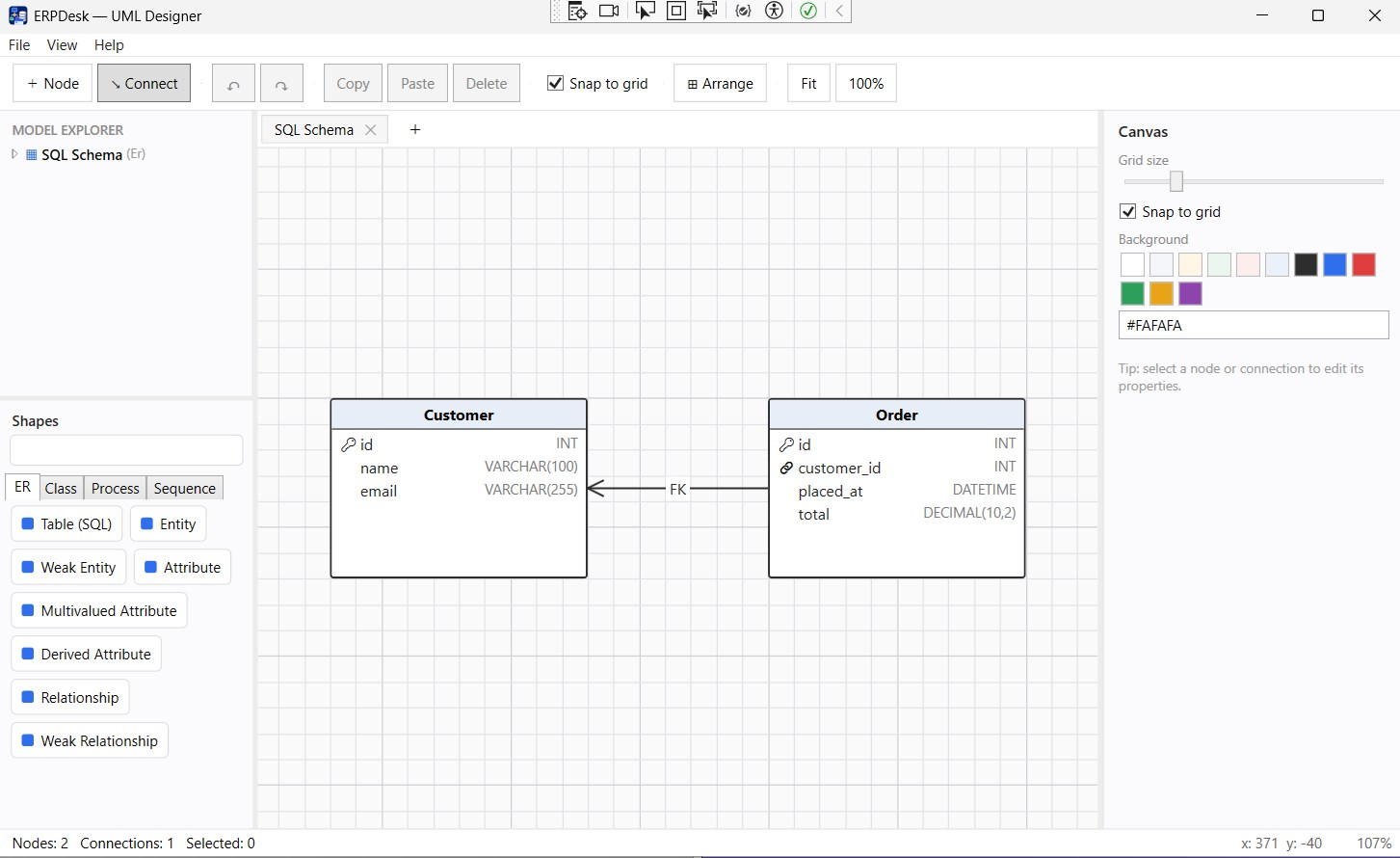
SQL schema diagram
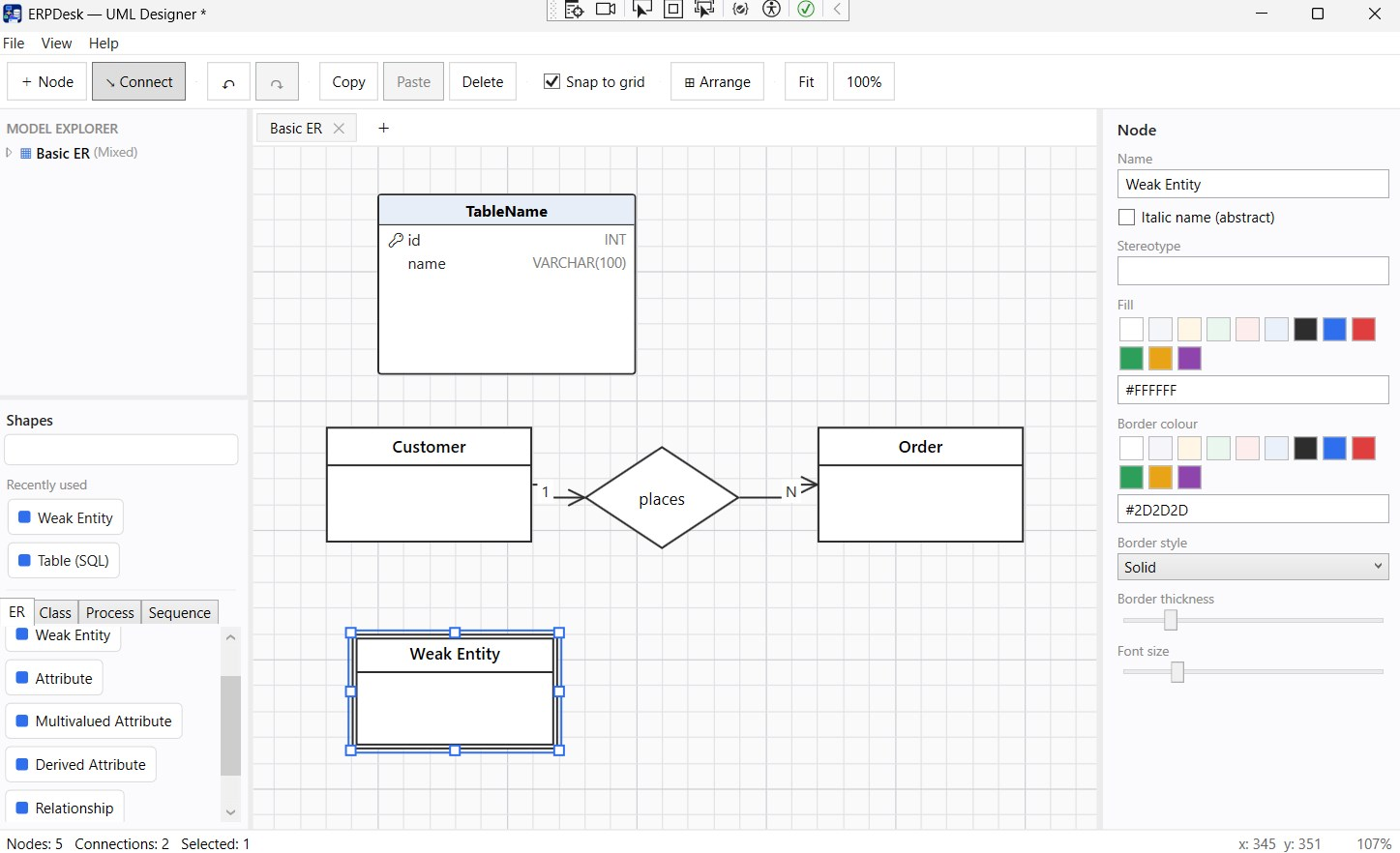
ER diagram with relationships
Class diagram editor
Latest Release
Version 1.3 — October 15, 2026
Tables get real constraints — composite foreign keys with on-delete / on-update actions, multi-column UNIQUE, CHECK and named indexes — that survive renames, export correctly for each database and import straight from mysqldump, pg_dump and SSMS scripts. A new History panel jumps to any undo step, saves are atomic, and a pre-release audit’s 27 high- and medium-severity bugs are all fixed. Note: projects saved in 1.3 can’t be read correctly by 1.2.