

Executive Appointment Scheduler – A Private Appointment Book for Windows
Calendar • Clients • Takings
Executive Appointment Scheduler is a complete appointment book that runs entirely on your own PC. There is no account to create, no subscription, and no server to reach — open it and start booking. Your calendar, your client list and your takings live in a single file on your machine, and nothing is ever transmitted anywhere. Bookings are made against a resource — a member of staff, a treatment room, a chair, a service bay, a machine — so whatever your business actually books, the app already handles it.
Download Version 1.0.1
Available on the Microsoft Store — no account, no subscription, no ads.

Or view the listing at apps.microsoft.com.
One column per resource, and the app only offers you times that are free
Give every resource its own working hours, recurring breaks and time off, and the start-time list narrows to the slots that are genuinely available — working hours, minus breaks and time off, minus what is already booked. If nothing is left, the app says why — “Main does not work on Saturday”, or “No free slots left on this date” — and then offers the business day anyway, because people do take a Saturday job. Clashes are flagged live as you change the time, with Book anyway when you mean it.
Changelog — what changed in each release
Full release notes, from the first release through 1.0.1 — which closes all twenty-four findings of the post-release audit.
View the full changelogUser Guide — from first launch to a working diary
Step-by-step walkthrough — setting up resources and services, booking, recurring appointments and series edits, client history, the Money view, backups, and starting the database clean.
Read the User GuideFeatures
📅 Four Views Over One Diary
Day puts each resource in its own column so you can read the whole operation at a glance. Week gives a column per day, Month the shape of the next few weeks, and Agenda a chronological list — which is also what search results and printing use. Live search runs across appointment titles, clients and notes.
👆 Drag to Move, Drag to Lengthen
Drag an appointment to reschedule it, drag its bottom edge to change how long it runs, or click an empty slot to book with that resource, date and time already filled in. Drag one on top of another and the ghost turns red before you let go. An undo toast takes back the last destructive action.
🔁 Standing Appointments Done Properly
Set up a weekly, fortnightly or monthly booking and the app asks the right question when you change one: this occurrence, this and following, or the entire series. An occurrence you edited on its own is left alone by later whole-series edits, so a one-off change is never silently undone.
⚖️ A Series Edit Plays by the Same Rules
Move a whole series onto a closed day or on top of existing bookings and the app lists which occurrences clash and offers to go ahead anyway — the series equivalent of Book anyway. Occurrences already completed, cancelled or marked no-show are left exactly as they are, and what has been billed or paid is never rewritten.
👥 Clients With Their Whole History
Selecting a client shows their ledger beside their details — every booking, newest first, with status, price, amount paid and what is still owed. Double-click a row to jump to that appointment on the calendar. A client who has ever been booked is archived rather than deleted, so the history survives.
💰 Know What You Are Owed
Billed, paid and outstanding totals over any date range, broken down by service and by resource, with a worklist of everything unpaid or part-paid so nothing quietly slips. Waived appointments are kept out of all three figures and reported on a card of their own — the outstanding number and the worklist under it always account for each other.
🕐 Services That Fill In the Form
Each service carries a default duration, a price and a colour, so choosing one fills in the rest of the booking for you and the appointment arrives on the calendar already colour-coded. Only the resource is actually required — you can book “Room 2, 10:00, 30 minutes” without naming a client or a service at all.
🔔 Reminders That Do Not Need Your Phone
Set a reminder on any appointment and a desktop notification arrives when it is due, with snooze and open-the-appointment. Close the window and the app carries on in the system tray, with your next appointment on the tray tooltip. A reminder nobody answers waits quietly rather than stacking up windows.
📤 Import and Export That Check First
Export the current view, an explicit date range or a single appointment as a standard .ics file for Outlook or Google Calendar. Import .ics through a preview screen that lists every parsed event, flags likely duplicates and lets you choose which resource they land on, before anything is written.
📋 CSV and Printed Sheets
Export clients, the appointments currently on the calendar, or the takings worklist to CSV for your accountant. Print a day sheet grouped by resource for the front desk, or a chronological agenda list over a date range — and the app tells you when cancelled appointments were left out rather than quietly producing a shorter file.
💾 Backup and Restore, Safely
Back up now copies your live data to a file you choose and is safe to run while you are working — nothing needs closing. Restore checks the file is one of this app’s own backups before replacing anything, and saves a copy of your current data first, so restoring the wrong file can itself be undone.
🔒 Offline, and Quick About It
No account, no sign-in, no cloud, no telemetry — everything is one file on your PC. Light and dark themes that follow your Windows setting and swap instantly. Keyboard shortcuts throughout with the full list on F1, and a second launch brings the running app back to the front instead of arguing with you.
Please note — what this deliberately is not
- It is a single-computer application. It does not sync between devices and has no mobile or web companion.
- Reminders appear on the PC running the app. There is no email or SMS sending of any kind.
- That is the trade: no account, no cloud, no ongoing cost, and your client records never leave your machine.
Screenshot
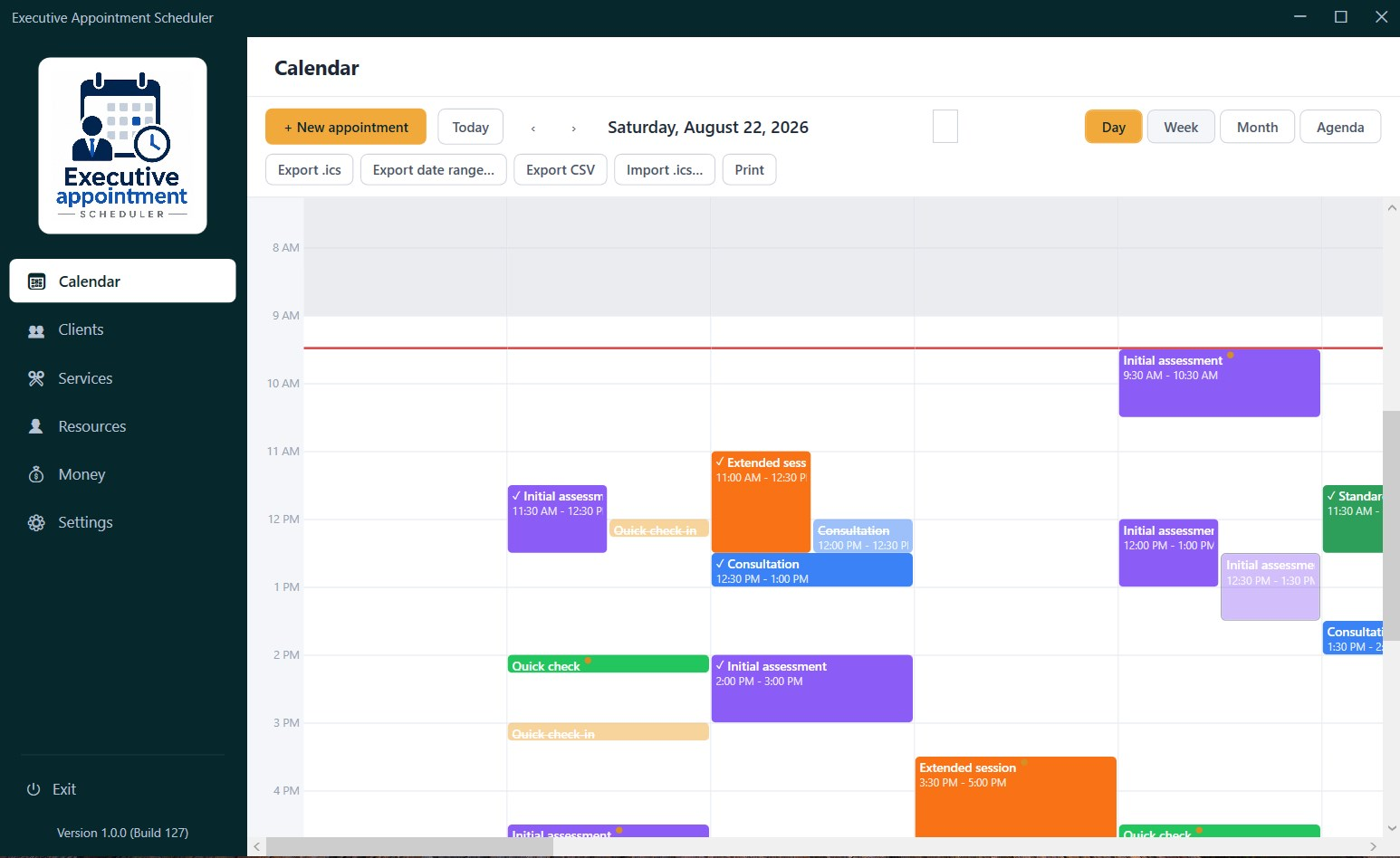
Day view — a column per resource, colour-coded by service, with the current time marked across the grid
Latest Release
Version 1.0.1 — August 31, 2026
Closes all twenty-four findings of the post-release audit. Payment history is now strictly per-appointment, so a series edit can no longer rewrite what was collected months ago; waived bookings leave the outstanding figure; imported .ics times no longer shift; series edits are held to the same scheduling rules as single ones; and search ignores letter case. The calendar is also markedly quicker to load and to search.