
RemoteDesk – A modern SSH, SFTP, RDP & VNC client for Windows
RemoteDesk brings every remote-access protocol you actually use into one tabbed Windows app — SSH terminal, dual-pane SFTP file browser, embedded RDP, and embedded VNC. Servers live as encrypted sessions in a master-password vault. Add jump hosts to chain through bastions, and let VNC traffic ride inside SSH automatically. Tile every open session side by side with Multi View, then type the same command into all of them at once with Multi Exec. Import your existing MobaXterm sessions on day one.
Download RemoteDesk for Windows
Available for Windows 10 / 11 (x64) — 7 day free trial on Microsoft Store
Current release 1.0.9. The Store listing is presently on 1.0.6; 1.0.7, 1.0.8 and 1.0.9 arrive together in its next update — see the changelog.
Features
- SSH terminal: A full-featured terminal — copy / paste / select-all, smart paste with multi-line confirmation, multi-paste to many open terminals at once, password or private-key authentication, inline credential prompts when nothing is saved.
- SFTP dual-pane file browser: Right-click an SSH session → Open file browser (SFTP). Local files on the left, remote files on the right, native Windows shell icons, drag-drop in both directions (and from Windows Explorer), recursive folder transfers, per-transfer progress and cancel, merge / overwrite prompts, transfer drawer with live throughput.
- Embedded RDP: The remote desktop renders inside the tab — no external
mstsc.exewindow, no Windows 11 "Opening Remote Desktop Connection" prompt, no taskbar entry. Saved password is injected directly, HiDPI-correct, live-resizes with the window. - Embedded VNC: Remote desktop rendered inside the tab — no external viewer required. Aspect-preserving fit, native mouse / keyboard / scroll-wheel forwarding, and a Send keys menu for
Ctrl+Alt+Del,☔Win,Alt+Tab,Alt+F4(which Windows intercepts locally otherwise). - Auto SSH-tunneled VNC: Add a jump host on a VNC session and tunneling happens automatically — the otherwise-plaintext VNC traffic rides inside SSH encryption. Supports a "loopback gateway" hop for the libvirt / QEMU / Proxmox case where the VNC console is bound to the hypervisor's 127.0.0.1.
- Jump-host chains: Chain any number of SSH gateways before the target connection — per-hop credentials (password or key), per-hop error attribution (you always know which hop rejected you), works for SSH, SFTP, and VNC.
- Multi View: One title-bar button tiles every open tab at once in an auto-laid grid — the active pane gets a colored border. Switch back to a single focused tab with the same button.
- Multi Exec — type into every terminal at once: In Multi View, turn on Multi Exec and your keystrokes are mirrored to every open terminal, so the same command runs across a whole fleet. Any pane can opt out with Exclude from multiexec, and Multi paste sends the clipboard to every included pane in one click. Only genuine keystrokes broadcast, so there is no echo loop.
- Switch to root with su: An SSH session can run
su -for you the moment you are logged in — entering a saved root password automatically (and running your Initial command as root), or dropping you at the root prompt to type it yourself. Works after either password or key-based login, and the root password is stored encrypted alongside the login password. - Shared known-hosts store: Trusted SSH fingerprints live in one place, the same role
~/.ssh/known_hostsplays for OpenSSH — accept a bastion once and every session routed through it connects without asking again. Settings → Known hosts lists what is trusted and lets you forget an entry when a server is legitimately rebuilt. - Encrypted session vault: AES-256-GCM with PBKDF2-SHA256 (600,000 iterations) under a master password. Atomic writes via tmp file + replace, 12-byte nonce regenerated per save, key material zeroed on lock / exit. Changing the master password re-encrypts in place — nothing is ever deleted and rebuilt.
- Auto-lock: After a configurable idle period the vault locks, and a locked sidebar says so with an Unlock button rather than looking like an empty session list. Set it to 0 to disable auto-lock entirely. Already-open terminals keep running — only new connects, edits, and CRUD operations are blocked. Manual lock via
Ctrl+Shift+Lor the title-bar padlock. - Portable vault directory: Start with
-c <dir>to keep the vault and settings in a directory you choose — a removable drive, for example — instead of your user profile. The runtime cache stays local, so a portable vault folder holds just your sessions and preferences. - MobaXterm session import: Read a
.mxtsessionsexport and bring everything in — SSH, SFTP, RDP, VNC, plus folder structure and single-hop jump hosts. Supported protocols pre-checked; unsupported (Telnet / Mosh / Serial / etc.) listed with an "Unsupported" tag so you see exactly what was skipped. - Sidebar with groups, search, and drag-to-reorder: Hierarchical TreeView with
/-separated groups, drag sessions between groups, persistent expansion state, live search by name oruser@host:port, multi-select with Ctrl/Shift, bulk actions on selections (open many SSH tabs at once, duplicate, delete). - Tabbed UI: Drag to reorder tabs, colored top accent per session, status dot (idle / connecting / connected / error / disconnected). Closing a tab selects its neighbour rather than jumping you to the end of the strip.
- Inline credential prompts: When a session has no saved username or password, you're prompted inside the terminal at connect time — like OpenSSH does. Multi-hop jumps are numbered (
Jump host 1/3:), key-auth hops skip the password prompt, paste works inside prompts. - Single-file portable .exe: Ships as a self-contained Windows executable with nothing to install alongside it. WebView2 Runtime is the only prerequisite (pre-installed on Windows 11; one-time install on Windows 10).
- Store-friendly: All app-data lives in
%APPDATA%\RemoteDesk\and%LOCALAPPDATA%\RemoteDesk\. Nothing is written next to the.exe, so the read-only Microsoft Store install layout works out of the box.
Windows 10 / 11 (x64)
WebView2 Runtime — pre-installed on Windows 11; one-time install on Windows 10 if the terminal pane is blank: developer.microsoft.com/microsoft-edge/webview2
Feature Deep Dive
Every saved server, credential, jump-host chain, and host-key fingerprint is stored inside a single encrypted file (%APPDATA%\RemoteDesk\sessions.vault) protected by your master password.
- AES-256-GCM authenticated encryption — a wrong password produces a clean tag mismatch rather than a partial decrypt.
- PBKDF2-SHA256 with 600,000 iterations for key derivation — slows brute-force attempts dramatically.
- Atomic writes — a save is written to a temporary file and swapped into place, so an interrupted save never corrupts your vault.
- Key material is zeroed on manual lock, idle auto-lock, and app exit.
- Changing the master password re-encrypts the vault in place — the current password is verified against the file on disk, then the whole payload is rewritten under a fresh key through the same atomic write. Nothing is deleted and re-created, so a failure part-way through cannot cost you your sessions or your empty groups.
- Unlocking runs off the UI thread, with a progress ring and disabled inputs, so the deliberately slow key derivation no longer freezes the window on the one screen where a frozen window reads as a rejected password.
- Group names live inside the vault too. Which folders you had expanded — and therefore their names — used to sit in plain-text settings; a vault whose job is hiding that you have a folder called
Clients/Acmeshould not write that name out beside itself. Existing installs migrate on first unlock. - No "remember device", no cloud backup, no master-password reset — if you forget the master password your sessions are gone and the vault must be reset. This is intentional and what makes the model strong against a stolen laptop.
- A full-featured terminal that matches the experience of a modern desktop terminal emulator, sized to the window from the very first connection so full-screen programs like
topuse every row. - Password or private-key auth, with browse-for-key-file and optional passphrase.
- Inline credential prompts at connect time when nothing is saved — banners label which hop is asking (
[Jump host: bastion:22],[Target: 10.1.1.81:22]). - Copy / Paste / Select All via
Ctrl+Shift+C / V / A. Multi-line paste opens a confirm dialog with a yellow warning that pasting will execute commands. - Multi-paste: right-click → Multi-paste to terminals → pick any subset of open terminals (All / None / Others shortcuts) and send the same text to every one.
- Switch to root with su — tick it on the session's Auth tab and RemoteDesk runs
su -as soon as you are logged in, entering a saved root password automatically or leaving you at the prompt to type it. Any Initial command then runs as root. - Multi Exec — in Multi View, broadcast your typing to every open terminal at once, with a per-pane opt-out and a Multi paste button for the clipboard.
- Trust-on-first-use host keys, shared across sessions — the SHA-256 fingerprint is shown for confirmation on first connect and then remembered in a shared known-hosts store, so a bastion you accept once is trusted by every session routed through it. A later mismatch is refused outright rather than connecting silently, and Settings → Known hosts is where you clear a key after a legitimate rebuild.
- Reconnect banner on disconnect/error — one click reuses the same tab with scrollback preserved.
Right-click any SSH session → Open file browser (SFTP). The SFTP tab shares the SSH session's credentials and jump-host chain — no second login.
- Dual pane: local Windows files on the left, remote SFTP files on the right, each with Up / Home / Refresh + editable path bar.
- Native Windows shell icons for file types (
.txt,.zip,.png...) — icons match what you see in Explorer. - Drag-drop in both directions and from Windows Explorer onto the remote pane.
- Recursive folder transfers — directory tree is walked, matching remote dirs created on demand (existing dirs reused, not re-created).
- Per-transfer progress and cancel in a transfer drawer with live throughput, direction-tinted arrows, and color-coded state.
- Merge / overwrite prompts before clobbering anything that already exists (in either direction).
- Concurrency cap: up to 3 transfers run in parallel per SFTP tab; the rest queue in the drawer.
- Recursive delete with pre-counted progress (
47 / 189 items).
RDP sessions render inside the tab — the same way MobaXterm shows RDP, using the remote-desktop engine already built into Windows.
- No external
mstsc.exewindow, no taskbar entry for the session. - No Windows 11 "Opening Remote Desktop Connection" warning — that prompt is tied to
mstsc.exeopening.rdpfiles, which RemoteDesk doesn't do. - Saved password injected directly — no Windows Credential Manager dance, no re-prompt.
- HiDPI-correct — the session opens at the true pixel size of the tab and the correct scale factor is sent to the server, so text on the remote stays crisp.
- Live resize with the RemoteDesk window — modern Windows servers renegotiate a new resolution on the fly; older hosts fall back to smart-sized scaling.
- Clipboard sharing is a per-session setting on the Auth tab, next to the certificate policy. Redirection runs both ways — while the session is open the remote host can read anything you copy locally, including a password copied out of a password manager — so it is on by default for convenience but refusable per session. Drive, printer and smart-card redirection are off; smart-card redirection would expose your local card and PIN to the remote.
- Reconnect works on a live session — redialling waits for the control to report itself disconnected first, instead of producing an error tab.
VNC sessions render inside the tab — the remote screen is drawn directly into the pane, with no separate viewer process required.
- Aspect-preserving fit with letterboxing (matches TightVNC / TigerVNC viewer behaviour).
- Native mouse / keyboard / scroll-wheel forwarding, with Windows keys mapped to their correct remote equivalents.
- Send keys menu for
Ctrl+Alt+Del,☔Win,Alt+Tab,Alt+F4— Windows intercepts these locally, so the menu synthesizes them directly into the remote framebuffer. - Plaintext-VNC warning bar when connecting to a non-private host with no SSH tunneling — the connection still proceeds (LAN-only setups are valid) but you're warned before typing a password.
- Automatic SSH tunneling when you add a jump host — the otherwise-plaintext VNC traffic rides inside SSH encryption. No "use SSH tunnel" checkbox to remember.
- Loopback gateway hop for the libvirt / QEMU / Proxmox case where the VNC console is bound to the hypervisor's 127.0.0.1 — one extra SSH hop lands on the hypervisor itself before the TCP forward.
- Better error messages for empty / DES-weak passwords and per-hop SSH chain failures — you always know which hop rejected the connection.
- Any number of hops, reorderable in the session editor — first row is dialed first, last row does the final TCP forward to the target.
- Per-hop credentials — mix password and private-key auth across the chain.
- Per-hop error attribution — when a chain fails, the error names the exact hop and auth method (e.g. SSH hop failed: admin@bastion:22 (password auth): Permission denied (password)).
- Works for SSH, SFTP, and VNC — same chain definition is reused across protocols.
- Inline prompts for missing jump-host credentials at connect time (in the terminal for SSH/SFTP); for VNC, missing credentials produce a clear pre-connect error rather than ambiguous "Permission denied".
- Reads a
.mxtsessionsexport and shows every entry in a preview dialog before importing. - Supported protocols (SSH, SFTP, RDP, VNC) are pre-checked.
- Unsupported protocols (Telnet, Mosh, Serial, RSH, Xdmcp, FTP, WSL, Browser, Shell, AWS S3, ...) appear with a disabled checkbox and an "Unsupported" tag — you see exactly what was skipped and why.
- Folder structure preserved — MobaXterm's
\-separated folders map to RemoteDesk's/-separated groups, including empty folders. - Single-hop jump hosts ("Connect through SSH gateway") are imported natively for SSH/SFTP sessions.
- Passwords are not imported (MobaXterm encrypts them with its own master key) — you'll be prompted inline on first connect.
🎯 Perfect For
- Sysadmins & DevOps — one client for every Linux box, every Windows server, and every VM console.
- Network engineers — tunnel into management VLANs via bastion chains; never type a jump-host password twice.
- MSPs & consultants — one encrypted vault per customer, MobaXterm import to migrate fast.
- Security-conscious teams — everything stays on the laptop, vault is encrypted at rest, no cloud sync.
- MobaXterm users — bring your sessions in unchanged on day one.
⭐ Why Choose RemoteDesk?
- SSH, SFTP, RDP, VNC — all four in one tabbed window, all four embedded (no external
mstsc/ VNC viewer launches). - Encrypted vault by default — not an afterthought, not opt-in.
- Auto SSH-tunneling for VNC — safe defaults without checkbox-hunting.
- No subscriptions — one-time purchase via Microsoft Store, free 7-day trial.
- No telemetry, no cloud — your sessions and credentials never leave your machine.
Screenshots
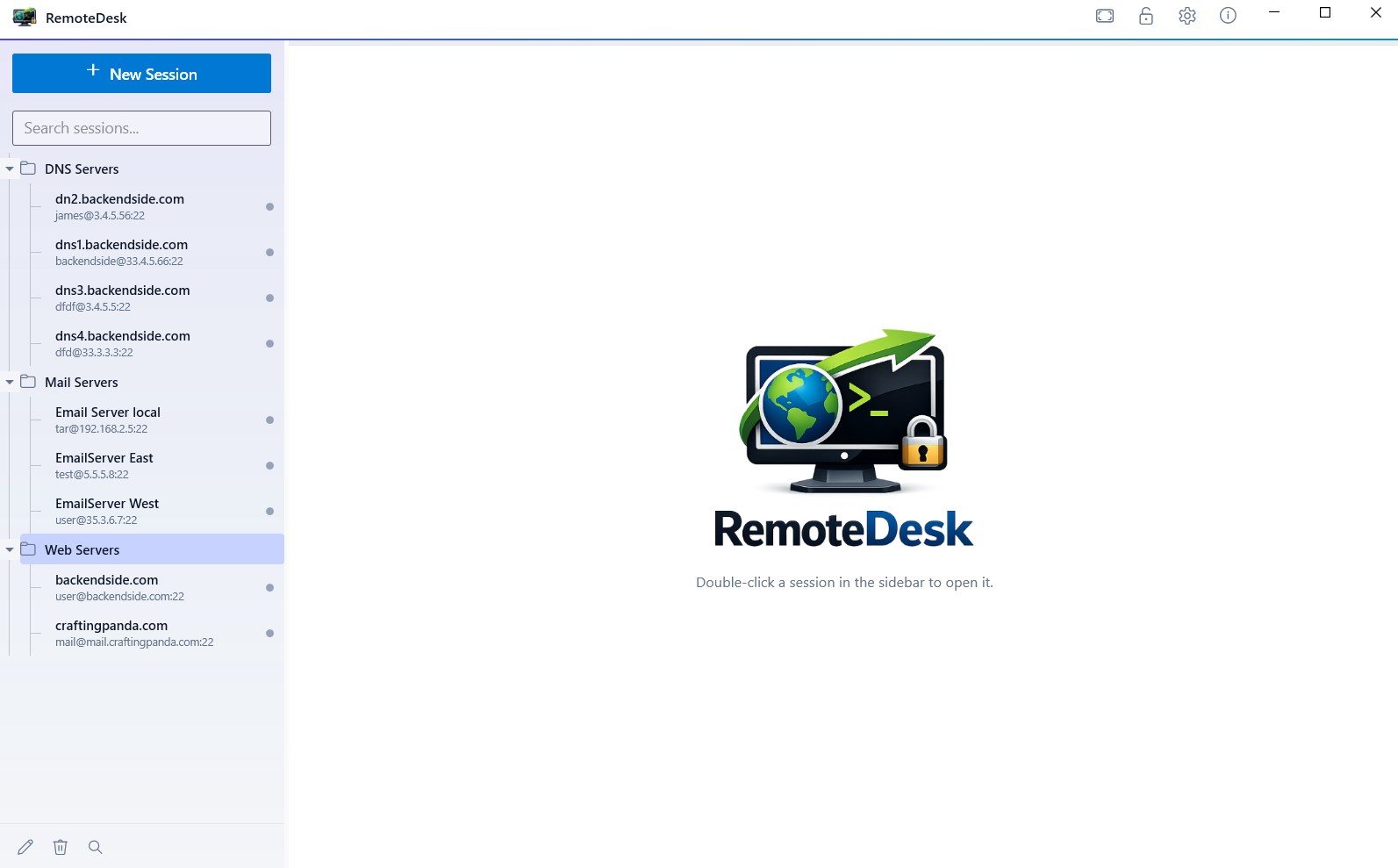
Your Whole Estate in One Sidebar — Foldered, Searchable, Encrypted
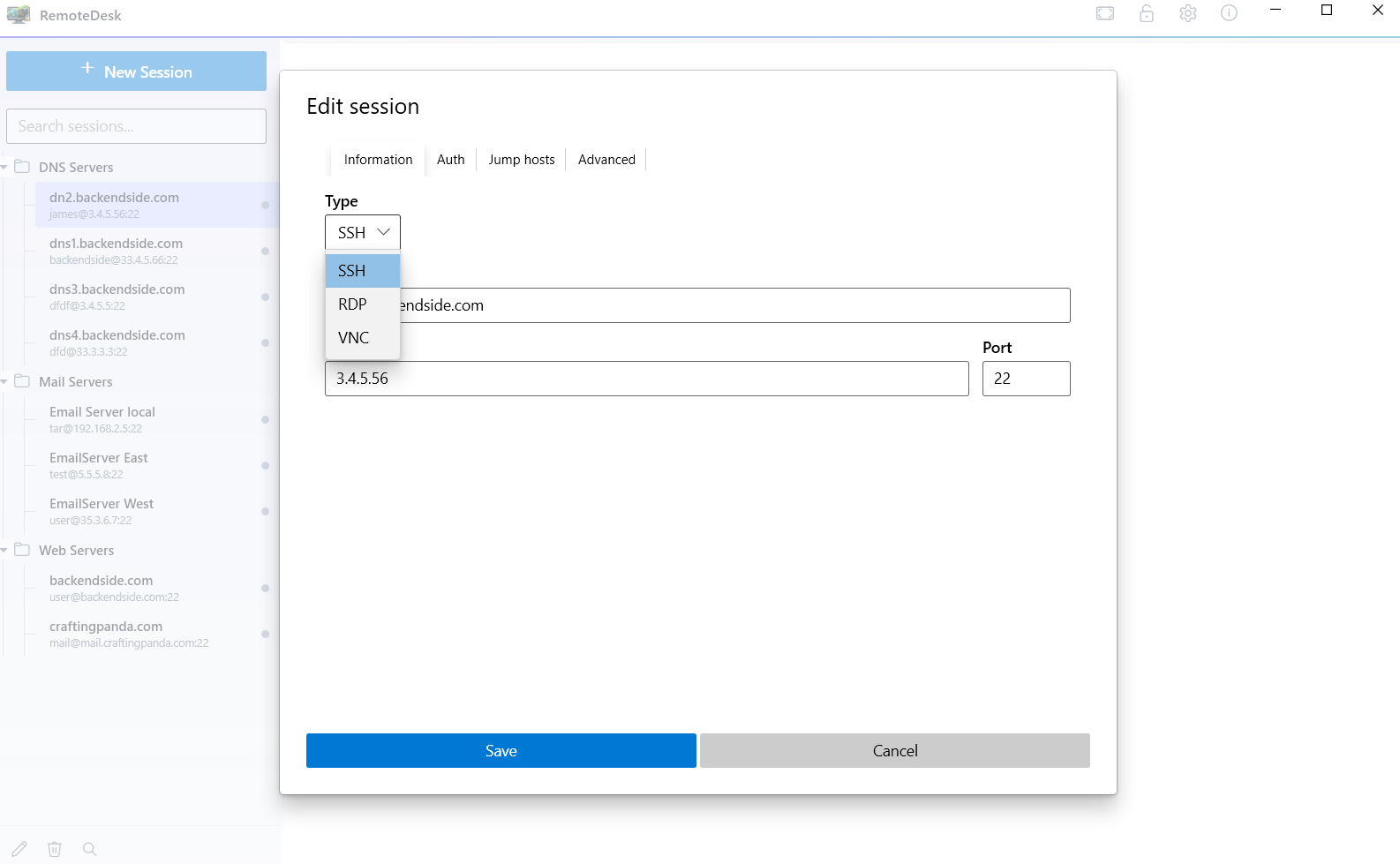
One Session Editor — SSH, RDP or VNC, With Auth and Jump Hosts Alongside
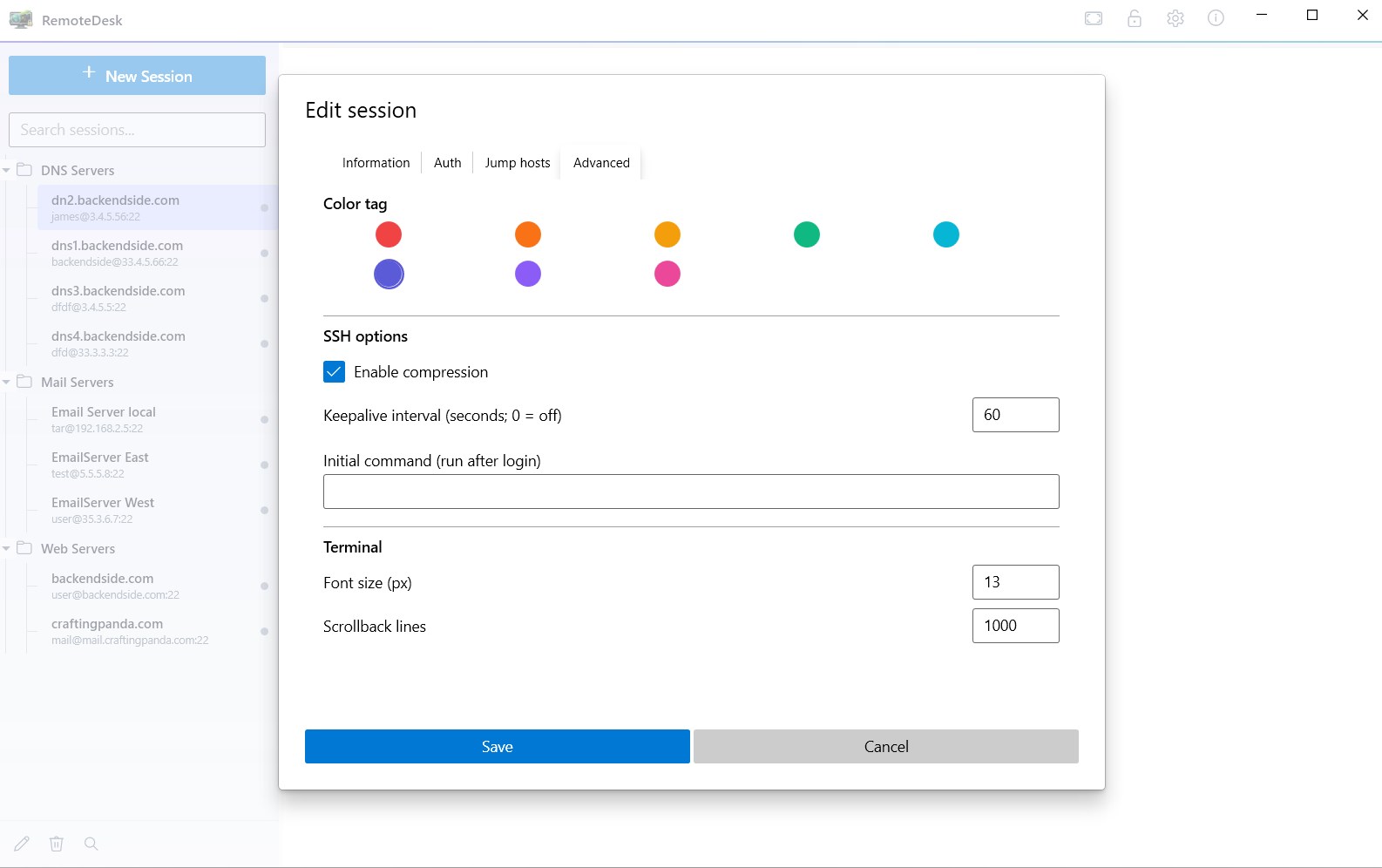
Per-Session Detail — Colour Tags, Keepalives, a Login Command, Terminal Size
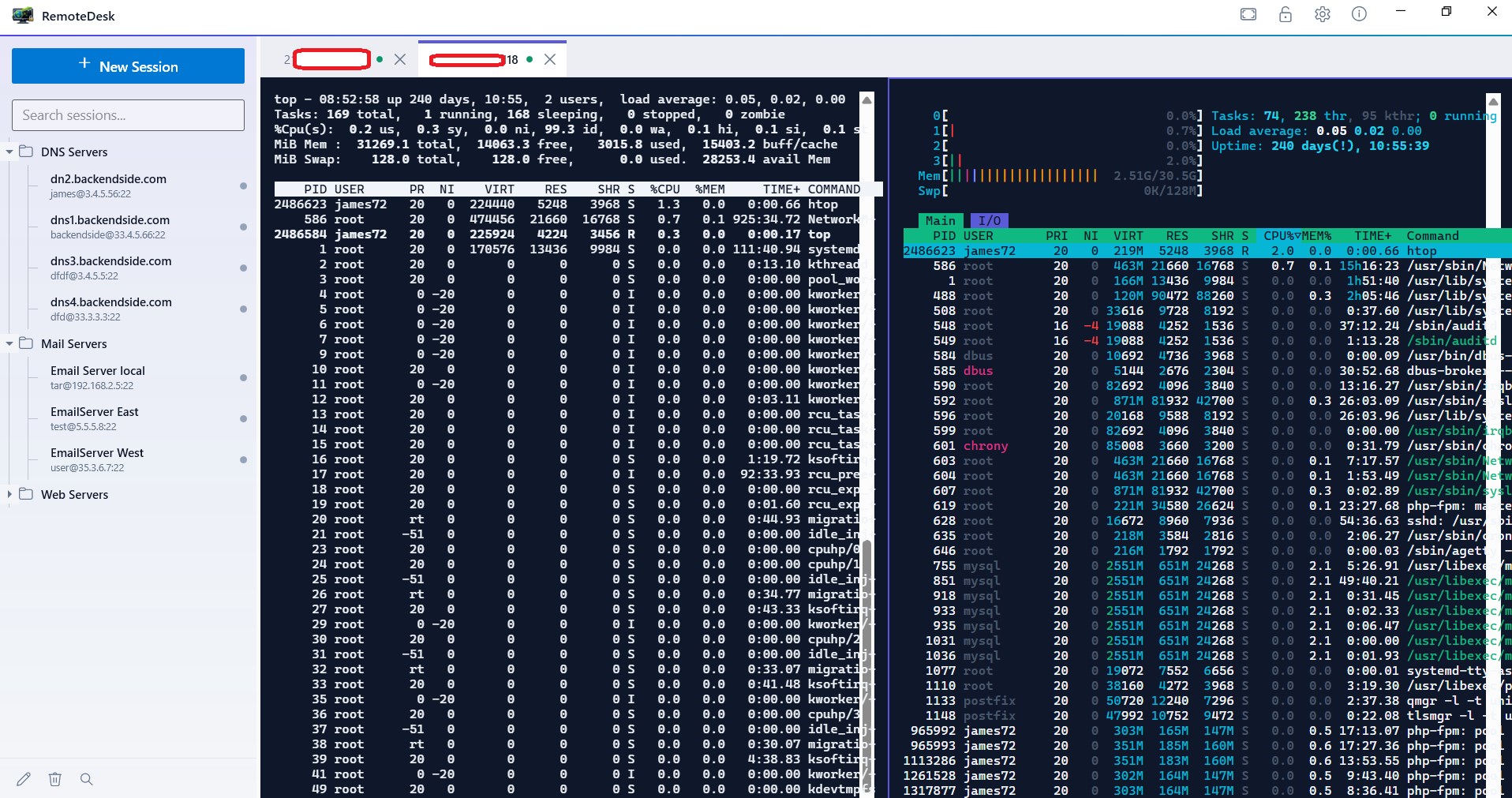
Multi View — Two Live Sessions Tiled in One Window
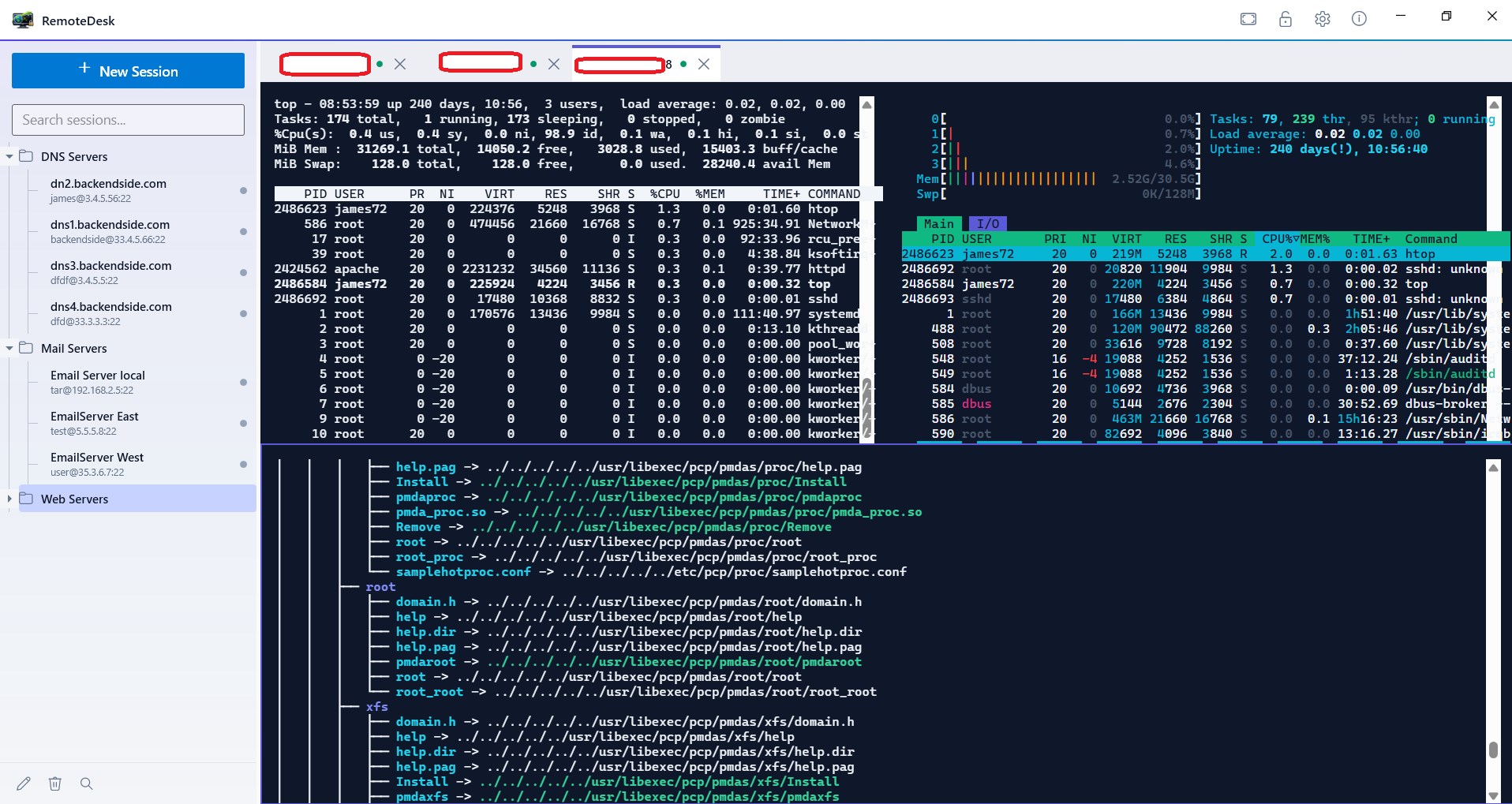
Three at Once — Watch a Whole Tier While You Work
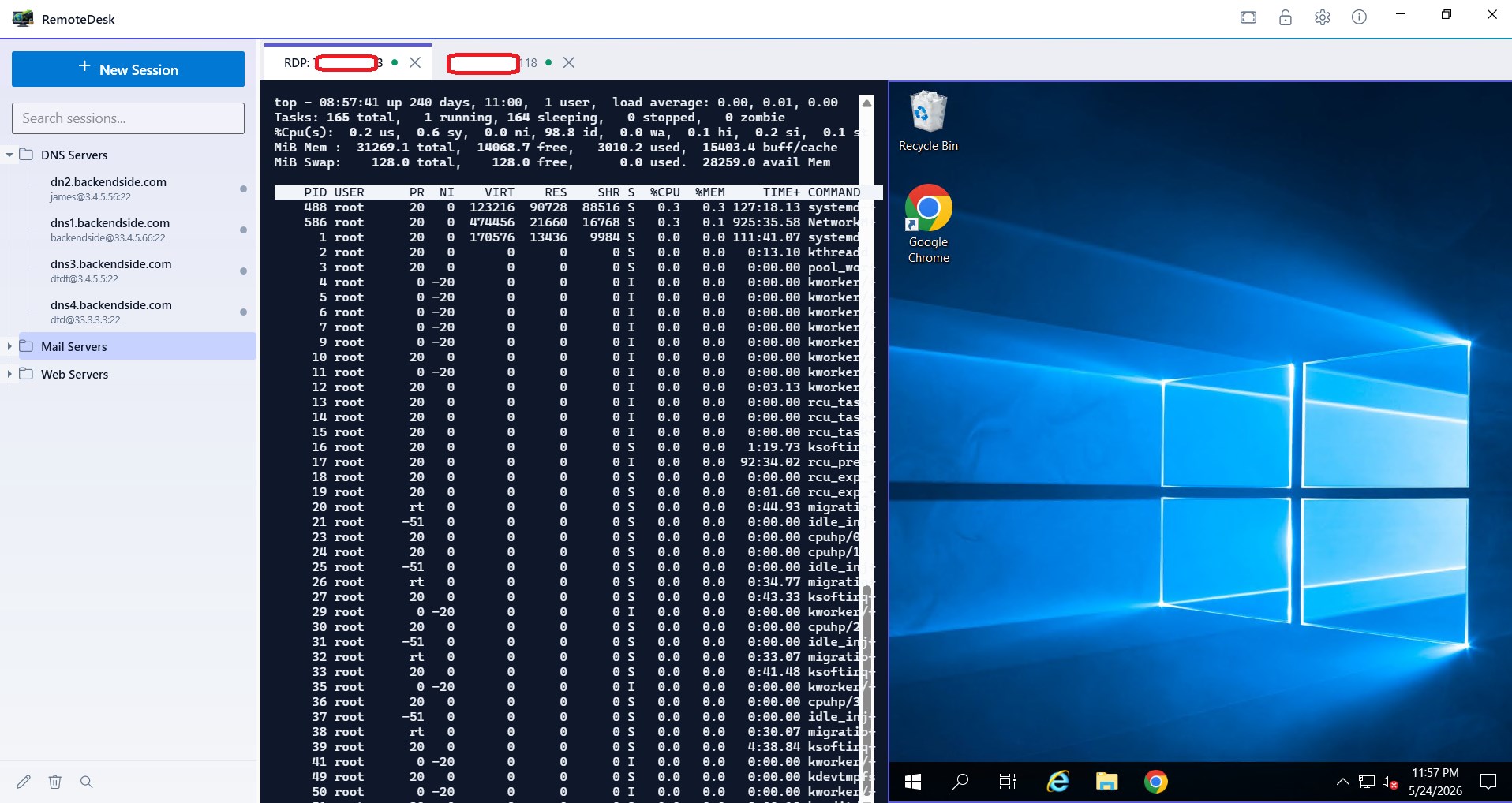
A Windows Desktop and a Linux Shell, Side by Side — Both Embedded
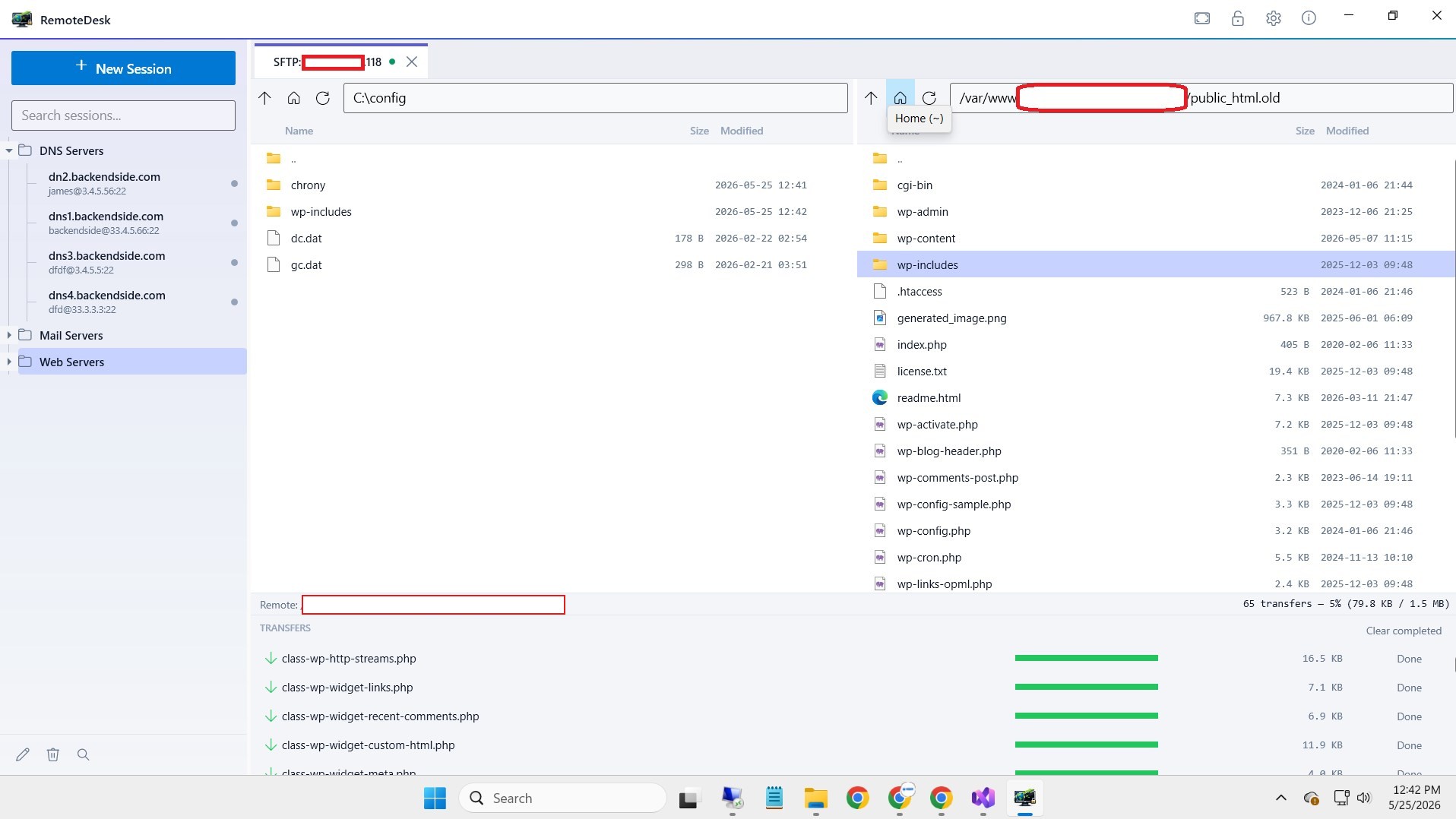
SFTP — Dual-Pane Browsing With a Live Transfer Queue
Latest Release
Version 1.0.9 — September 2026
Closing the window no longer needs two clicks on X when no tabs are open, and the window now hides the moment you click it, so a shutdown that genuinely takes a few seconds — live SSH, VNC and SFTP tabs being torn down — no longer looks like a frozen app. Before it, 1.0.8 brought a shared known-hosts store — accept a bastion once and every session through it is quiet — plus a Known hosts settings page, VNC sessions that close cleanly, and the expanded-group list moved into the encrypted vault, and 1.0.7 a full source audit, Multi Exec refinements, per-session RDP clipboard control, non-freezing vault unlock, and a master-password change that can no longer destroy the vault. The Microsoft Store is currently publishing 1.0.6, so updating from it brings all three of these releases in one step.